10 ST PLUS ENGLISH
ENGLISH ST PLUS 10
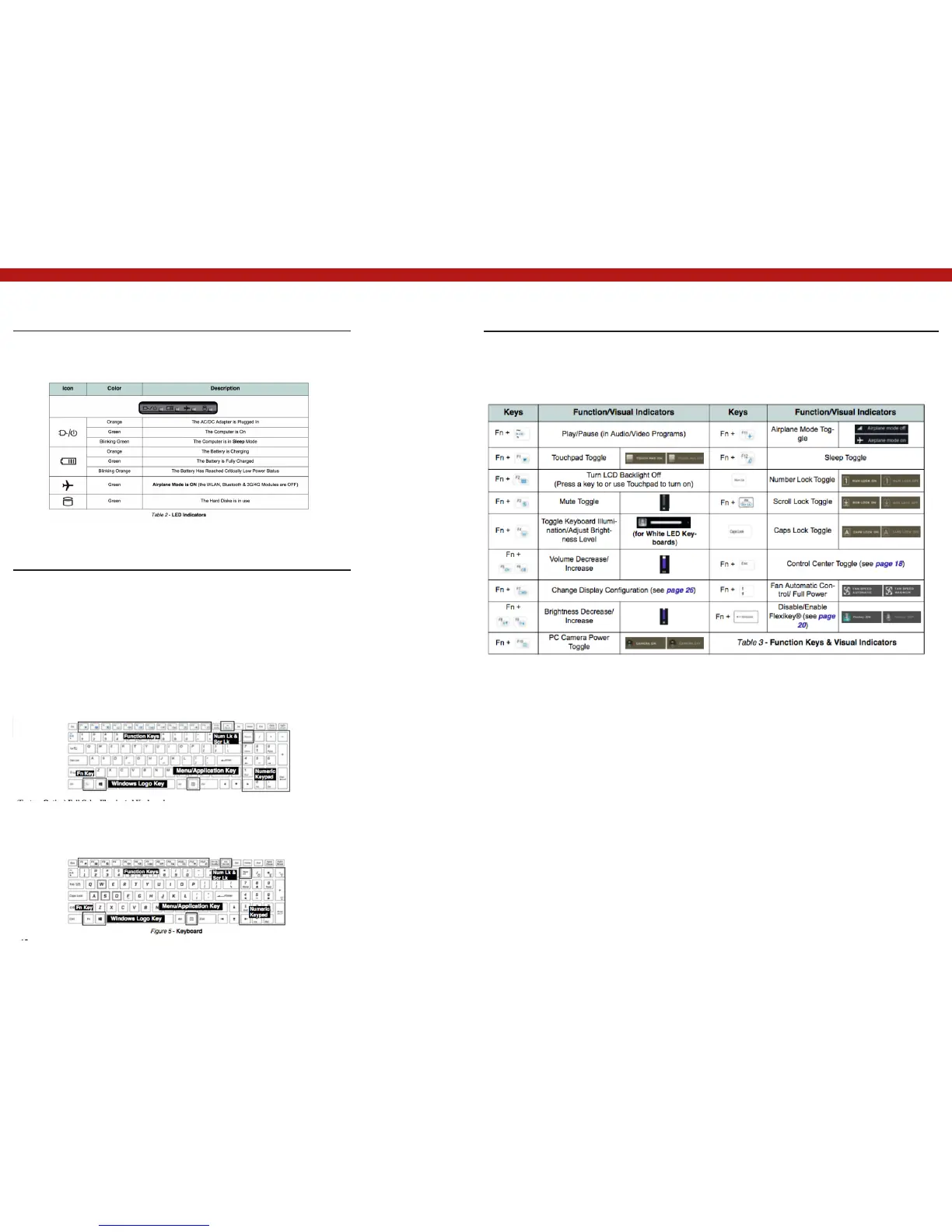
LED Indicators
The LED indicators on the computer display helpful information about the
current status of the computer.
Keyboard
The keyboard, white-LED illuminated keyboard or full color illuminated
keyboard (Factory Option), includes a nu- meric keypad (on the right side
of the keyboard) for easy numeric data input. Pressing Num Lk turns on/
off the numeric keypad. It also features function keys to allow you to
change operational features instantly.
Function Keys & Visual Indicators
The function keys (F1 - F12 etc.) will act as hot keys when pressed while the Fn key is held down.
In addition to the basic function key combinations, some visual indicators are available when the
Control Center driver is installed.
White-LED Illuminated Keyboard
The keyboard illumination level may be adjusted, or turned off/on, by using
the Fn + F4 keys.
(Factory Option) Full Color Illuminated Keyboard
Refer to Colored Keyboard Backlight LED on page 12.



 To Next Page