14
Reminding: at least one step should be included in one stage.
4
th
Step: Edit Step
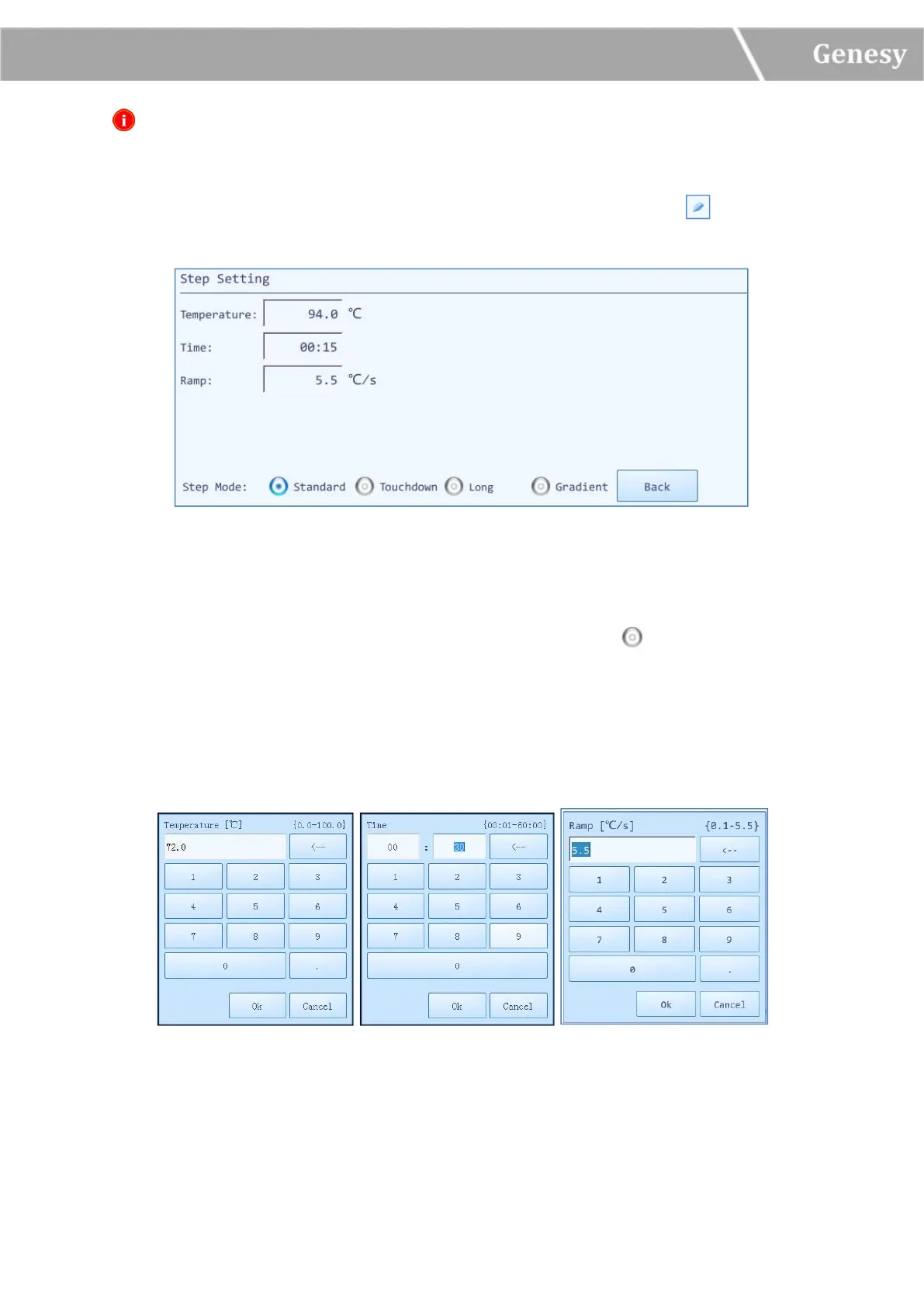
Users could select a certain step in the step setting box, and press the icon in the
corresponding Edit column, the step edit window will pop up, as shown in figure 3-3-3.
Figure 3-3-3 Step Edit Window - Standard Step Mode
Four Step Mode options are provided by the system software: Standard, Touchdown, Gradient
and Long. Users could select a certain step mode option by pressing icon in front of it, and
the icon will turn blue.
1) The Standard step mode option is selected by default.
► Users could press the input boxes of Temperature, Time and Ramp to edit the
corresponding parameters for the current standard step, as shown in figure 3-3-4.
Figure 3-3-4 Step Edit Window - Standard Step Mode Parameters Setting


 To Next Page