EasyManua.ls Logo

TierTime UP BOX - Calibration for Correct Dimension; Dimension Calibration Procedure

Default Icon
35 pages
Print Icon
To Next Page IconTo Next Page
To Previous Page IconTo Previous Page
Loading...
25
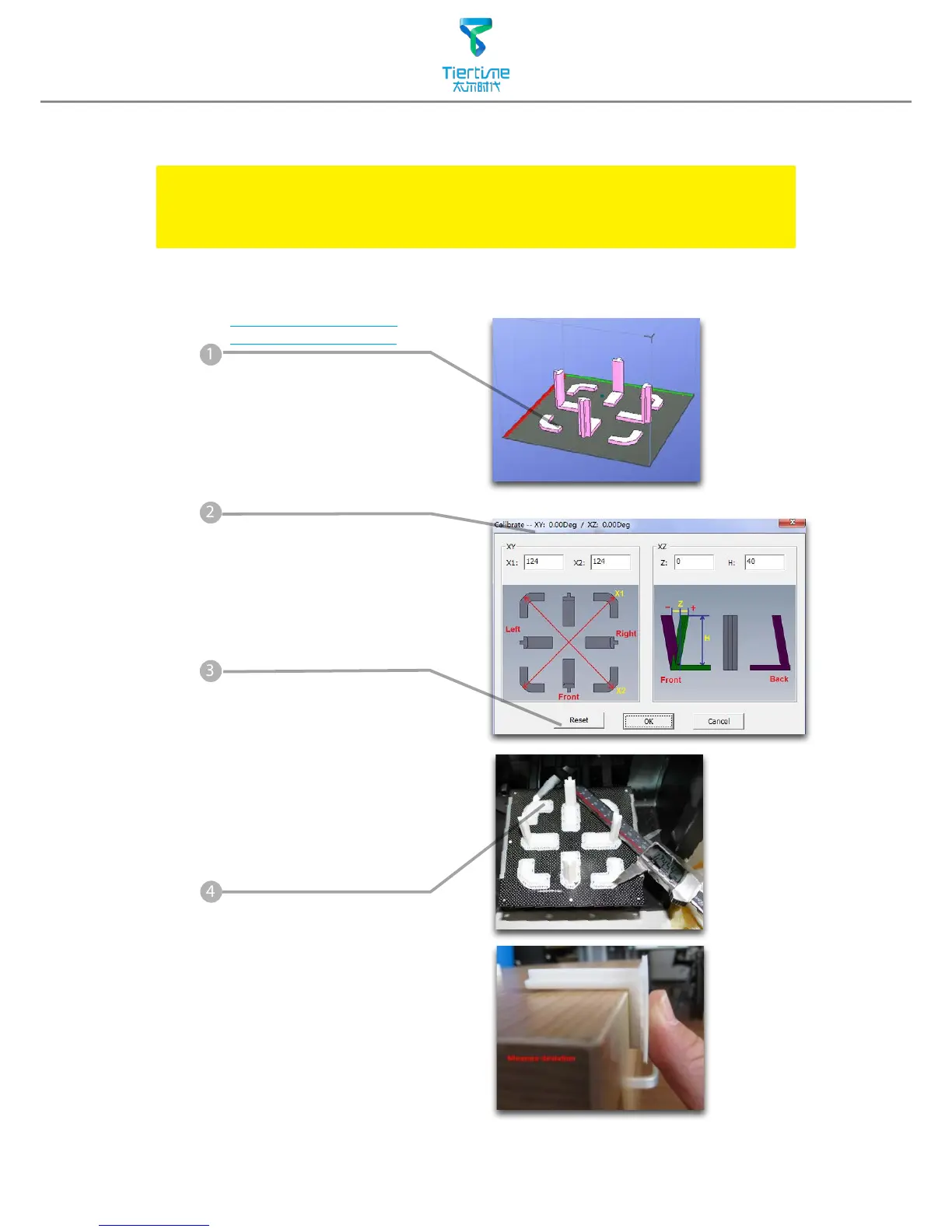
Load and print the
calibration model:
C:\ProgramFiles\UP\
Example\Calibrate96.UP3
Calibration for the Correct Dimension
If prints are too big or too small or skewed, user could re-calibrate the printer to
print in correct dimension. The method is to print a calibration model, measure
its dimension and feedback to the software.
Measure the printed
model accroding the
calibration panel.
Input the measured
values into the software
and nish the calibration.
1
4
Open: 3D Print - Calibrate
This will open the calibration
panel.
2
Hit "Reset" button to
revert the value back to
default,make sure the
upper panel dispaly:
XY:0.00 Deg/XZ:0.00 Deg
3

Other manuals for TierTime UP BOX

Related product manuals