IM2023
42
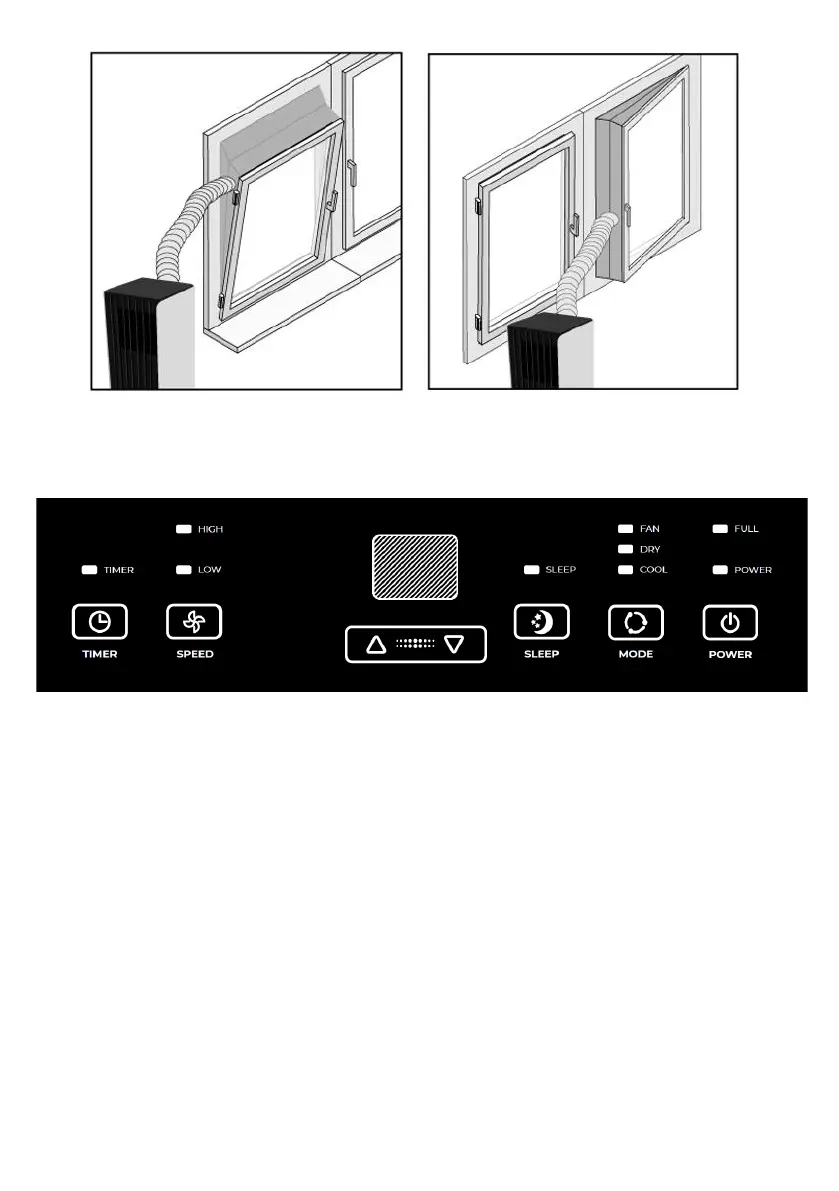
8. DEVICE CONTROL
Control panel
1. “TIMER” button - in the case of power on, press the button to set the time to
automatically turn off the device; in the case of power off, press the button to set the
time to automatically turn on the device. Press the “TIMER” button, then, when the
timing symbol flashes on the LED display, press “UP” and “DOWN” buttons to select
the required timing value. Timing values can be set in 1-24 hours range. One pressing
of “UP” or “DOWN” button equals 1 hour.
2. “SPEED” button - in cooling and fan mode, press the button to select HIGH, LOW
wind speed operation. In dehumidifying mode, pressing the key is invalid, in this mode
the fan works only in low wind speed operation.
3. “UP” and “DOWN” buttons - press these buttons to change the setting
temperature or setting time, operate as follows:
While setting temperature, press “UP” or “DOWN” button to select the
required temperature (not available in fan or dehumidifying mode).



 To Next Page