Page 13
Installing Impression Rail
™
Express
Open Mid-Rail Stair Panels
Dia. #7
4
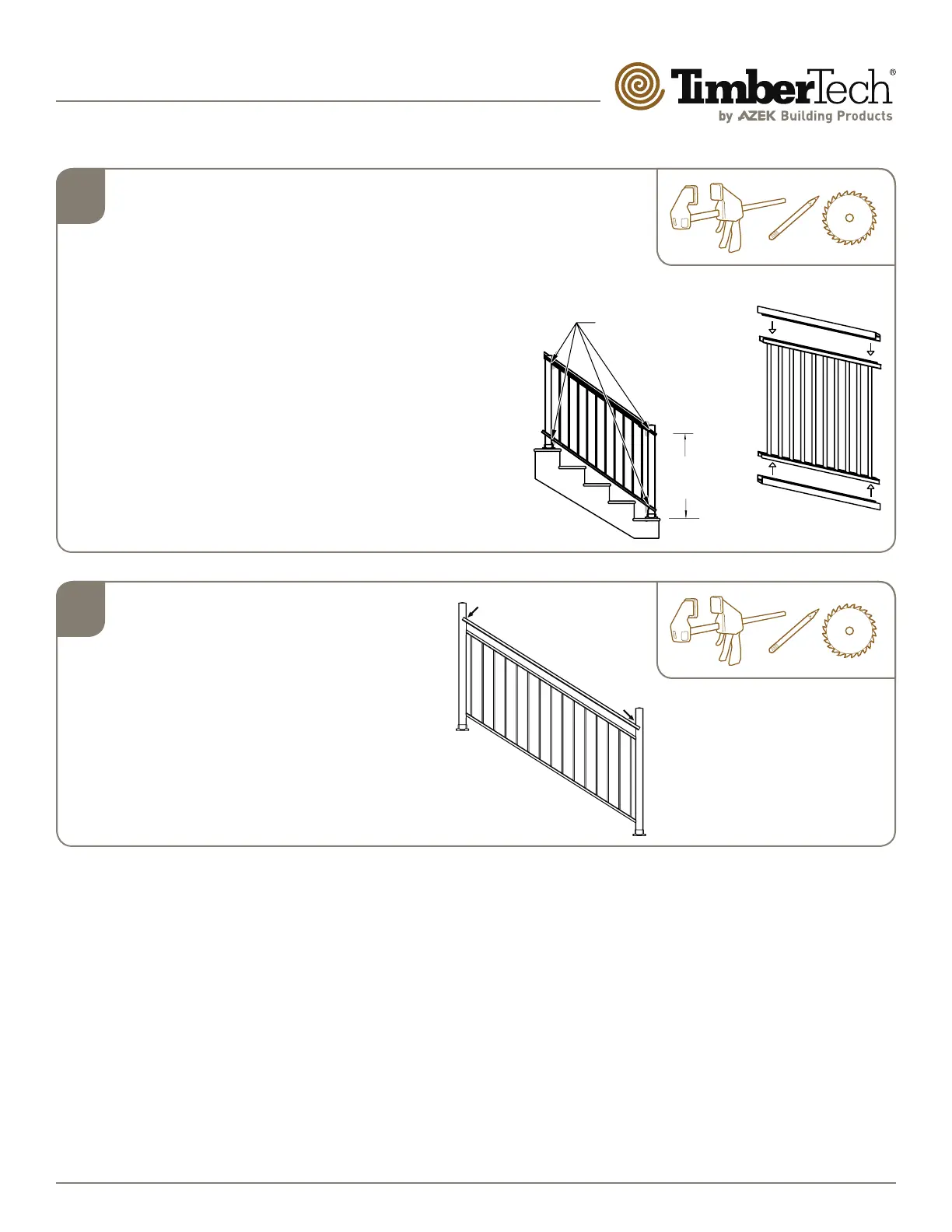
Install Upper and Lower Bottom Snap
Covers
• Following the same angle as the secured stair panel,
clamp or hold top/bottom rail snaps against 3" posts
(Dia. 7). Using a sharp #2 pencil, mark the bottom rail
snaps at all four (4) locations.
• Remove clamps and cut bottom rail snaps at all four (4)
locations. Take care to cut snaps at appropriate stair
angle. Use of Miter saw with a sharp non-ferrous blade
is recommended. Cut 1/16" less than opening size.
• Clean cut areas and apply touch-up paint on exposed
ends.
• Snap each rail snap over the corresponding rail
channel until properly seated (Dia. 8).
34” to 38”
from stair nosing
to top of rail
Temporarily clamp top
and bottom rail snaps
against posts and mark
for miter cuts. Cut 1/16”
less than opening size.
Dia. #8
5
Cut Unpunched H-channels
Clamp or hold panel and H-channel against
post, adjust for equal end spacing. (Dia. #9)
• Mark cut lines on the top and bottom rails
and H-channel.
• Cut panel and H-channel 1/16″ less than
opening size.
• Clean cut areas and apply touch-up paint on
exposed ends.
Dia. #9
Temporarily clamp unpunched
H-channel against posts and
mark for cutting.


 To Next Page