Page 6
Installing Impression Rail
™
Express
Aluminum Posts
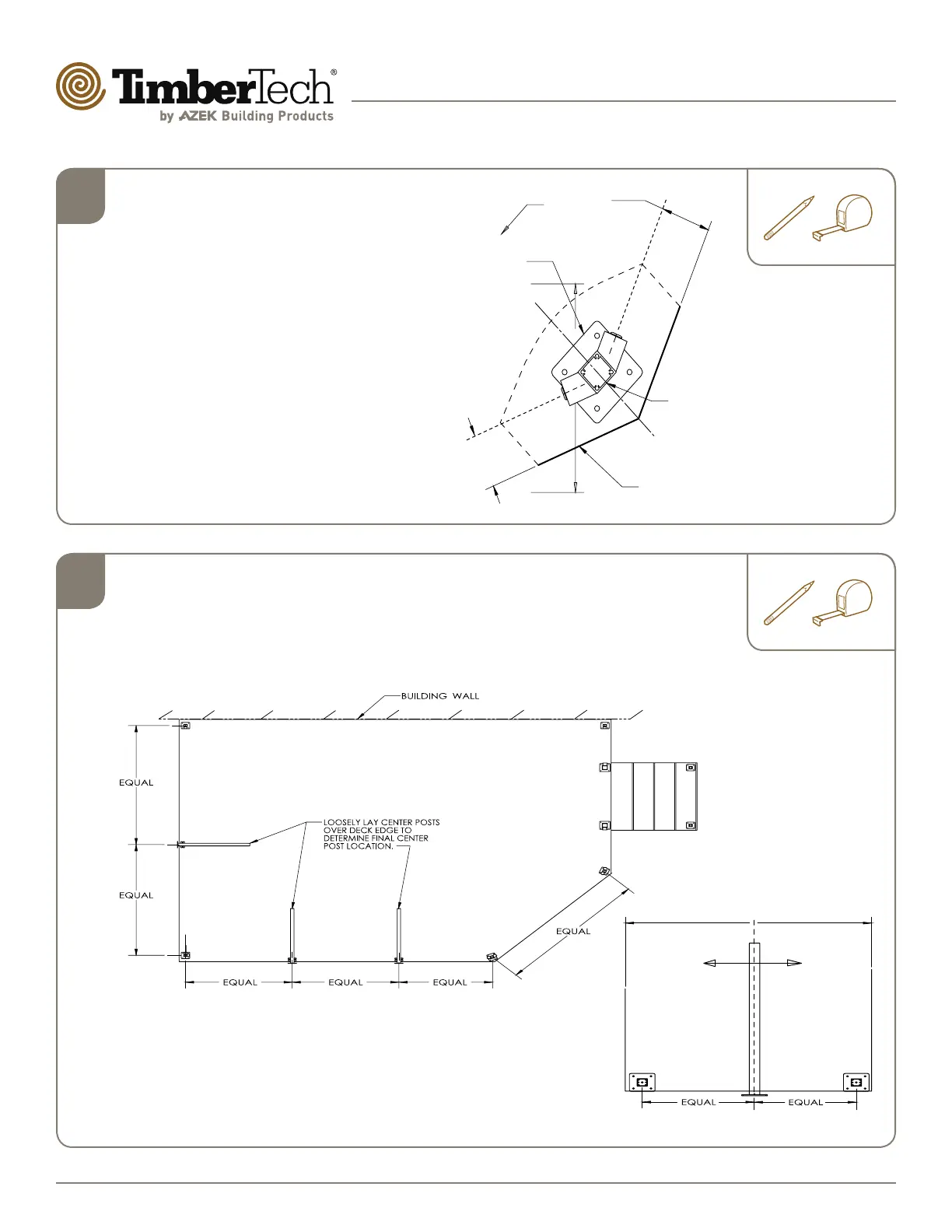
Determine Center Post Locations
Loosely lay center post over deck edge and
adjust as required to determine nal center post
mounting locations. (Dia. #9 & #10)
7
Dia. #9
Dia. #10
PLAN VIEW
CLOSE UP
VIEW
CENTER LINE
Install 45° Corner Posts
(Post to be installed at 22.5°
to accommodate a 45°
angle.)
Position post on same 3" centerline
(typical) and temporarily fasten to deck
surface. Use one 22.5° Panel Attach
Kit (purchased separately) to install 45
degree corner posts. (Dia. #8)
6
Dia. #8
TOP VIEW
POST DISSECTS
DECK ANGLE
TYPICAL
DECK
EDGE
3" CENTERLINE
TYPICAL
3" CENTERLINE
TYPICAL
LOCATE 45°
ANGLED POST


 To Next Page