4 Troubleshooting
4.1 GPS Lock
Getting GPS lock on the Time Server is required for it to function. Most GPS lock issues come down
to issues with Antenna location, or cabling. If there are problems getting GPS lock (I.e.the Lock LED
doesn't turn on and the 1 PPS LED doesn't flash each second) trying moving the antenna outside and
see if that resolves the issue. If it does, try a window and see if lock is maintained. If that works, move
the antenna back to its original location and see if lock is lost. This will help determine where lock can
be received and where it cannot. If no lock is achieved outdoors, then something is either wrong with
the cabling or the Time Server itself. Contact TimeMachines for help.
4.2 Resetting to Factory Defaults
Front Panel Button - Push and hold the front panel button with a small object for 5 seconds. This
will cause the TM2000B to reset to factory default settings.
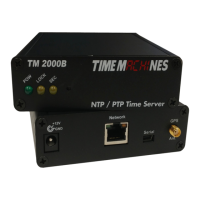
The front panel button, accessible with a paperclip or other small object, accessible from the front panel
of the TM2000B is used to reset the units software settings to factory original. This is useful when a
password is forgotten or the IP address cannot be determined. To do this, insert a paperclip or ball
point pen end through the hole in the front of the unit until you feel the button depress. Hold this
button down for a few seconds and release the button by extracting the paperclip/pen. It should now
have the factory default password and IP address information.
Installation and Operations Manual | Page 18
Web / timemachinescorp.com Email / tmsales@timemachinescorp.com Phone / (402) 486-0511


 To Next Page