Need help?
Do you have a question about the Time Machines TM2500C and is the answer not in the manual?
Describes the ideal placement for the GPS antenna to ensure optimal signal reception.
Details the physical connections required for the Time Server, including power, network, and serial ports.
Provides default login credentials and IP address for accessing the device's web interface.
Overview of the web interface for configuring device parameters like name, IP, and network settings.
Displays real-time information about the device's operational status and GPS lock.
Provides instructions and important notes regarding firmware updates and file extraction.
Offers MIB file download and details supported SNMP trap notifications.
Controls SNMP application startup and selects SNMP trap version (v2 or v3).
Configures SNMP notification type and security settings for V3.
Controls the starting and stopping of the NTP server service on the device.
Manages holdover limits, remote NTP servers, and authentication settings.
Allows manual setting of the device's time via the web interface.
Configures packet output types and PTP sync/delay packet generation modes.
Covers delay mechanism, domain number, priority, and transmission method.
Configures TTL and intervals for PTP multicast messages.
Details 802.1AS configuration and remaining multicast settings.
Provides options to download log files for diagnostics and reboot the system.
Addresses common problems with obtaining and maintaining GPS lock.
Explains how to reset the device to its original factory default settings.
Details the technical features and specifications of the Time Server device.
Lists specifications for the GPS module and active patch antenna.
Details the OCXO timing information and specifications for the TM2500C model.
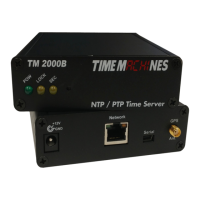
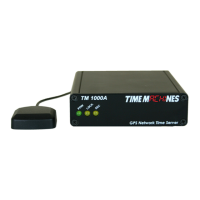
The Time Machines PTP Network Time Server is a GPS-sourced time server designed to provide accurate time to all computers and time-keeping devices on a network. It supports both PTP (Precision Time Protocol) and NTP (Network Time Protocol) to ensure precise time synchronization without relying on an internet connection. This is particularly useful for maintaining time synchronization even if the internet connection is lost, as the device uses an active GPS antenna to receive time broadcasts from United States GPS satellites.
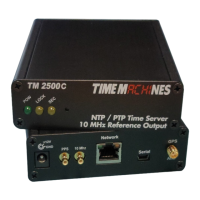
The device incorporates a high-precision internal clock based on an OCXO (Oven Controlled Crystal Oscillator). This allows the unit to continue serving accurate time even if the GPS antenna signal is lost, providing a holdover capability. The TM2500C model offers additional functionality compared to the TM2000B, featuring two SMB outputs for a 1PPS (Pulse Per Second) signal and a synchronized 10MHz reference signal.
Setting up and using the time server is designed to be straightforward. Users connect the included power supply and the GPS antenna to the base unit, then connect the base unit to the local network. Configuration is done via a web interface, accessible by browsing to the device's default IP address (192.168.1.20 from the factory). The web interface allows users to set network parameters and other device settings. Once configured, the system begins sending time packets to any device on the network requesting an update. The ability to set up two servers provides redundancy and increased capacity.
The device is compact and can be placed anywhere within the network layout. Its high-sensitivity GPS receiver can often acquire a lock on multiple satellites from within buildings or near a window, potentially eliminating the need for outdoor antenna installations.
 General
| Form Factor | 2U Rackmount |
|---|---|
| CPU | Intel Xeon E5-2600 series |
| RAM | Up to 512GB DDR4 |
| Storage | Up to 8x 2.5" or 3.5" HDD/SSD |
| Power Supply | Redundant 800W |

 To Next Page