3 4
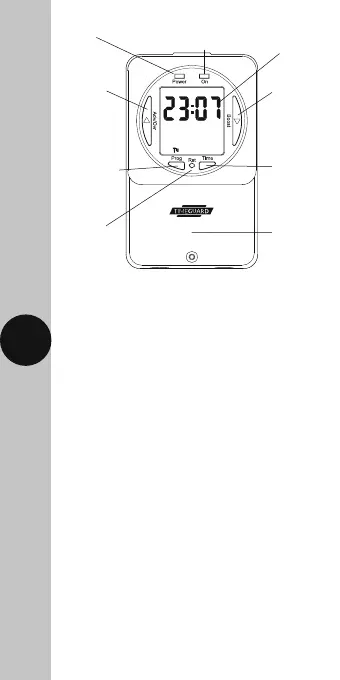
Programme
button
Illuminated
screen
Reset
button
Time
button
Power LED
Terminal
cover
Output
LED
Boost
button
Advance
button
4. Installation
• Ensure the mains supply is switched off
and the circuit supply fuses are removed
or the circuit breaker turned off.
• Remove the terminal cover by undoing
the fixing screw on the bottom of the
time switch.
• Mark the position of the top wall mounting
screw. Drill out the top mounting hole taking
care to avoid any joists, electrical cables
or water/gas pipes that may be hidden
beneath the surface. Insert the rawl plug
into the hole.
• Fix the top mounting screw and leave
2.5mm proud off of the wall.
• Place the key hole in the top of the product,
over the screw head, and slide down.
• Mark the position of the lower mounting
hole on the wall using the wall plate
as a template.











 To Next Page