8
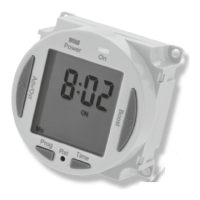
• Use the Adv/Ovr or Boost to change the day
grouping mode. This will step through the
following options;
24hour – Mo Tu We Th Fr Sa Su
5 day – Mo Tu We Th Fr (followed automatically
in programming by 2 day – Sa Su)
Individual day – Mo (followed automatically
in programming by each of the other days
of the week)
• Once the desired day grouping is selected,
press Prg button once to set and move onto
programming the ON/OFF times.
• The display will show
Prog 1, with dashes for
the hours and minutes;
Note: the example shown
is for 5 day + 2 day
programming.
9. Programming
ON/OFF times
The NTT08 has 4 independent On/Off periods
available for programming each day. There is
a choice of programming options, including
7 days the same (24 hours), 5 + 2 days
(where the weekdays are the same, and the
two weekend days are the same),
and 7 individual days.
• Press and hold the Prg button for 3 seconds,
the word Hold will show on the screen.
• After 3 seconds release the
Prg button and the MODE
screen will be displayed;











 To Next Page