13
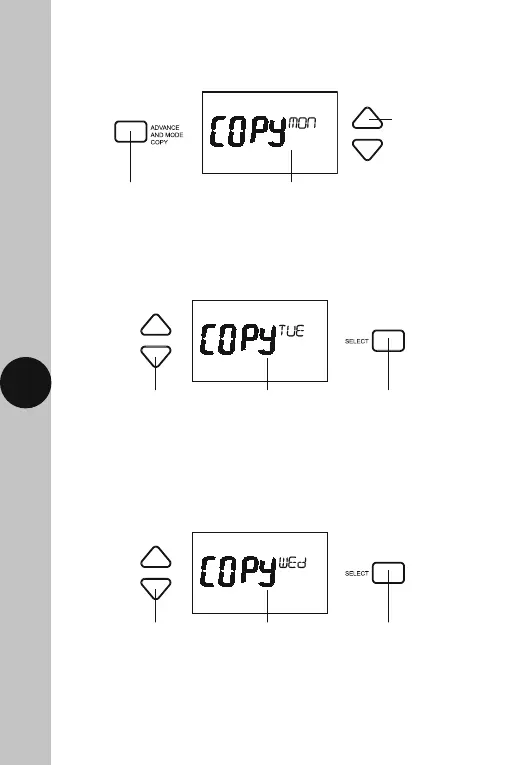
10.13 Press the Advance and Mode Copy button once. Use the Up/Down
arrow button to choose the day of the week you wish to copy,
and press the Select button once.
10.14 Use the Up/Down arrow buttons to choose the day of the week you
wish to copy the Programme to e.g. Tue, and press the Select button
once to confirm.
10.15 Use the Up/Down arrow buttons to choose the next day of the week
you wish to copy the Programme to e.g. Wed, and press the Select
button once to confirm.
10.16 Repeat step 10.15 until you have copied the programme to all
of the days of the week that are required.
10.17 Press the Set button twice to exit the programme entry.
Copy and the day of
the week will flash
Use the Up/Down arrows to
choose the day you wish to copy
the Programme to e.g. Tue
Use the Select button
to confirm and copy
the Programme
Copy and the day of
the week will flash
Use the Up/Down arrows to
choose the next day you wish to
copy the Programme to e.g. Wed
Use the Select button
to confirm and copy
the Programme
Copy and the day of
the week will flash
Press the Advance
and Mode copy
button once
Use the Up/Down
arrow button if you
wish to change the
day of the week
to copy



 To Next Page