7 Add Clients or Facilities
G
UARD
1 P
LUS
makes it easy to organize your information, whether you are a
guard company or a corporate security department, and whether you have one
site or many. You organize your information in the same way you organize your
operations. The online documentation in G
UARD
1 P
LUS
Help provides detailed
information about clients, facilities, groups, and related topics.
Installation Guide Add Clients or Facilities
••
13
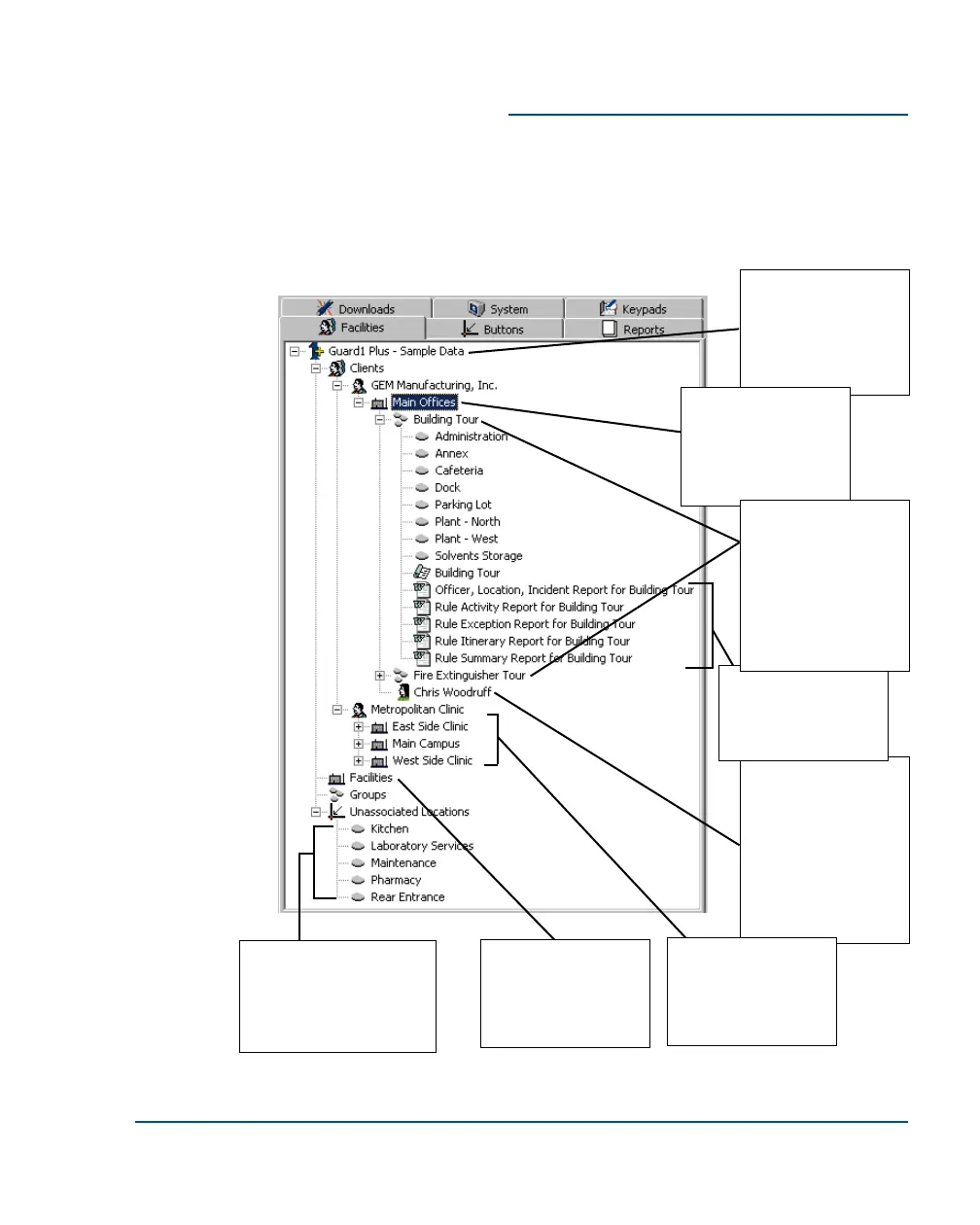
Information about
one or more
contacts can be
associated with a
related client or
facility. Here, Chris
Woodruff is the
contact for GEM
Manufacturing's
main offices.
This example is
taken from the sam-
ple data file. It
shows information
for a guard firm with
multiple clients.
A facility is a site or
building. In this
case it is related to
a client, GEM
Manufacturing.
Custom reports are
associated with a
related client, facility
or group.
Unassociated locations
are buttons which have
been defined but not yet
associated with a client,
facility, or group.
Information can be
organized in groups
to support various
patrol requirements.
In this example,
there are groups for
a Building Tour and
a Fire Extinguisher
Tour.
If you are not a
guard firm, facilities
and groups do not
have to be related
to a client.
A client can have
multiple facilities.
This client,
Metropolitan Clinic,
has three.



 To Next Page