4 TimePilot me and a endance systems TimePilot me and a endance systems 5
TimePilot Database
hours each employee worked. The extracted data can be archived on their hard drive,
on a CD or DVD, on an external hard drive or uploaded to storage on the Internet.
The report can be printed, saved as a spreadsheet or exported in a format that can be 4.
used by payroll so ware or a payroll service.
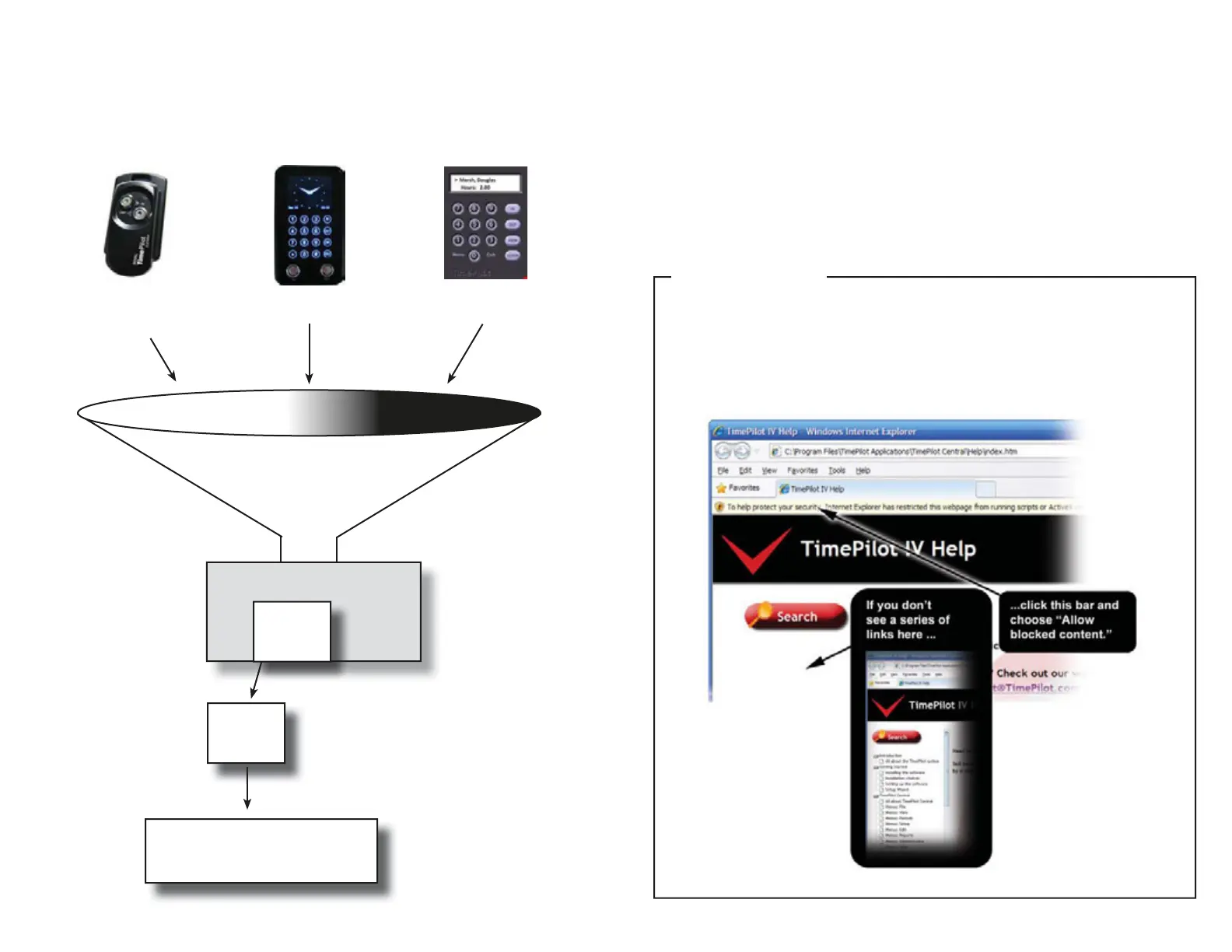
The diagram below illustrates how the system works:
TimePilot Extreme TimePilot PCTimePilot Vetro
Clock-in and
clock-out data
Extracted pay period
Reports, spreadsheets or export to
payroll so ware/service
Why so many choices in installa on?
We’ve found that many of our customers use more than one TimePilot me and a endance
product. All of our products—TimePilot Extreme, TimePilot Vetro and TimePilot PC—can work
together, crea ng one custom system. So, for instance, you can run TimePilot PC in the front
offi ce, TimePilot Vetro in the back shop and TimePilot Extreme at the job site or on the trucks,
with all three systems feeding me and a endance data into one folder on your PC or server.
By including all these choices on your disk, we give our customers the greatest fl exibility to
install the so ware they want.
By the way, if you’d like to try TimePilot PC for free for 30 days, you can install it by clicking
For more detailed instruc ons...
...and defi ni ons of many of the terms in this manual, check out the Help fi les in the
TimePilot so ware. You can view the help fi les by clicking the “Help” menu in TimePilot
Central.
TimePilot Tip
Data from
May 1 to
May 14
Data from
May 1 to
May 14


 To Next Page