INSTALLATION MANUAL
MODEL : TIS-4PL-E66D
NETWORK 4 ZONE AMPLIFIER
5
www.tiscontrol.com
TIS CONTROL LIMITED
Wanchai, Hong Kong
TIS CONTROL PTY LIMITED
SA, AUSTRALIA
Copyright © 2023 TIS, All Rights Reserved
TIS Logo is registered trademark of TIS CONTROL.
All of the specification are subject to change without notice.
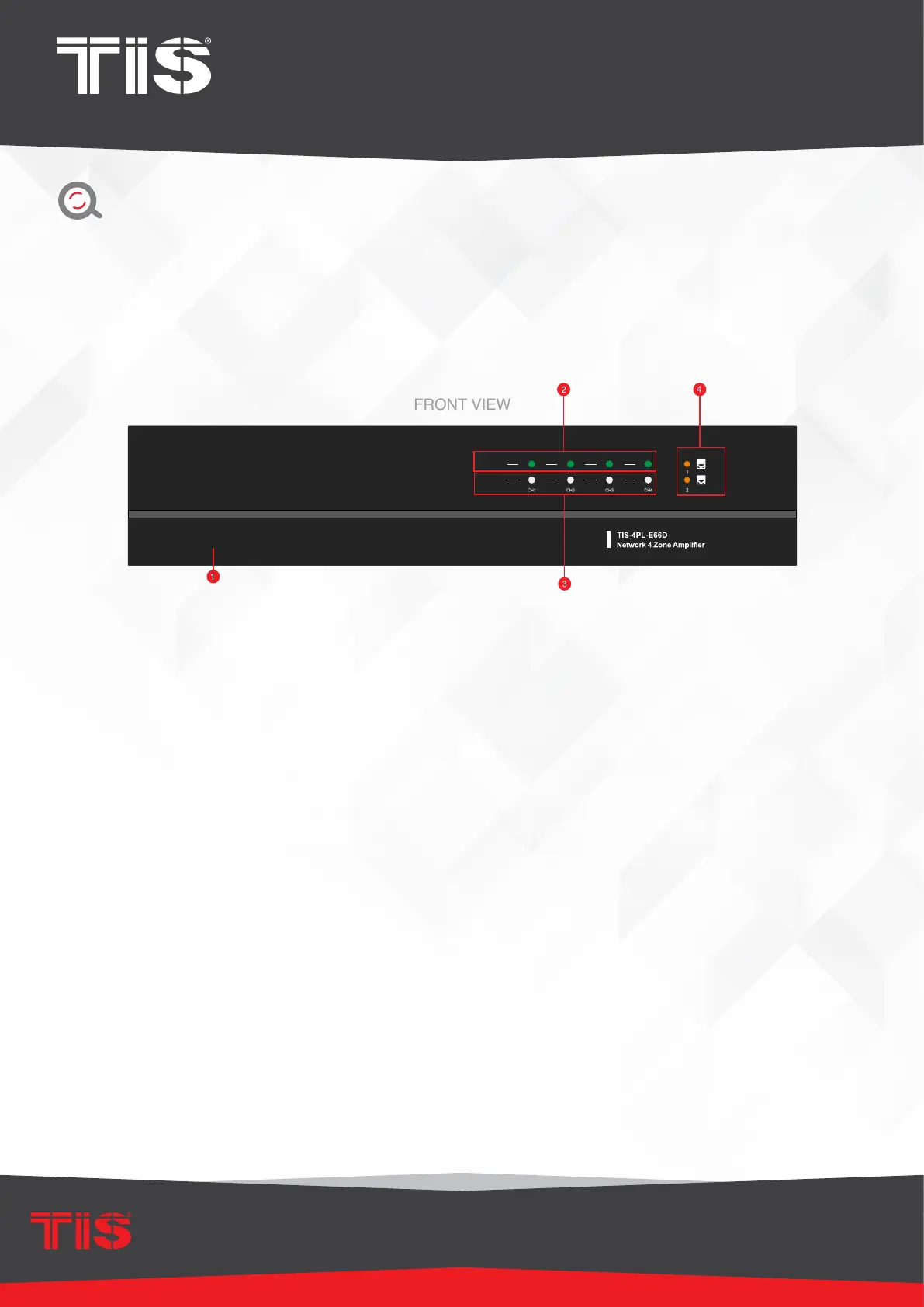
1) Power button
2) Streaming Indicator — When streaming, the LED turns on.
3) Input Source Indicator — LED Color:
White represents Network Audio, Green
represents Line in 1 (Zone Line in), Yellow represents Line in 2 (Master Line in),
Magenta represents Master Optical in, Cyan represents Master Coaxial in, and Red
represents USB.
4) Network Indicators — LED turns on when the network is accessible.
OVERVIEW


 To Next Page