

EasyManua.ls Logo

TIS TIS-4PL-E66D - User Manual

TIS TIS-4PL-E66D
21 pages
Print Icon
To Next Page IconTo Next Page
Loading...
6 06795 20838 8
BARCODE (UPC-A)
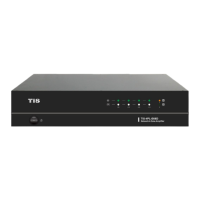
NETWORK 4 ZONE AMPLIFIER
INSTALLATION MANUAL
Model: TIS-4PL-E66D
TIS-4PL-E66D is a 4-zone multi-room audio
system that allows you to play music from various
sources, including online music services, your
phone storage, and NAS, in different rooms or the
same room. It is easy to set up and use.
PRODUCT INFORMATION
PRODUCT SPECIFICATIONS
Input
Line in Max 2V RMS input
Optical in
Max 192kHz/24bit sample rate decode
PCM encoding
USB USB disk drive playback
Output
Pre out Max 2V RMS output
Coaxial out 44.1kHz/16bit output
Speaker out
SOW per channel / 8ohms
Bridged Amplifier mode 100W / 4ohms per channel
General
Power 115-230V AC 50/60Hz
Control Interface Dual-way RS232
Size 2U rack size
Protection
Bus connection Reverse polarity protection
Amplifier Reverse polarity protection
Network
Ethernet In RJ45, Connect to internet
Ethernet Out RJ45, Output to other device to share the network
Dimensions Width × length × height 300mm × 100mm × 430mm
Music Sources
Streaming Protocol Spotify Connect, Airplay, DLNA, UPnP, Qplay
Online Music
Spotify, Tidal, Deezer, Qobuz, Napster, Pandora, Amazon Music,
Internet Radio, iHeartRadio, vTuner, QQ music, QQ FM
Local Music
Mobile device music, NAS storage music files, USB disk drive
music files
Multizone function
1.By Master input source
2.By APP to setup one zone as master to sync music to other
zone
Question and Answer IconNeed help?

Do you have a question about the TIS TIS-4PL-E66D and is the answer not in the manual?

Summary

Installation and Safety

Read Instructions and Safety

Emphasizes reading the manual and following safety guidelines for electrical installations.

Installation and Mounting

Guides on simple installation, mounting location, and warranty information.

Programming Capabilities

Explains device programming, requiring software and training for advanced features.

Whats Included in the Box

System Requirements

Internet, Wi-Fi, and App Requirements

Details requirements for internet, Wi-Fi network, and the WIIM app for system operation.

Front View Overview

Front Panel Indicators and Controls

Describes the Power Button, Streaming Indicator, Input Source Indicator, and Network Indicators on the front panel.

Back View Connections

Input;Output Ports and Speaker Connections

Covers various input/output ports, speaker outputs, and stereo/bridge mode switch.

Control Ports and Voltage Selection

Describes RS232 ports, the Reset Button, and voltage selection for operation.

Mounting the Amplifier

Zone Connection and Speaker Setup

Zone Connection Diagram

Illustrates connecting audio sources to the four zones for synchronized or individual playback.

Speaker Connection Modes

Details connecting stereo speakers in Stereo (ST) mode or mono speakers in Bridge (BR) mode.

Connecting External Audio Devices

Connecting to Amplifiers;AV Receivers and Subwoofers

Guides on connecting the amplifier's LINE OUT to external audio devices and subwoofers.

Connecting Audio Sources

Connecting USB Storage and Playback Devices

Explains connecting USB drives and audio sources like CD players to various input ports.

Network and RS232 Connectivity

RS232 Control and Network Connection

Describes RS232 control and connecting the amplifier to a router via LAN cable.

WIIM App Control

WIIM App Setup and Zone Selection

Guides on downloading the WIIM app and selecting zones/music sources for streaming.

Multi-Room Audio Features

Synchronized Multi-Room Playback

Explains playing the same music in multiple rooms by grouping devices, noting sync behavior.

Online Music Services Integration

Lists compatible online streaming services for wireless streaming.

Streaming Services

Spotify, Airplay, Qplay, and Local Music

Guides for using Spotify, Airplay, Qplay, and streaming local music via DLNA.

Music Playlists and Source Inputs

Creating Playlists and Using Line;Optical;Coaxial Inputs

Explains playlist creation and connecting external sources via Line In, Optical In, or Coaxial In.

PC Audio and Channel Configuration

PC Audio Streaming and Output Channel Settings

Describes streaming from PC and changing zone output channels for stereo playback.

Device Settings and Web Interface

Zone and Device Settings Management

Covers renaming zones, device info, alarms, presets, timers, EQ, and factory reset.

Web Player Interface Access

Explains accessing the web player interface via IP address in a web browser for control.

App Interface Operations

Playback Control and EQ Settings

Describes controlling playback functions and configuring EQ settings within the app.

Radio Station Management and Network Setup

Radio Station Management

Explains adding, viewing, and managing internet radio stations, including sharing them publicly.

Setup Menu and WiFi Connection

Details accessing the setup menu for firmware updates, device renaming, WiFi connection, and password changes.

Firmware Update and FCC Compliance

Firmware Update Procedure

Explains how to update the device's firmware, recommending prompt updates for features and performance.

FCC Compliance Statement

Provides FCC radiation exposure information, compliance conditions, and notices regarding interference.

Frequently Asked Questions (FAQ)

Connectivity and Feature Support

Addresses questions on AirPlay, DLNA, zone combinations, wireless range, and high-resolution music support.

Music Playback and Language

Covers online/local music services, PC playback, multiroom sources, and supported languages.

Device Compatibility and Usage

Answers questions regarding Windows compatibility and simultaneous multiroom audio sources.
TIS TIS-4PL-E66D Specifications

General IconGeneral
BrandTIS
ModelTIS-4PL-E66D
CategoryAmplifier
LanguageEnglish