12
4.4.1 RS485 Directly
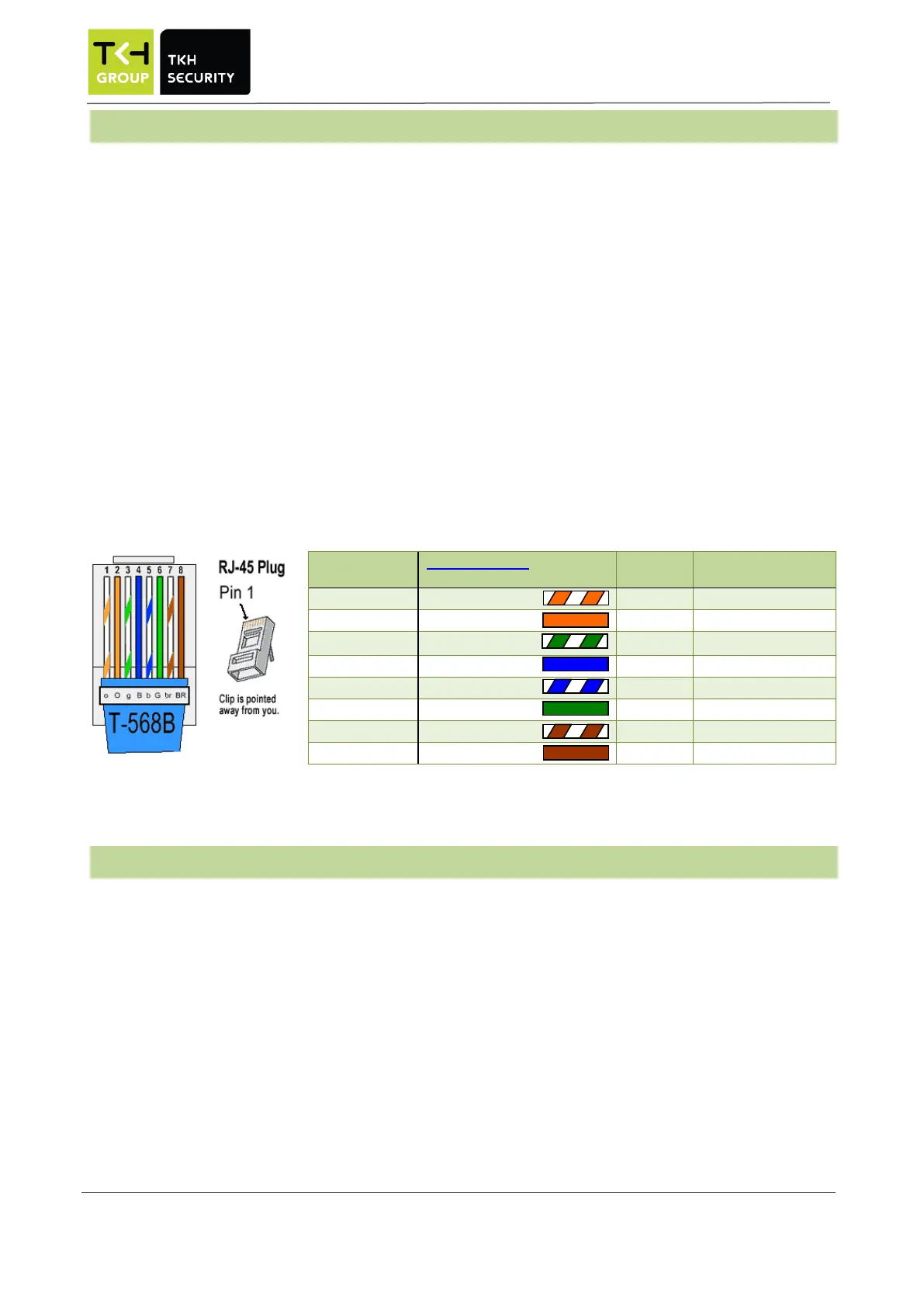
Recommended cable type between the a Orion or Polyx and the Sirius iX30 card reader is:
• CAT 5 UTP four twisted pairs of 24AWG copper conductors
• CAT 6 UTP four twisted pairs of 24AWG copper conductor
A direct connection (without using an Adapterboard) between the Sirius card reader and a door controller
based on RS485™ is NOT possible when:
• Sirius and door controller™ are installed in different buildings and thus the connection leaves
the building or
• the wiring is no UTP cable (CAT5 or CAT6) or
• an existing (non UTP) cable is reused or
• overvoltage protection for the card reader is required or
• An external power supply is required for the card reader.
If any of the above conditions applies, see chapter 5.4.2.
4.4.2 RS485 via Adapterboard
Recommended cable type between a Polyx and the Sirius card reader, using an Adapterboard is:
• Shielded cable with twisted pairs
If a direct connection is not possible, an Adapterboard must be placed between Orion or Polyx and the
Sirius iX30 card reader.
Adapterboard is connected with the door controller with a default UTP cat5 cable (or higher) (plug connection).


 To Next Page