Hardware Version : 5.02 Document Version : 1.0.
TECHMAN ROBOT INC. 5F., No. 58-2, Huaya 2nd Rd., Guishan Dist., Taoyuan City, 333411 , Taiwan
65
Appendix 4
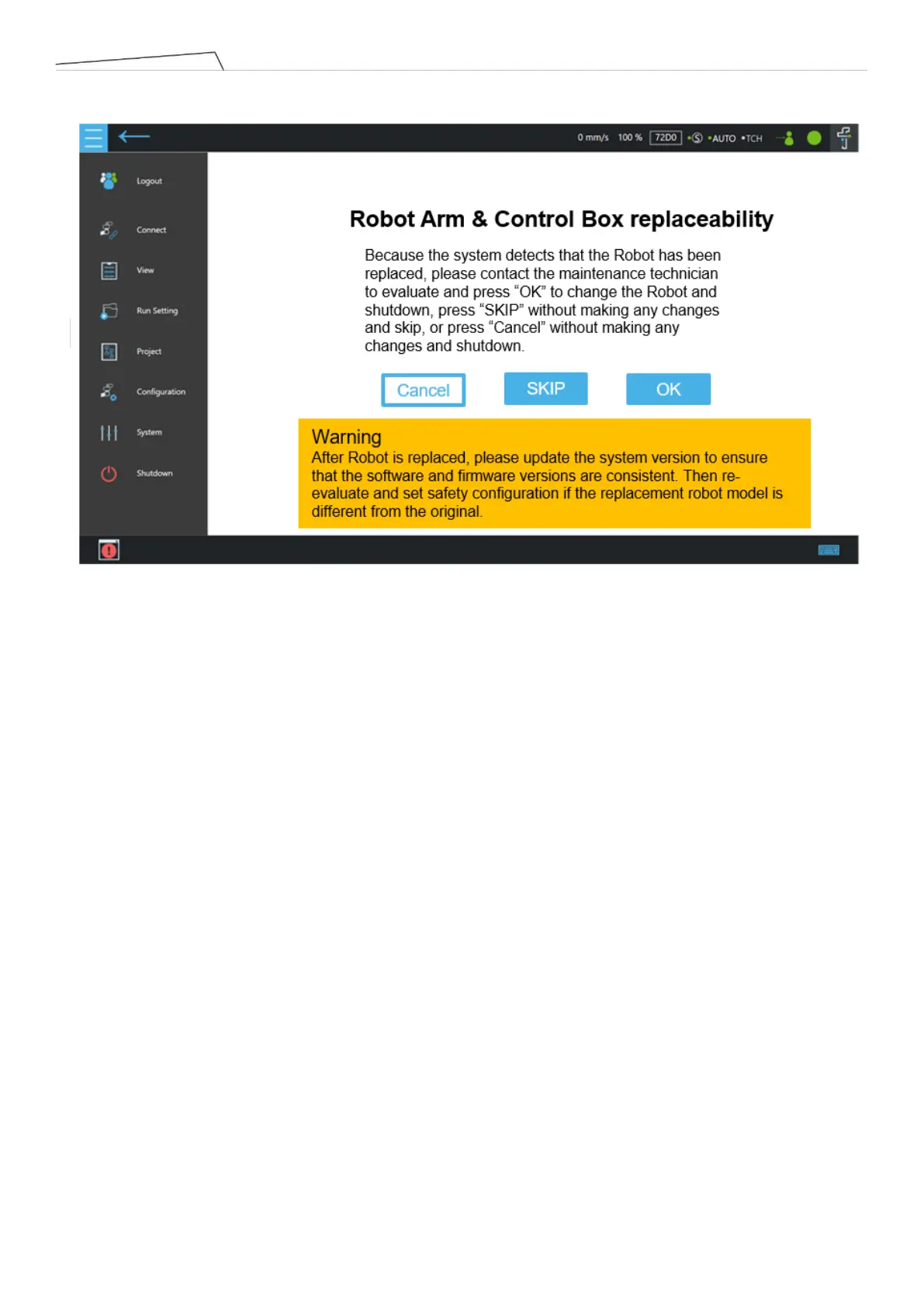
If all the above criteria are met, but the data on the arm side differs from the data on the control box side, switch to
this special page after turning on the machine.
Cancel : Do not make any changes. Click to initiate the shutdown procedure.
SKIP:No changes needed. Click to exit this special page. If there is no service key, the button will be greyed out and
cannot be clicked.
OK : Overwrite the data of the arm side to the control box side, and switch off the machine, if there is no Service key,
the button will be greyed out and cannot be clicked.
Note: The visual connection camera check takes approximately 60 seconds. During Normal power on, the page may
jump to this special page after a period of time. The check will first go to the Normal condition, and then jump to this
special page when any unit is checked to a different condition.
Please click ‘OK’ and enter the Safety Password to confirm the arm change. This password is the same
as the Safety Configuration Tool Password.
After replacing the arm, update the system version to ensure the firmware version remains the same. If the arm
model has been changed, conduct a new safety assessment and modify the safety function settings



 To Next Page