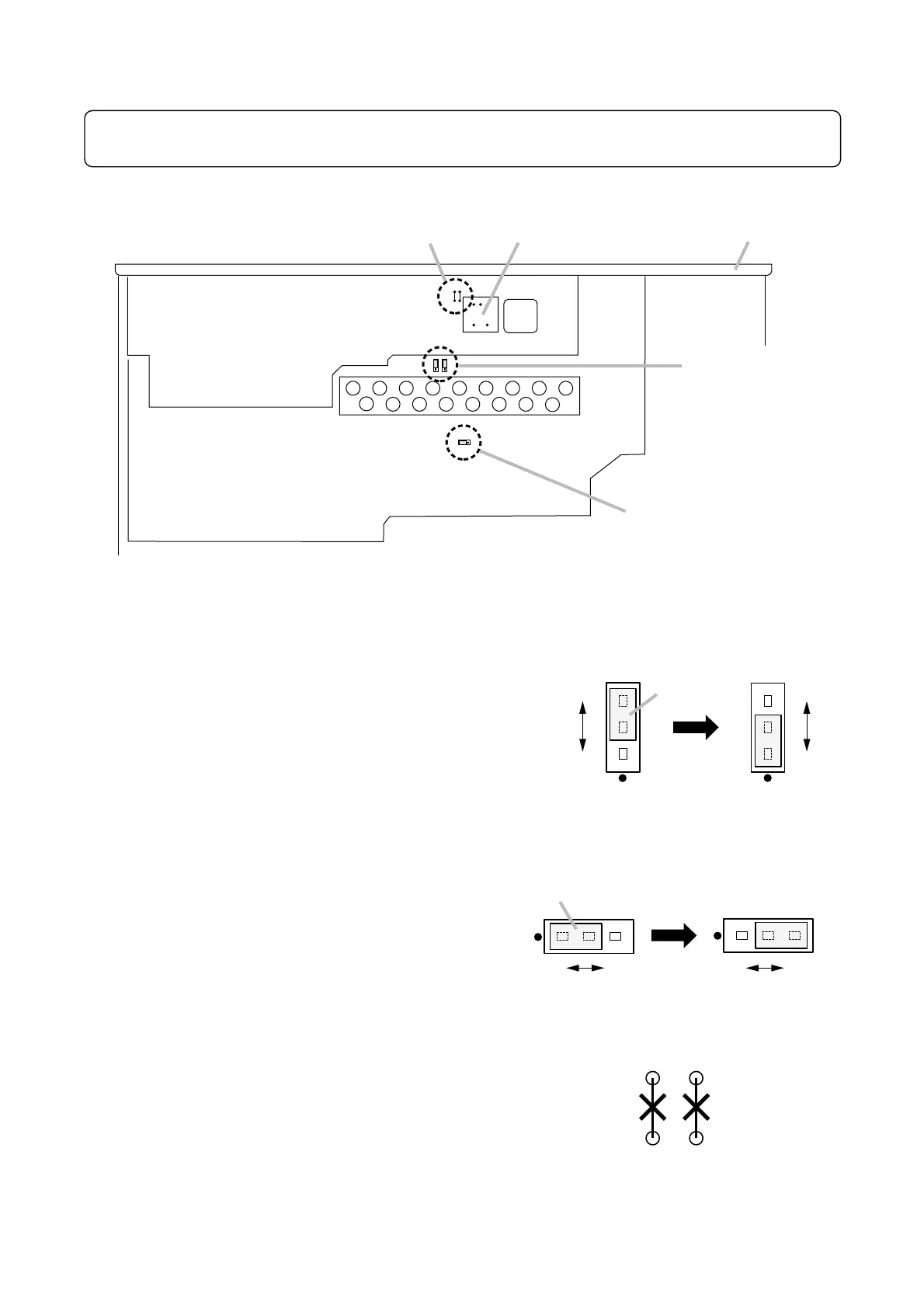
Leave the modifications described here to a qualified service technician only.
Please consult your TOA dealer.
14.3. Convert TEL PAGING Input into Transformer-Balanced Type
Step 1. Cut the jumpers SJP400 and SJP401.
Note: Treat the cut jumper pieces, especially SJP400's
pieces, so that they will not touch the transformer
case to be installed in the next step.
Step 2. Install and solder the optional IT-453A Input Transformer in place of "T400" indication on the Control
circuit board.
14.2. Turning the Power Off to Disable Broadcast with EMRGENCY Control Activation
Install the SJP102 jumper to "OFF" position.
14.1. Turning On/Off LINE OUT 1 (2) in conjunction with ZONE 1 (2) Selector Switch
• To interlock LINE OUT 1 with ZONE 1 switch, install the
SJP100 jumper to "ON" position.
• To interlock LINE OUT 2 with ZONE 2 switch, install the
SJP101 jumper to "ON" position.


 To Next Page