10
8.2. Module Selector Switch Settings
Shift the rear panel-mounted Module Selector Switch to either the PAGE or BGM position, depending on the
output terminal to which the module signal is to be sent.
PAGE: Signals from the installed module are only sent to the speaker
outputs.
BGM: The terminal to which the signal from the module is to be output
differs depending on jumper wire settings inside the unit.
(Refer to p. 12, "AUX, PROGRAM, MODULE (BGM) Output
Selection.")
Set both the bass and treble controls to the center position when using the equalizer module.
Caution
Make sure that the supplied blank panel is placed over the module input port when the port is not in use.
PAGE BGM
MODULE
Module selector switch
AB
MUTE
Mute selector switch
8. PLUG-IN MODULE INPUT PORT
A single port for TOA plug-in modules is located on the unit's rear panel. Any 900 Series plug-in module can
be inserted into this port.
Note: Consult your nearest TOA dealer for selection of appropriate module types.
Be sure to turn off the power before performing the following operations:
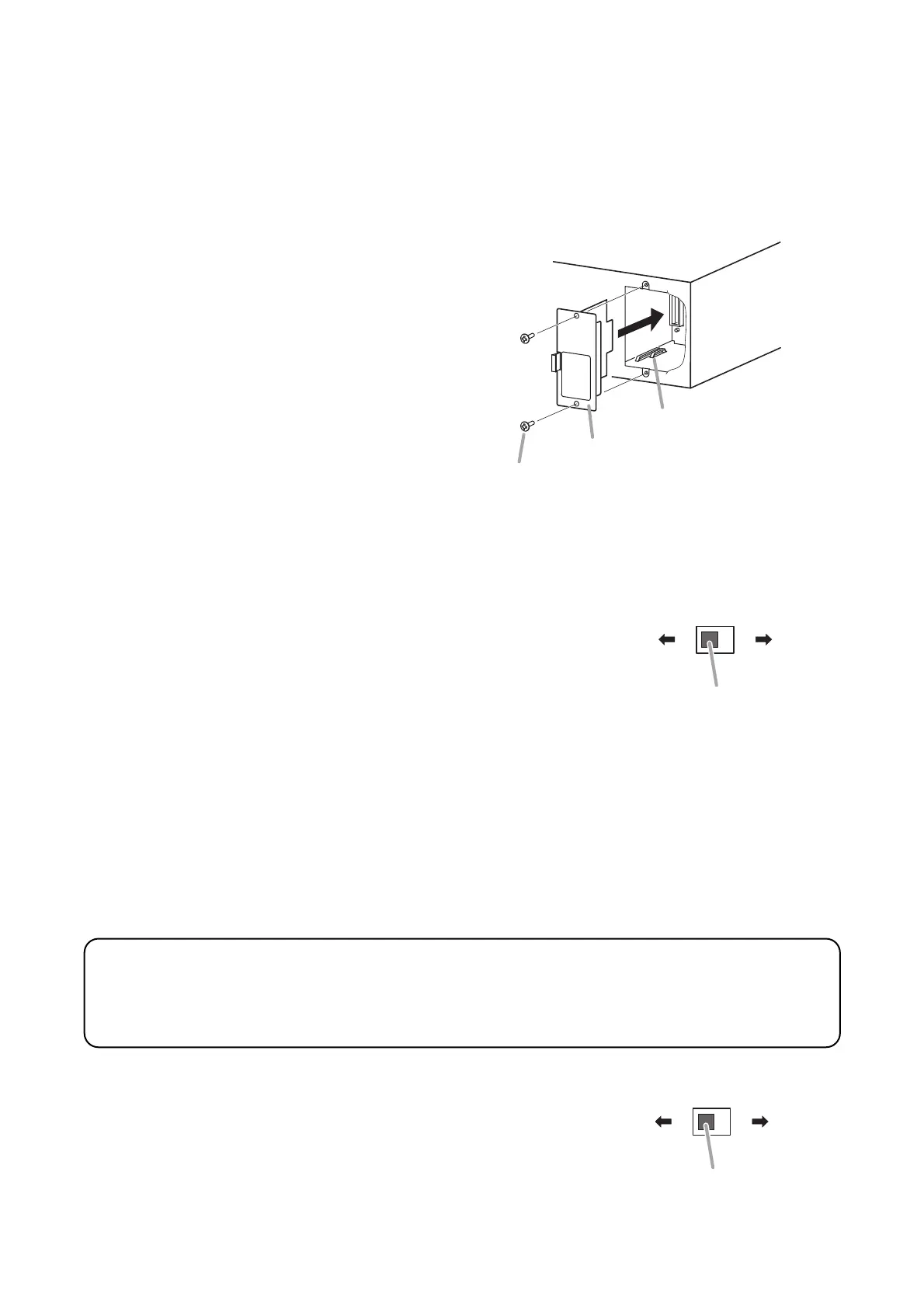
8.1. Module Installation
Step 1. Remove the blank panel covering the module
slot on the rear panel.
Step 2. Align the module board with the top and
bottom guide rails, and press in.
Step 3. Using the screws supplied with the module,
secure the module to the rear panel.
Mixer power amplifier
900 Series plug-in module
Module mounting screw (supplied with the module)
Guide rail
9. EQUIPMENT SETTINGS
These servicing instructions are for use by qualified personnel only. To avoid electric shock, do not
perform any servicing other than that contained in the operating instructions unless you are qualified to
do so. Refer all servicing to qualified service personnel.
CAUTION
9.1. Mute Function
The unit features 2 different mute functions, A and B.
Mute A or B can be selected with the rear panel-mounted Mute Selector
Switch.



 To Next Page