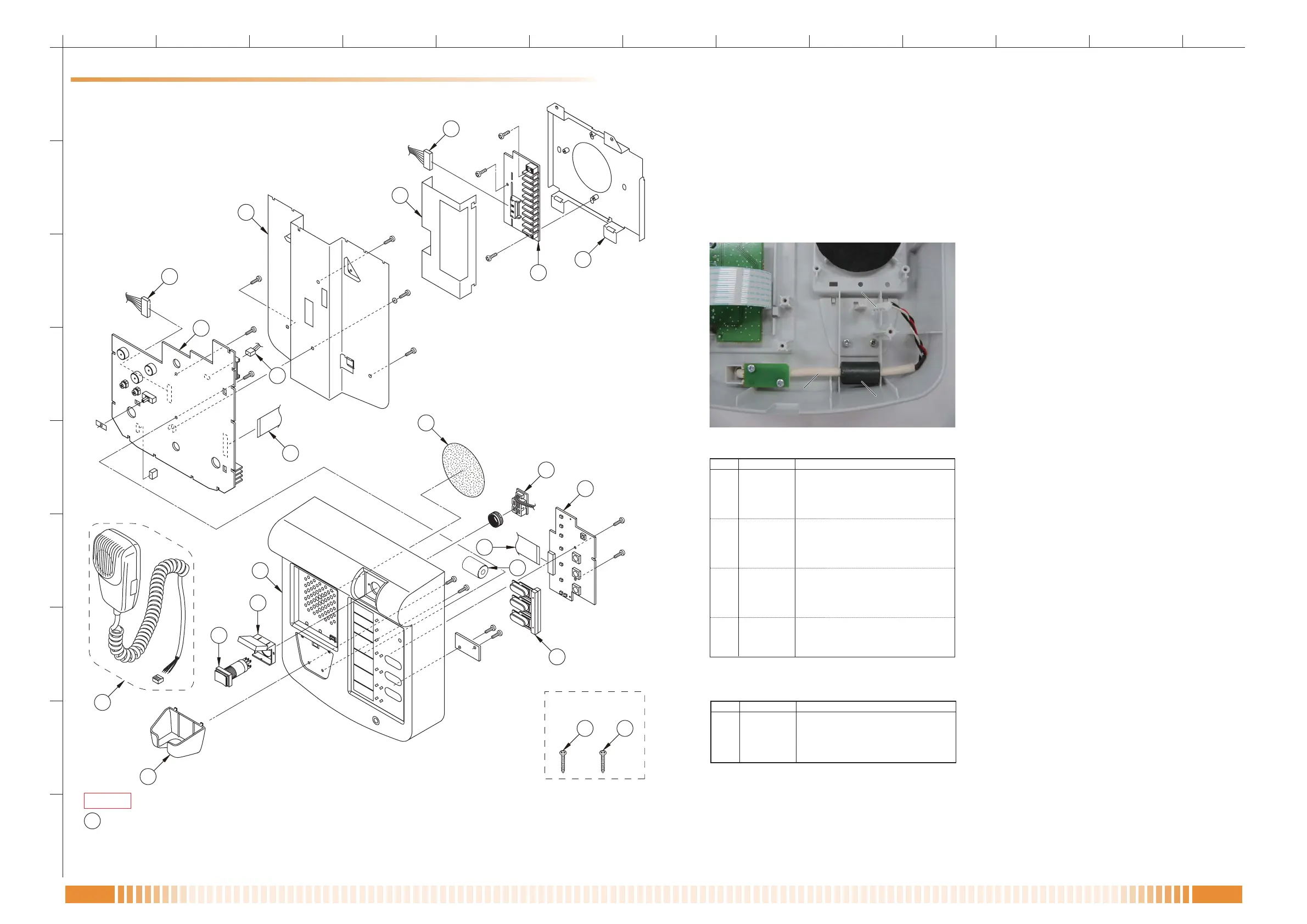
CASE ASSY.
The microphone unit comes with a connector housing (EHR-4).
Ref.No. Part Code Description
1 Z3292 CASE ASSY, UPPER RM300MF
2 101-11-092-50 DOST COVER,RM200XF
3 102-15-428-70 HOLDER,MICROPHONE RM200XF
4 102-32-327-8A UNDER COVER, RM300MF
5 121-01-859-70 COVER,REC TANGLE180° 50-011-12
6 121-01-860-90 KNOB, RM200XF
7 Z3302 MIC ASSY, RM300MF
8 115-14-485-70 SWITCH, P16LMT1-1ABHR(RED)
9 102-32-328-3A BRACKET, TERMINAL RM300MF W/S
10 102-32-326-50 BRACKET, WALL RM300MF
11 123-49-486-50 CONNECTION CABLE W/PLUG 8P
12 124-04-316-90 FLAT CABLE, 19T83(200)P1.25
13 123-39-730-20 CONNECTION CABLE W/PLUG 3P
14 700-04-438-80 PCB ASSY, CPU RM300MF
15 700-04-439-50 PCB ASSY, SW RM300MF
16 700-04-442-70 PCB ASSY, EMG SW RM300MF
17 700-04-440-30 PCB ASSY, CONNECTOR RM300MF
18 C06-31-010-20 B.H. SCREW, 4*25 TAPPING(1)
19 D15-44-013-70 FILTER, A8H150285070
· SCREWS
Ref.No. Part Code Description
A 106-61-618-30 B.H. SCREW, 3*12 B-TIGHT
B 106-61-615-40 B.H. SCREW, 3*8 B-TIGHT
C C06-73-004-00 LOCK WASHER M4 EXTERNAL
D C06-02-001-80 P.H. SCREW, M3*8
E 106-61-614-50 B.H. SCREW, M3*6
*
The parts not listed are not supplied.



 To Previous Page