27
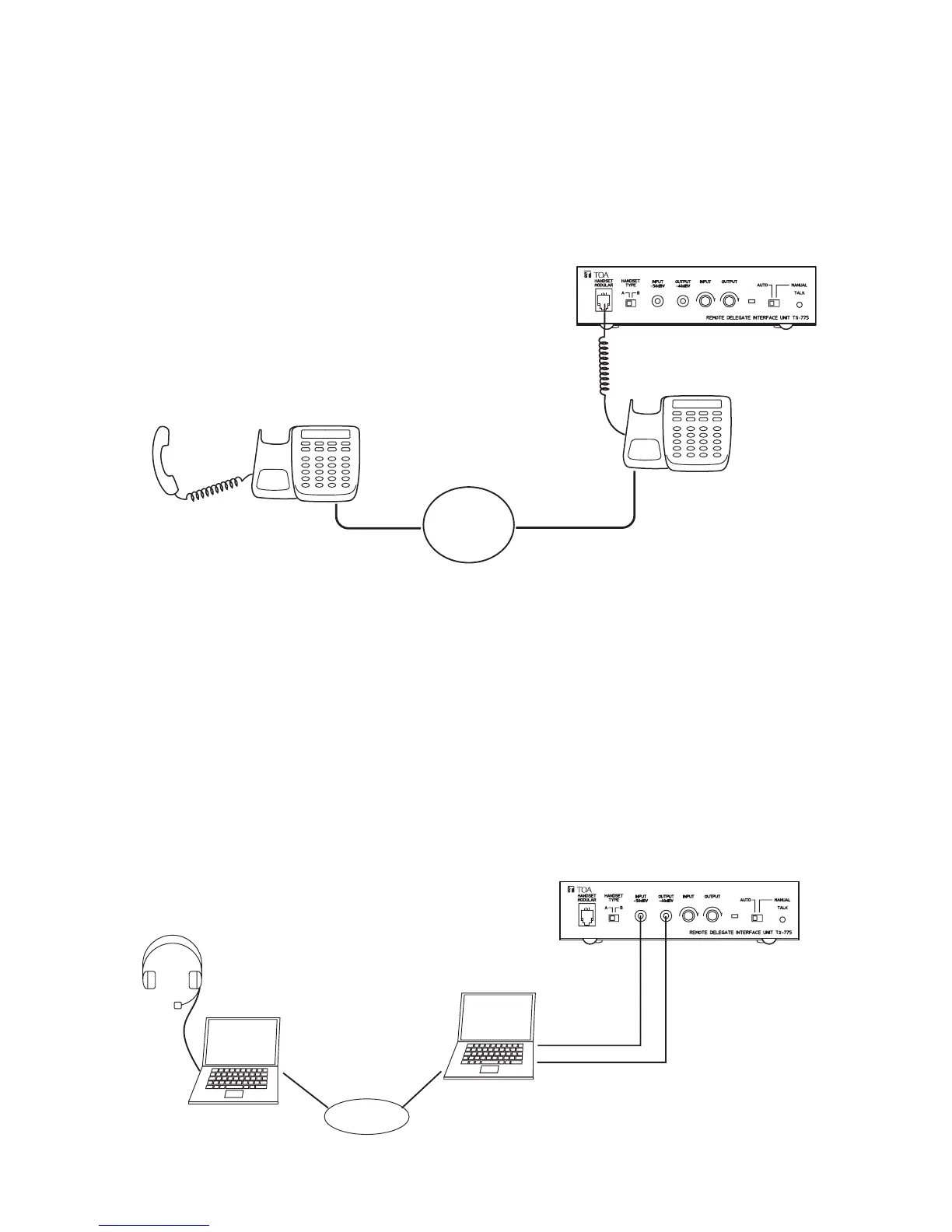
Step 3. Set the telephones or PCs in both the conference room and remote location to conversation mode
and connect the conference room telephone or PC to the Remote Delegate Interface unit.
3-1. If using the telephone:
Use a telephone equipped with a handset using modular connectors.
1) Set the telephones in both the conference room and the remote location to conversation mode.
2) Detach the modular plug from the handset, then connect the plug to the Remote Delegate Interface
unit.
3-2. If using the PC's microphone input and headphone output:
1) Using Skype* or other IP telephone software, set the PCs in both the conference room and the
remote location to conversation mode.
2) Set the PC's microphone input and speaker output to allow conversations to be held between PCs
at an appropriate level.
3) Connect the PC's headphone output terminal to the Remote Delegate Interface unit's Microphone
Input terminal, and the Remote Delegate Interface unit's Speaker Output terminal to the PC's
microphone input terminal.
* Skype is a trademark of Skype Limited.
Skype is a toll-free IP telephone software program which allows conversations via the Internet.
For details, refer to http://www.skype.com/helloagain.html.



 To Next Page