30
8.3. Voting (TS-901, TS-911, TS-902, and TS-912 only)
Step 1. Place the system in voting mode.
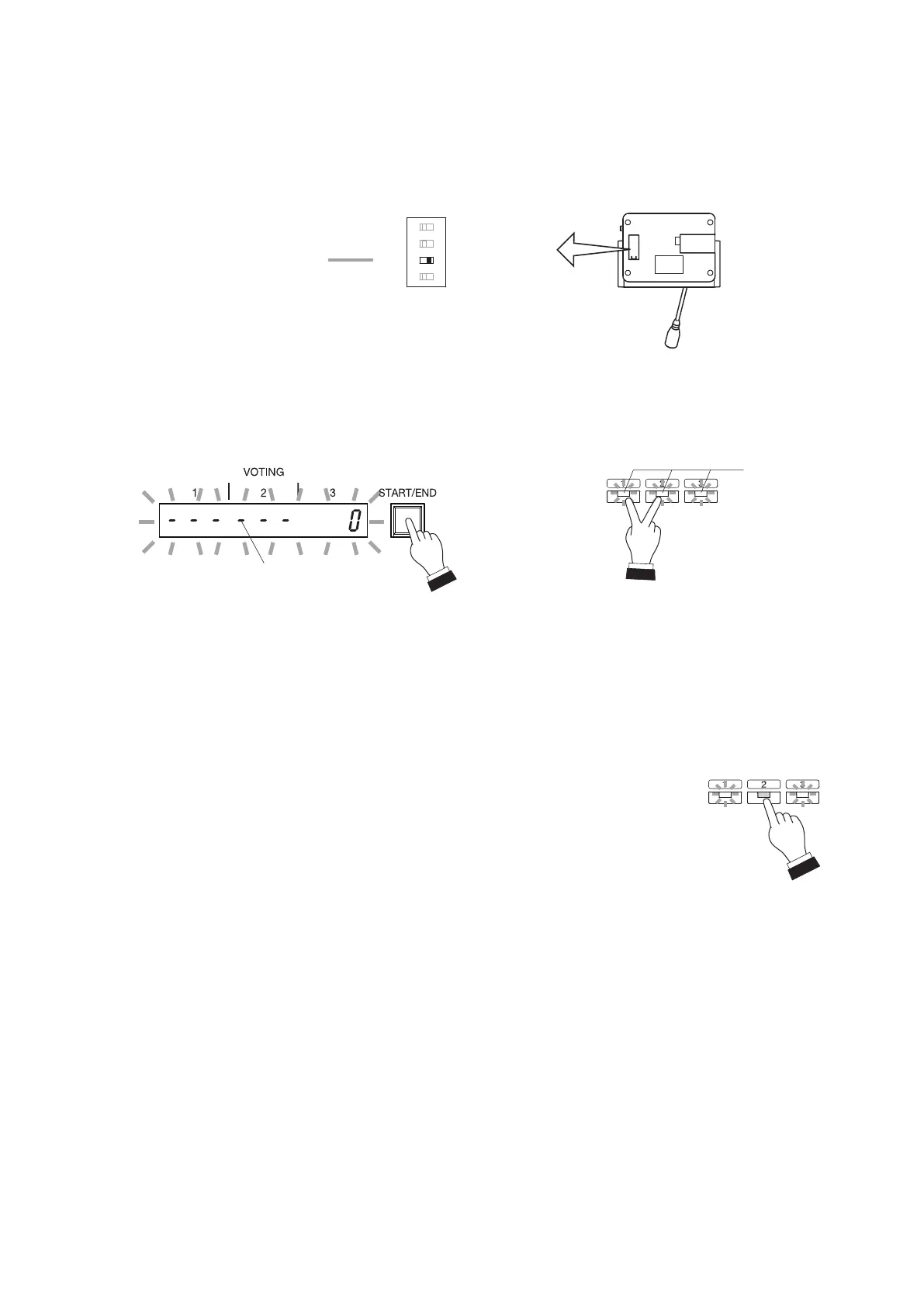
On the Central unit, hold down the Voting Start/End button for 1 second or more. On the Chairman Unit,
simultaneously press Voting keys [1] and [2] for 1 second or more.
The Voting Result display (1 – 3) on the Central unit, and the Voting Status indicators on the Conference
unitsash,enablingvoting.
(In this event, the Voting Result Display shows [--- --- 0].)
OnlyapriorityspeechcanbeinitiatedbywayoftheChairmanunit’spriorityspeechkeyduringvoting
operation, and the currently used microphones of all other units are turned off.
Step 2. Vote.
Press the desired Voting key on the Conference unit, and the
corresponding Voting Status indicator lights.
(OtherVotingStatusindicatorsremainashing.)
The totaled number of votes polled with the press of the vote
keys is instantly displayed on the Central unit’s voting result
display.
Tips
• To cancel voting
Press the lit key (initially pressed for voting) again.
Allkeyswillash,indicatingthatvotingiscancelled.
• To change voting
Pressanyashingkey(touseinvoting).
Therstkeypressediscancelled,andthelastkeypressedis
enabled and continuously lit.
Chairman unit's bottom
Voting activation setting switch
(factory-preset to OFF)
RESET
OFF
OFF
PTT
ON
ALT
VOTE
PRIORITY MODE
ON
1 2 3 4
ON
PRIORITY
RESTORE
CHIME MUTE
Voting can be started and terminated from the Central unit or the Chairman unit.
To perform this operation from the Chairman unit, set the Voting activation setting switch to ON as shown in
the figure.
(For the Central unit)
Voting result display
Hold down this button
for 1 second or more.
Lights
(Example)
Voting status
indicators
(For the Chairman unit)
Hold down these keys
for 1 second or more.
Flashes


 To Next Page