8
ON
OFF
Speaker line
Normal
Speaker line
Open
Speaker line
Short
ON
OFF
ON
OFF
1 sec. 1 sec. 1 sec. 1 sec.
Speaker line
Normal
Speaker line
Open
Speaker line
Short
ON
OFF
ON
OFF
ON
OFF
1 sec. 1 sec. 1 sec. 1 sec.
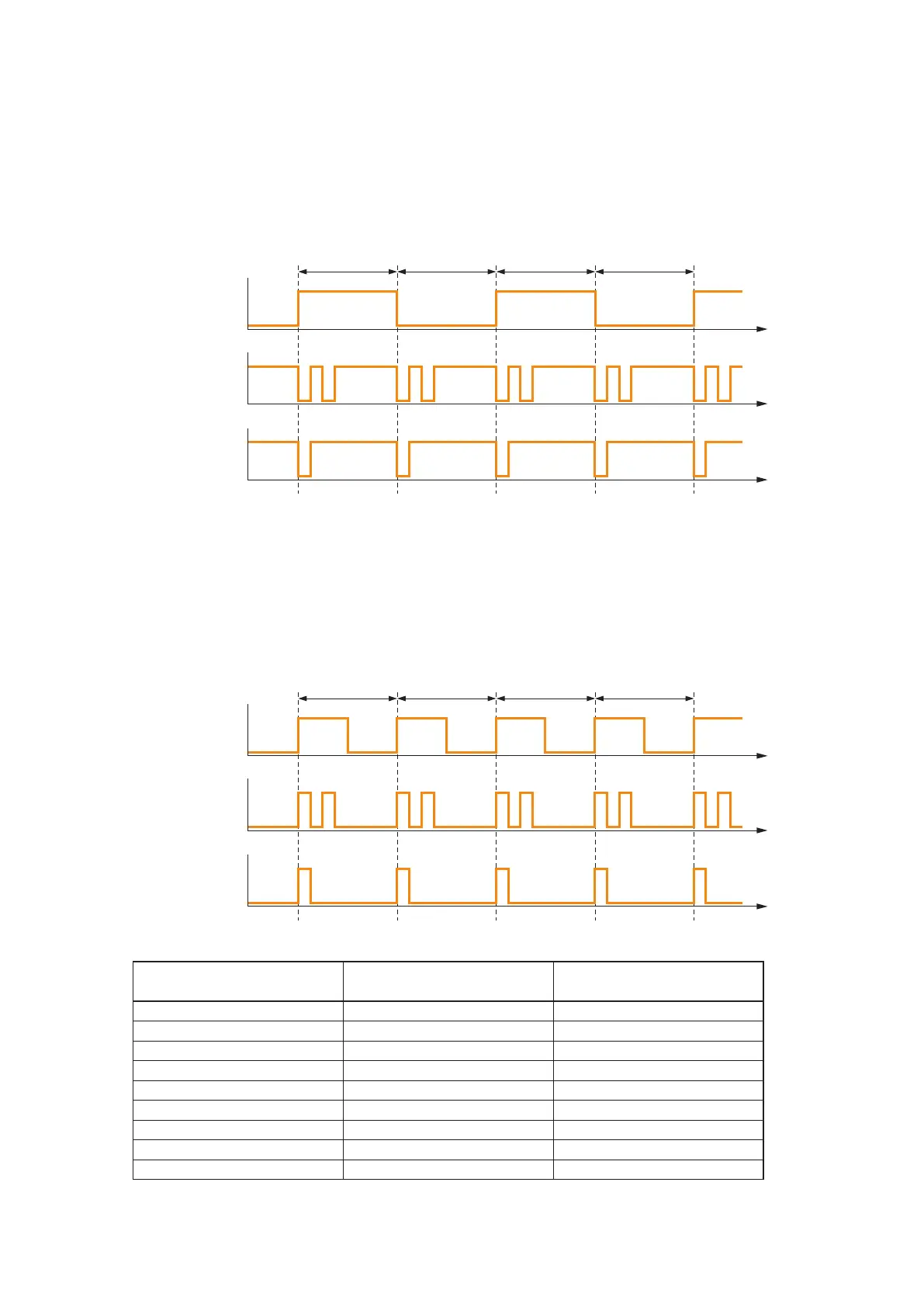
[Speaker line status vs. indicator status]
TheSpeakerlineAorB statusindicatorshowsthecorresponding speakerlinestatus"Normal," "Open," or
"Short"bytheindicatorlightingconditionsasfollows.
•WhentheVX-200SZ-2isusedasfactory-preset
This is the case where the initial impedance settings have not yet been performed or cannot be performed
because of the speaker line failure.
(For the initial impedance settings, refer to the VX-2000 series Instruction manual.)
•WhentheVX-200SZ-2isinnormaloperatingmode
This is the case where the initial impedance settings have been completed.
(For the initial impedance settings, refer to the VX-2000 series Instruction manual.)
*AftertheVX-200SZ-2detectsline"Short"oneitherthespeakerlineAorB,theshortedspeakerline
willbeautomaticallydisconnected,permittingthelogdatatobedisplayedas"Open"onaPC.
Speaker line A Speaker line B Log diaplayed on a PC
(See the indicator status above.) (See the indicator status above.)
Normal Normal NORMAL
Open Normal OPEN
Normal Open OPEN
Short Normal OPEN*
Normal Short OPEN*
Open Open OPEN
Short Short SHORT
Open Short OPEN*
Short Open OPEN*
The table below shows the speaker line A and B status (indicators status) and its log data to be displayed on a PC.
Note
When either indicator shows speaker line failure (open or short), another indicator showing normal status
extinguishes.



 To Next Page