2-22
Chapter 2
INDICATOR STATUS OF REMOTE MICROPHONES
2.4.IndicatorStateattheTimeofGeneral-PurposeBroadcastPattern
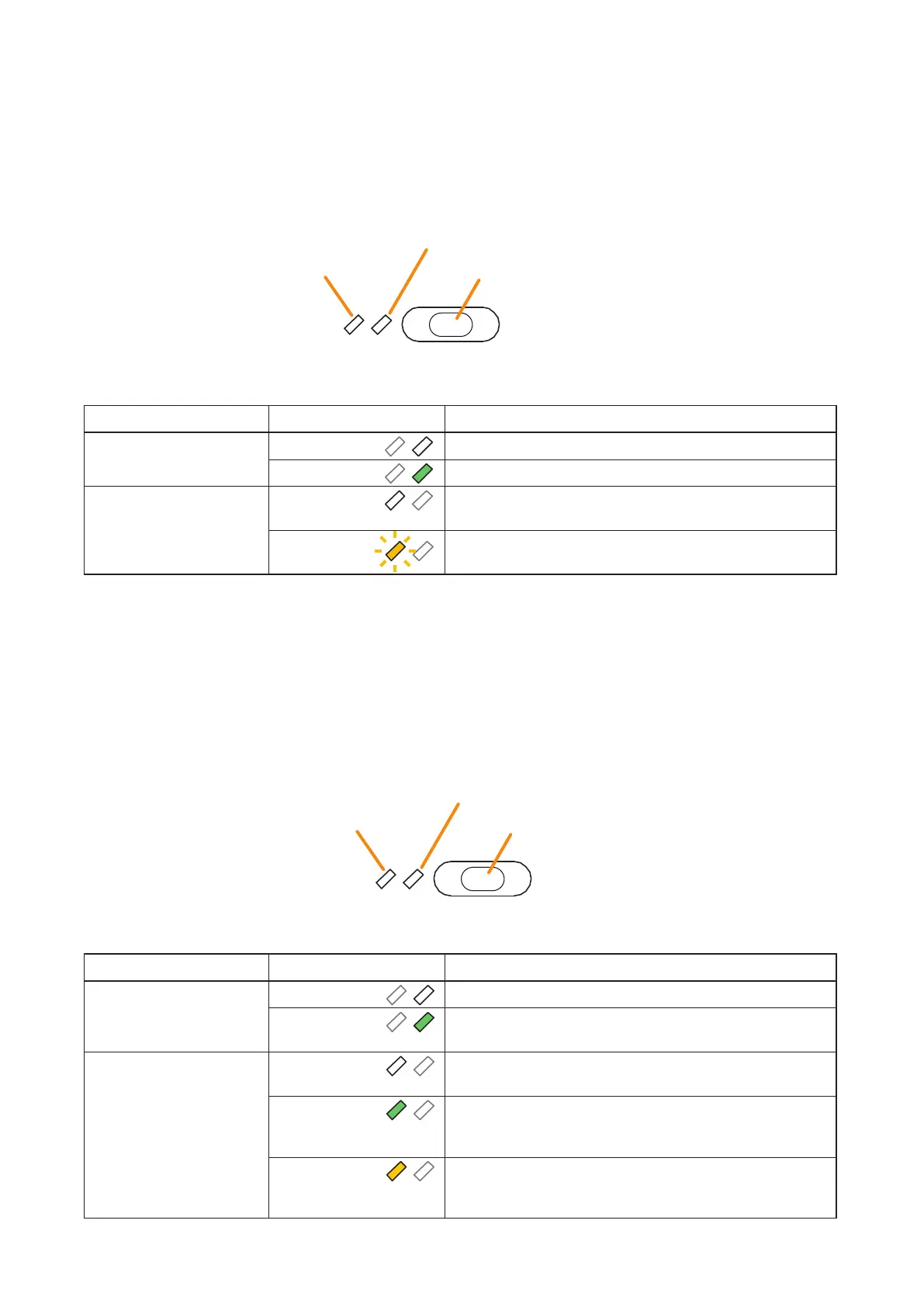
When a general-purpose broadcast pattern function has been assigned to a function key, the 2 indicators to the
left of the key indicate its pattern selection and broadcast status.
Note
For instructions on assigning functions to function keys, see the separate Setting Software Instructions, "EVENT
SETTINGS."
Broadcast Status Indicator
Pattern Selection Indicator
Function key (General broadcast pattern key)
The meanings of the 2 indicators next to the Function key are as follows:
2.5.IndicatorStateattheTimeofGeneral/BGMBroadcast
When a general/BGM broadcast function has been assigned to a function key, the 2 indicators to the left of the
key indicate its selection and broadcast statuses.
Note
For instructions on assigning functions to function keys, see the separate Setting Software Instructions, "EVENT
SETTINGS."
Broadcast Status Indicator
Selection indicator
Function key (General/BGM broadcast key)
The meanings of the 2 indicators next to the Function key are as follows:
Indicator Status Meaning
Pattern Selection Indicator Unlit
When the function key is not pressed
Lights green
When the function key is pressed
Broadcast Status Indicator Unlit
When the broadcast pattern assigned to the function key is
not being broadcast
Flashes yellow
When the broadcast pattern assigned to the function key is
being broadcast
Indicator Status Meaning
Selection Indicator Unlit
When the function key is not pressed
Lights green
When the unit is brought in general/BGM broadcast by
pressing the function key
Broadcast Status Indicator Unlit
When a general/BGM broadcast assigned to the function
key is not activated
Lights green
When a general/BGM broadcast assigned to the function
key is being broadcast from the equipment other than the
Remote Microphone
Lights yellow
When a general/BGM broadcast assigned to the function
key is being broadcast from the primary Remote Microphone
or other Remote Microphone



 To Next Page