1-5
Chapter 1
NOMENCLATURE
2. RM-200SF FIREMAN’S MICROPHONE AND RM-320F REMOTE
MICROPHONE EXTENSION
2.1. RM-200SF
• TheRM-200SFFireman’sMicrophonefeatures3functionkeys,1emergencykey,1talkkey,andtheindicator
lamps associated with these keys. Functions are assigned to the function keys using the VX-3000 Setting
Software.
• Speciallydesignedforbothemergencyandgeneralpurposebroadcastapplications,theFireman’sMicrophone
can be used for push-button zone selection and microphone broadcasts.
• VX-3000settingsoftwarepermitsdesiredfunctionstobeassignedtoindividualFunctionkeys(equippedwith
2 LED indicators).
• Upto4RM-320FRemoteMicrophoneExtensionunitscanbeusedwitheachRM-200SFRemoteMicrophone.
•Upto2RM-200SFFireman’sMicrophonescanbeconnectedwithinaVX-3000F.
• TheCPUswitchenablesall-zoneemergencybroadcastsfromtheRM-200SFFireman’sMicrophone,even
when the CPU malfunctions.
•FailuresofEmergencybuttonsandsignal(bothcontrolandaudio)pathbetweenthemicrophone(including
the internal microphone element) and the VX-3000F are automatically detected.
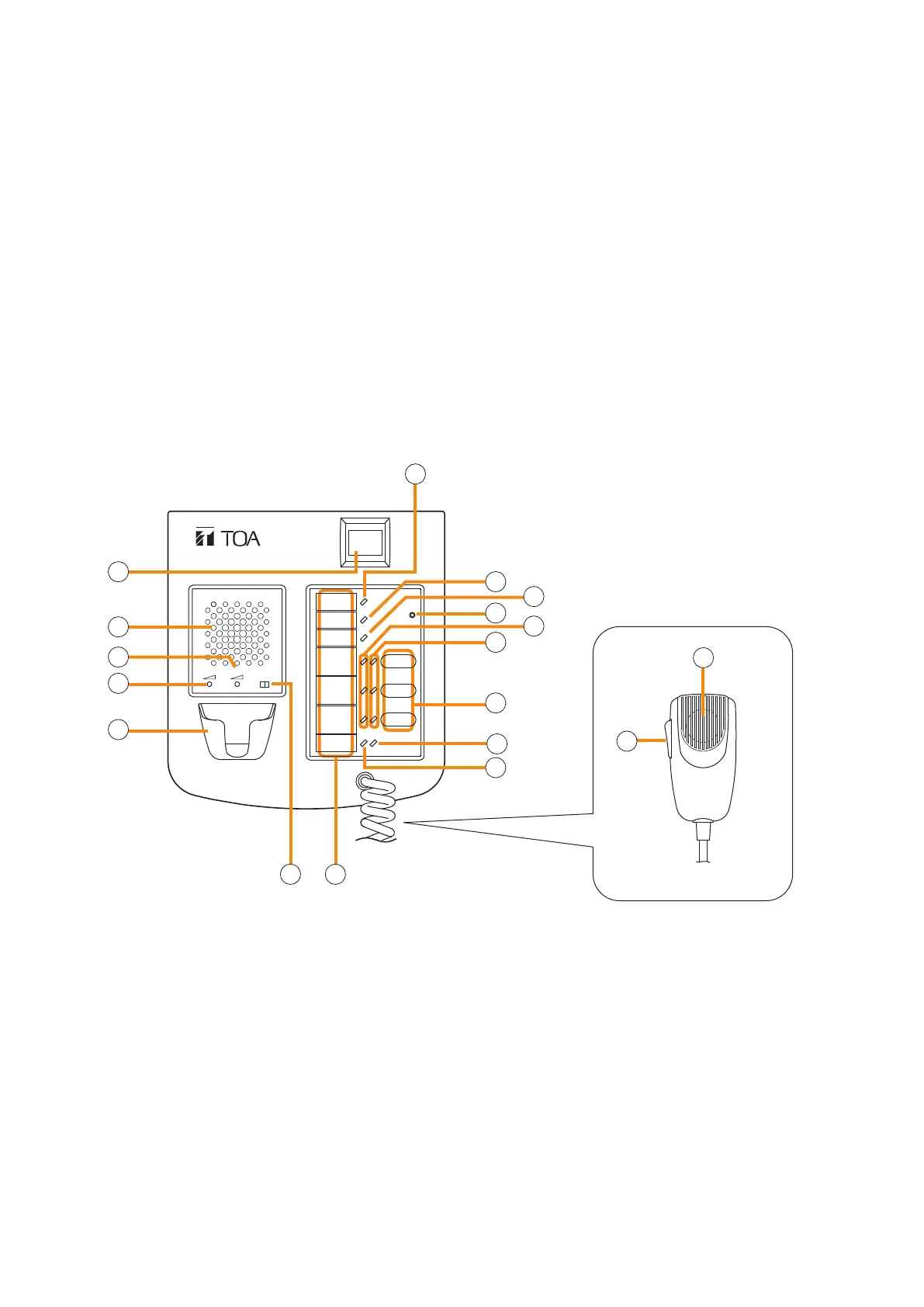
[Front]
1. Power indicator (Green)
Lights when the power is turned on.
2. Emergency key
Assign emergency activation function to this key
using the VX-3000 Setting Software.
Lights when the VX-3000F is in an emergency
condition.
3.Monitorspeaker
Used to monitor current broadcasts.
4.Monitorspeakervolumecontrol
Adjusts the volume of the built-in Monitor speaker
(3).
5.Microphonevolumecontrol
Adjusts the input sensitivity of the Hand-held
Microphone.
6. Microphone hanger
Used to hold the unit's Hand-held Microphone.
7.CPUswitch
Normally set to ON. (Factory-preset: ON)
Setting this switch to OFF in combination with the
DIP switch setting on the bottom surface allows
the all-zone emergency broadcast to be made
using a hand-held microphone by way of analog
transmission not via the CPU control.
FIREMAN'S MICROPHONE
RM-200SF
MIC SP CPU
OFF ON
1
2
3
4
5
6
7 8
9
10
11
12
13
14
15
16
17
[Hand-held microphone]
18



 To Next Page