EasyManua.ls Logo

Toastmaster 1186 - Programming The Delay Timer (Bread or Dough); Baking Control (Bread)

Toastmaster 1186
63 pages
Print Icon
To Next Page IconTo Next Page
To Previous Page IconTo Previous Page
Loading...
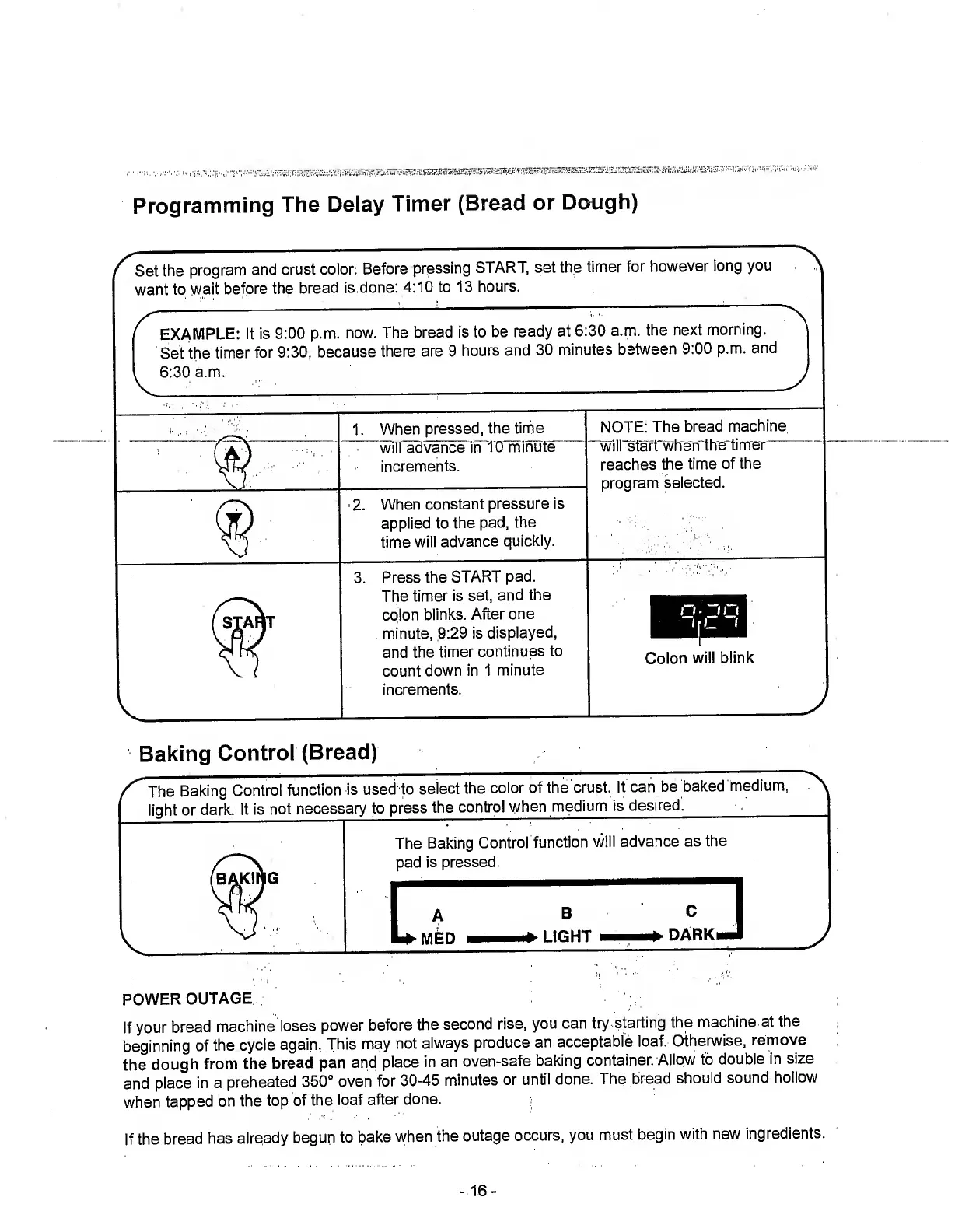
Programming
The
Delay
Timer
(Bread
or
Dough)
Set
the
program
and
crust
color.
Before
pressing
START,
set
the
timer
for
however
long
you
want
to
wait
before
the
bread
is
done:
4:10
to
13
hours.
r
EXAMPLE:
It
is
9:00
p.m.
now.
The
bread
is
to
be
ready
at
6:30
a.m.
the
next
morning.
Set
the
timer
for
9:30,
because
there
are
9
hours
and
30
minutes
between
9:00
p.m.
and
6:30
a.m.
1.
When
pressed,
the
time
~
will
advance
in
TO
minute
increments.
2.
When
constant
pressure
is
applied
to
the
pad,
the
time
will
advance
quickly.
3.
Press
the
START
pad.
The
timer
is
set,
and
the
colon
blinks.
After
one
minute,
9:29
is
displayed,
and
the
timer
continues
to
count
down
in
1
minute
increments.
NOTE:
The
bread
machine
wiirsfarfwhen
the
timer
reaches
the
time
of
the
program
selected.
Colon
will
blink
Baking
Control
(Bread)
The
Baking
Control
function
is
used
to
select
the
color
of
the
crust,
it
can
be
baked
medium,
light
or
dark,
it
is
not
necessary
to
press
the
control
when
medium
is
desired.__
BAKING
The
Baking
Control
function
will
advance
as
the
pad
is
pressed.
B
LIGHT
C
DARK.
POWER
OUTAGE
If
your
bread
machine
loses
power
before
the
second
rise,
you
can
try
starting
the
machine
at
the
beginning
of
the
cycle
again.
This
may
not
always
produce
an
acceptable
loaf.
Otherwise,
remove
the
dough
from
the
bread
pan
and
place
in
an
oven-safe
baking
container.
Allow
to
double
in
size
and
place
in
a
preheated
350°
oven
for
30-45
minutes
or
until
done.
The
bread
should
sound
hollow
when
tapped
on
the
top
of
the
loaf
after
done.
If
the
bread
has
already
begun
to
bake
when
the
outage
occurs,
you
must
begin
with
new
ingredients.
-
16
-

Related product manuals