EasyManua.ls Logo

Toastmaster 1186 - Control Panel

Toastmaster 1186
63 pages
Print Icon
To Next Page IconTo Next Page
To Previous Page IconTo Previous Page
Loading...
Control
Panel
—
Model
1186
shown
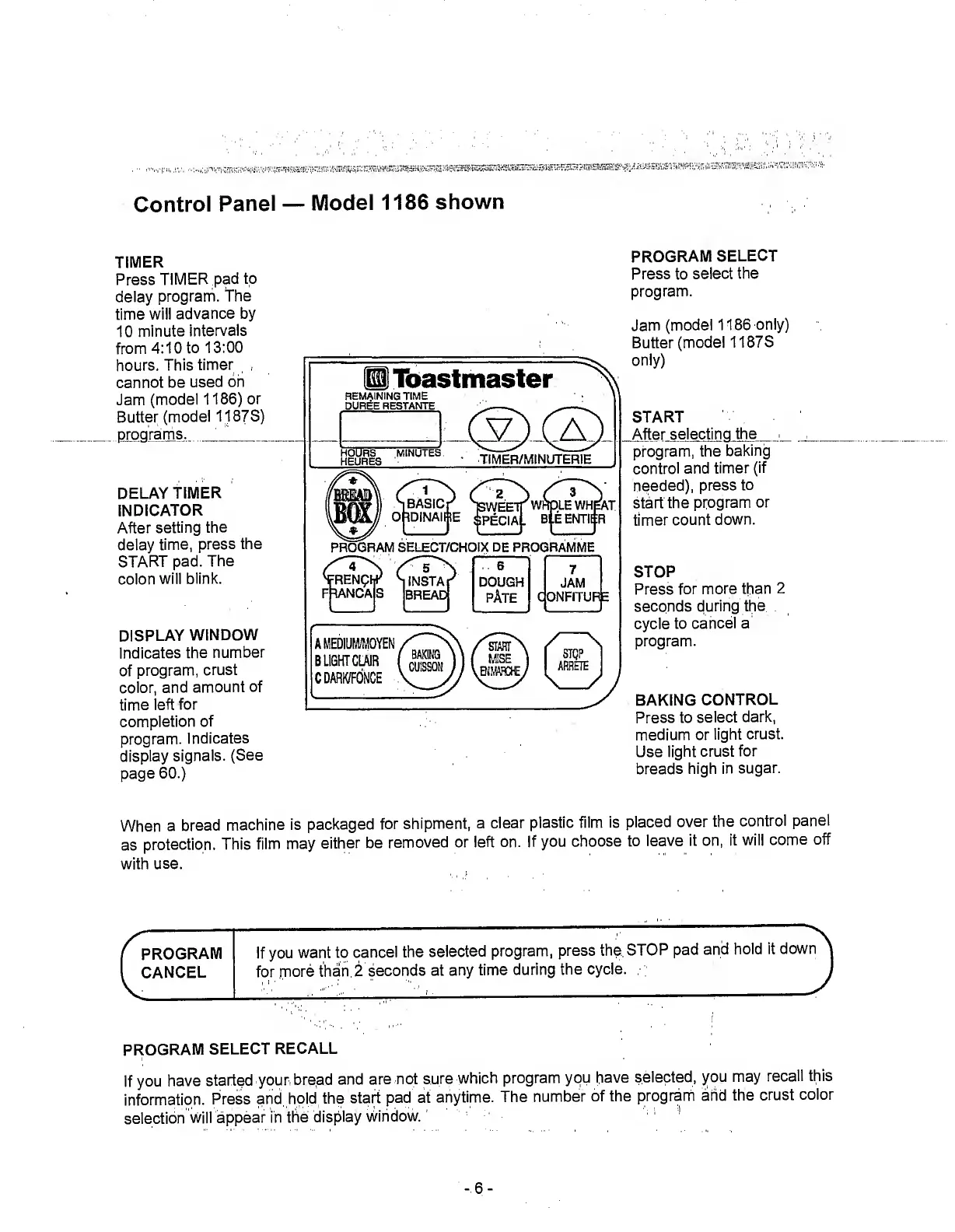
TIMER
Press
TIMER
pad
to
delay
program,
the
time
will
advance
by
10
minute
intervals
from
4:10
to
13:00
hours.
This
timer
cannot
be
used
on
Jam
(model
1186)
or
Butter
(model
1187S)
program
s.
_
DELAY
TIMER
INDICATOR
After
setting
the
delay
time,
press
the
START
pad.
The
colon
will
blink.
DISPLAY
WINDOW
Indicates
the
number
of
program,
crust
color,
and
amount
of
time
left
for
completion
of
program.
Indicates
display
signals.
(See
page
60.)
PROGRAM
SELECT
Press
to
select
the
program.
Jam
(model
1186
only)
Butter
(model
1187S
only)
START
Af
te
r
selecting
the
program,
the
baking
control
and
timer
(if
needed),
press
to
start
the
program
or
timer
count
down.
STOP
Press
for
more
than
2
seconds
during
the
cycle
to
cancel
a
program.
BAKING
CONTROL
Press
to
select
dark,
medium
or
light
crust.
Use
light
crust
for
breads
high
in
sugar.
When
a
bread
machine
is
packaged
for
shipment,
a
clear
plastic
film
is
placed
over
the
control
panel
as
protection.
This
film
may
either
be
removed
or
left
on.
If
you
choose
to
leave
it
on,
it
will
come
off
with
use.
PROGRAM
If
you
want
to
cancel
the
selected
program,
press
the
STOP
pad
and
hold
it
down
CANCEL
for
more
than
2
seconds
at
any
time
during
the
cycle.
PROGRAM
SELECT
RECALL
If
you
have
started
your
bread
and
are
not
sure
which
program
you
have
selected,
you
may
recall
this
information.
Press
and
hold
the
start
pad
at
anytime.
The
number
of
the
program
and
the
crust
color
selection
will
appear
in
the
display
window.
-
6
-

Related product manuals