55
c) Changing the soldering tip of the soldering iron
Attention, risk of burns! Switch off the 4-in-1 rework station before changing the soldering tip and let the
soldering iron cool down completely.
Throughout the warm-up and cool-down process, it may be that the soldering tips are hard to release.
However, do not use force, as this may damage the soldering iron and void the warranty/guarantee!
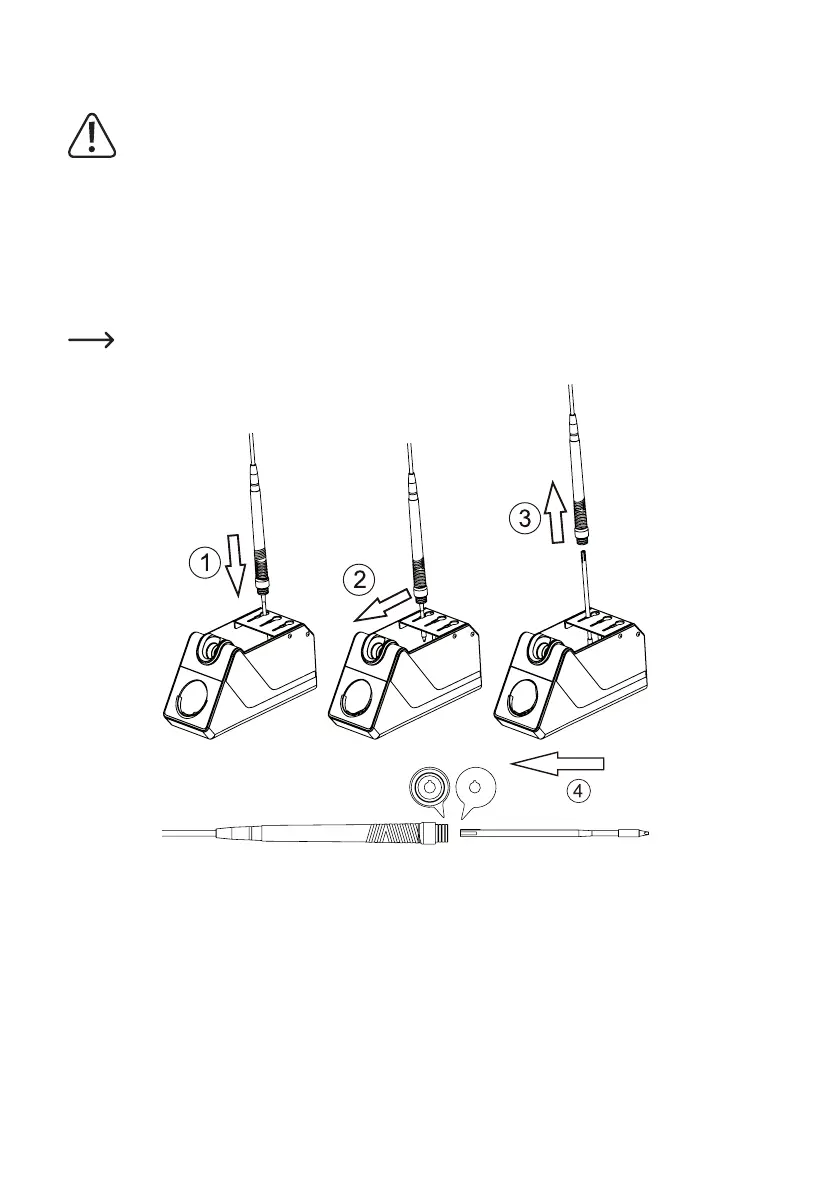
• Insert the tip of the soldering iron as shown in (1) in one of the openings of the holder.
• Slide the soldering tip forwards in the opening (2).
• Pull out the soldering iron upwards (3), so that the soldering tip remains in the holder.
• Then slide a new tip as far as it will go in the soldering iron (4).
Thesolderingtiponlytsintothesolderingironifcorrectlyaligned.
• The soldering iron is now ready for use again.



 To Next Page