1.2 Controlling The Digital Receiver 3
1.2.2 Remote Control
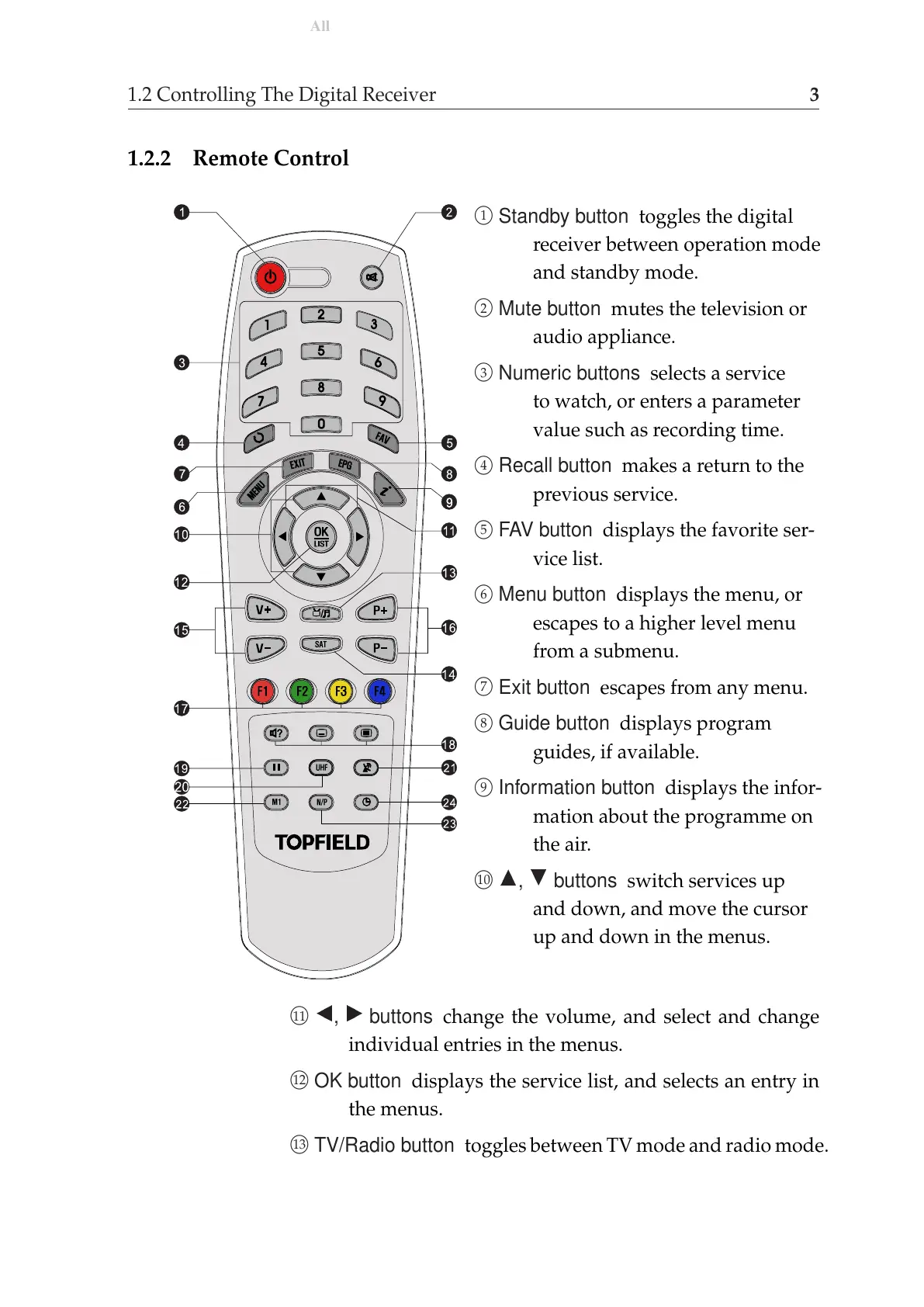
1
Standby button toggles the digital
receiver between operation mode
and standby mode.
2
Mute button mutes the television or
audio appliance.
3
Numeric buttons selects a service
to watch, or enters a parameter
value such as recording time.
4
Recall button makes a return to the
previous service.
5
FAV button displays the favorite ser-
vice list.
6
Menu button displays the menu, or
escapes to a higher level menu
from a submenu.
7
Exit button escapes from any menu.
8
Guide button displays program
guides, if available.
9
Information button displays the infor-
mation about the programme on
the air.
10
a
,
c
buttons switch services up
and down, and move the cursor
up and down in the menus.
11
b
,
d
buttons change the volume, and select and change
individual entries in the menus.
12
OK button displays the service list, and selects an entry in
the menus.
13
TV/Radio button toggles between TV mode and radio mode.











 To Next Page