10
BATTERY TROUBLESHOOTING
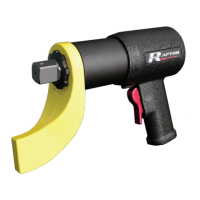
If the VOLTA Series Torque Wrench switches o automatically, the electronics have
activated automatic protection mode. A warning signal sounds (continuous beeping). The
beeping stops after a maximum of 30 seconds or when the trigger is released. In spite
of this protective function, overloading is still possible with certain applications and can
result in damage to the tool.
Causes and Remedies:
1. Battery almost empty: The electronics protect the battery pack against damage
through total discharge). If one LED is ashing, the battery pack is almost depleted. If
necessary, press the button and check the LEDs to see the charge level. If the battery
pack is almost depleted, it must be recharged.
2. Long continuous overloading of the machine: This will activate the temperature cut-
out. Leave the tool or battery pack to cool. Note: If the battery pack feels very warm, the
pack will cool more quickly in an “AIR COOLED” charger. Note: The tool will cool more
quickly if you operate it at idling speed.
3. Safety Shutdown: The tool was SWITCHED OFF automatically. If the slew rate of the
current is too high (for example, if the tool suddenly seizes or kickback occurs), the tool
switches o. Switch o the tool at the trigger. Switch it on again and continue to work as
normal. Try to prevent the tool from seizing.
Note: The LED lamp switches o automatically after a specic time. To activate the
electronic functions, press the trigger.


 To Next Page