EasyManua.ls Logo

Toshiba 19LV506 - User Manual

Toshiba 19LV506
80 pages
Print Icon
To Next Page IconTo Next Page
Loading...
TOSHIBA
CtJlDOLBVI
DIGITAL
HOml'·
'UiiJ""·';'
HIGH·DEFINITION
MULTIMEDIA
INTERFACE
~
........
.:::
~U~
Digital
Out
~
VI
DEO
[Q]D~@
(DIGITAL
VIDEO)
dl
O
OCR~
r;::
2l
II
lill
CJU!J
~I~
Introduction ,
DIGITAL
AUDIO
- -
COOOO''''''11
19j22-inch* Diagonal
LCD
TVjDVD
COMBINATION
19LV505
19LV506
22LV505
22LV506
OWNER'S MANUAL
B"",~"pil
TV
""",,~,
II
B.o,
pl.,..",
II
Ad",,,,,
pl.,.".
II
F"""~,
....p
iii
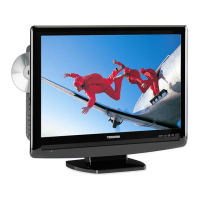
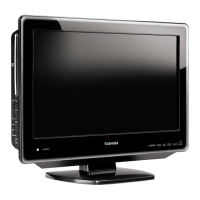
Illustration of 19LV505
©2008 Toshiba Corporation
Before operating the unit, please read this manual thoroughly.
'Screen size is approximate.
Owner's Record
The model number and serial number
are on the back of your TV/DVD.
Record these numbers
in
the spaces
below. Refer to these numbers
whenever you communicate with your
Toshiba dealer about this TV/DVD.
Model number: _
Serial number: _

Other manuals for Toshiba 19LV506

Questions and Answers

  • Z
    zlongSep 3, 2025
    Why does the picture wobble or drift on my Toshiba 19LV506?
    • D
      Derek SnyderSep 4, 2025
      If the picture on your Toshiba TV DVD Combo wobbles or drifts, the station or Cable TV may have problems, so try another station. Make sure the channels are set into memory. It's possible that the Cable TV company is scrambling the signal. Check the antenna or Cable TV connections, and reorient the antenna.
  • C
    cody53Sep 18, 2025
    Why angle cannot be changed on Toshiba TV DVD Combo?
    • L
      Larry CopelandSep 18, 2025
      If the angle cannot be changed on your Toshiba TV DVD Combo, it may be because multi-angles are not recorded on the DVD disc.
  • S
    Samuel CannonSep 16, 2025
    How to display subtitles on Toshiba 19LV506 TV DVD Combo?
    • J
      John RussellSep 16, 2025
      If there are no subtitles appearing on your Toshiba TV DVD Combo, it may be that some discs have no subtitles. If subtitles are cleared, press the SUBTITLE button on your remote.
  • B
    Bonnie CooleySep 14, 2025
    Why can't I change the audio soundtrack and/or subtitle language on my Toshiba TV DVD Combo?
    • Y
      yrodriguezSep 14, 2025
      If you cannot change the audio soundtrack and/or subtitle language when you playback a DVD on your Toshiba TV DVD Combo, it may be because a multilingual language is not recorded on the DVD disc.
  • B
    Barbara GoodwinSep 12, 2025
    How to change the display language on Toshiba TV DVD Combo?
    • P
      patriciafernandezSep 12, 2025
      To change the display language on your Toshiba TV DVD Combo, select the proper language in the menu options.
  • A
    Adam MorganSep 12, 2025
    How to turn on the on-screen display on Toshiba TV DVD Combo?
    • W
      William ClarkeSep 12, 2025
      To turn on the on-screen display on your Toshiba TV DVD Combo, set the Display to On.
  • T
    Tommy ChurchSep 9, 2025
    How to fix no reception above channel 13 on Toshiba 19LV506 TV DVD Combo?
    • C
      Curtis JamesSep 9, 2025
      If you're not getting any reception above channel 13 on your Toshiba TV DVD Combo, ensure the Air/Cable selection is in the appropriate position. If you're using an antenna, check the UHF antenna connections.
  • D
    Dominic GrantSep 7, 2025
    What causes horizontal or diagonal bars on the screen of my Toshiba 19LV506 TV DVD Combo?
    • T
      tiffany19Sep 7, 2025
      Horizontal or diagonal bars on the screen of your Toshiba TV DVD Combo might be caused by the following: * Check antenna or Cable TV connections, reorient antenna. * Check for sources of possible interference.
  • P
    Paul RiceSep 5, 2025
    How to fix no CATV reception on Toshiba 19LV506 TV DVD Combo?
    • R
      Ruth MontgomerySep 5, 2025
      If you're experiencing no CATV reception on your Toshiba TV DVD Combo, check all Cable TV connections. Set the Air/Cable selection to the Cable position. The station or Cable TV system may have problems, so try another station.
  • M
    Mr. Marvin Cline DDSAug 20, 2025
    What to do if the Toshiba TV DVD Combo remote control does not function?
    • M
      margaret23Aug 20, 2025
      If the remote control for your Toshiba TV DVD Combo is not working, try the following: * Aim the remote control directly at the remote sensor. * Operate the remote within approximately 5 meters or reduce the amount of light in the room. * Ensure there are no obstacles blocking the path of the beam between the remote and the sensor. * Replace the batteries, as they may be weak. * Check that the batteries are inserted correctly.

Summary

Introduction

Safety Precautions

General warnings to reduce risk of fire, electric shock, and ensure safe operation.

Child Safety Guidelines

Tips for safely using flat panel displays to prevent injury to children.

Safety Instructions

Important Safety Instructions

Essential guidelines for safe product use, handling, and installation.

Installation, Care, and Service

Installation Procedures

Recommendations and precautions for setting up the TV/DVD unit.

Care and Maintenance

Recommendations for cleaning the unit and precautions for continued use.

Precautions

Location and Handling Notes

Guidelines for choosing placement, handling the LCD panel, and general notes.

Disc Handling and Storage

Instructions on how to handle, clean, store, and understand disc contents.

Disc Playback Information

Playable Disc Types

Lists all supported disc formats including DVD, CD, and DivX.

Component Identification

Front and Side Panel Controls

Identifies buttons and indicators on the front and side of the unit.

Rear Panel Connections

Details all input and output jacks located on the rear of the unit.

Remote Control Functions

Explains the function of each button on the remote control.

Connections

Antenna and Cable TV Connections

Guides for connecting antennas and cable TV services.

Connecting External Devices

How to connect VCRs, camcorders, and game consoles using A/V inputs.

Digital Audio Input and HDMI;DVI Connections

Connecting digital audio sources and HDMI/DVI devices.

Basic Setup

Automatic Setup Procedure

Step-by-step guide for initial automatic installation and channel tuning.

Channel Management and Tuning

Setting channel memory, selecting Air/Cable, and performing automatic channel search.

TV Operation

Basic TV Viewing Controls

How to turn on the TV, adjust volume, and select channels.

Picture Preference and Settings

Selecting picture modes (Sports, Movie, etc.) and adjusting brightness, contrast, etc.

V-Chip and Parental Controls

Procedures to register, change V-Chip password, and set content restrictions.

Basic Playback

Playing a Disc

Step-by-step guide to loading and starting playback of discs.

Playback Speed and Navigation

Controls for fast forward/reverse, frame-by-frame, slow-motion, and chapter/track search.

Advanced Playback

Zooming and Scene Location

Features for magnifying the image and navigating to specific points on a disc.

Multimedia File Playback

Information on playing MP3, WMA, JPEG, DivX, and Audio CDs.

DivX Playback and VOD Content

Playing DivX video files and managing DivX Video-on-Demand content.

Function Setup

Customizing Function Settings

Steps to access and change DVD playback and display settings.

Parental Control and DivX VOD

Setting parental controls and registering for DivX Video-on-Demand service.

Troubleshooting

Common TV Symptoms and Solutions

A guide to diagnosing and resolving common TV reception and operation problems.

DVD Playback and Remote Troubleshooting

Troubleshooting common issues with DVD playback and remote control functionality.

Specifications

Limited United States Warranty

Obtaining Warranty Service

Toshiba 19LV506 Specifications

General IconGeneral
Screen Size19 inches
Display TechnologyLCD
Aspect Ratio16:9
Refresh Rate60 Hz
Built-in DVD PlayerYes
HDMI Ports1
Component Video Input1
Composite Video Input1
TV TunerATSC/NTSC
VGAYes
Sound OutputStereo
Resolution1366 x 768 (WXGA)

Related product manuals