7
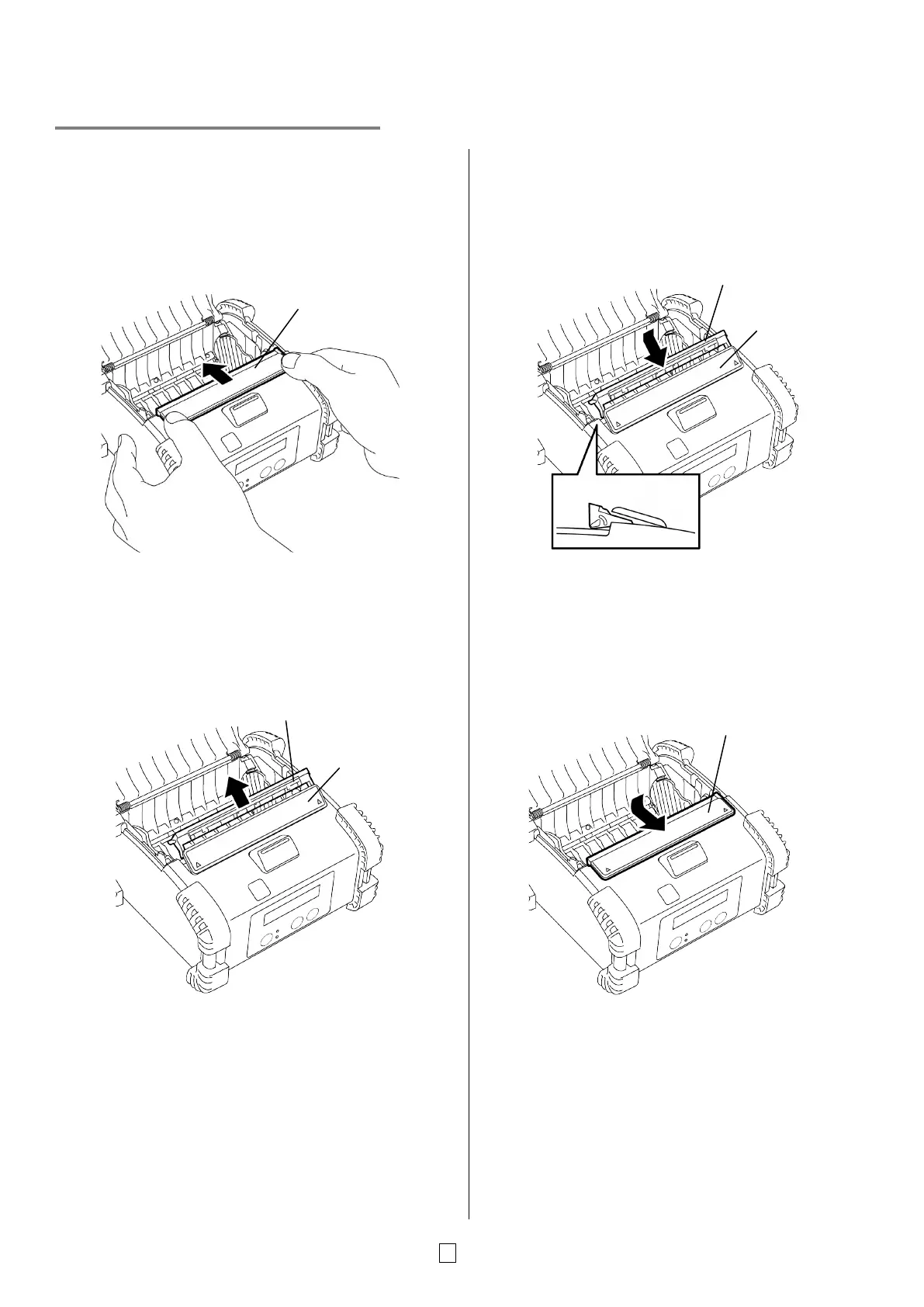
Before using a Peel-off Unit
When issuing labels in the peel-off mode, pull out the
peel-off roller before loading a label roll.
1. Open the top cover, and push the peel-off roller
cover by the ▲ marks with your thumbs in the
direction of the arrow.
2. Pull out the peel-off roller until both edges
completely come out with a click
Refer to “Loading the Media” on the previous page
and set a label roll.
NOTES:
1. DO NOT PULL the center of the peel-off roller
strongly. Doing so may break the peel-off roller.
2. Do not forcibly pull out the peel-off roller or push it
into the printer, otherwise the peel-off roller may
break.
How to put back the peel-off roller
1. Slightly hold down the peel-off roller cover and
insert the peel-off roller under the peel-off roller
cover.
2. Hold down the peel-off roller cover and push it into
the printer in the direction indicated by the arrow
until it clicks.
-off roller cover
-off roller cover
-off roller cover
-off roller
-off roller cover
-off roller



 To Next Page
 Loading...









