INITIAL SETTINGS
2-3
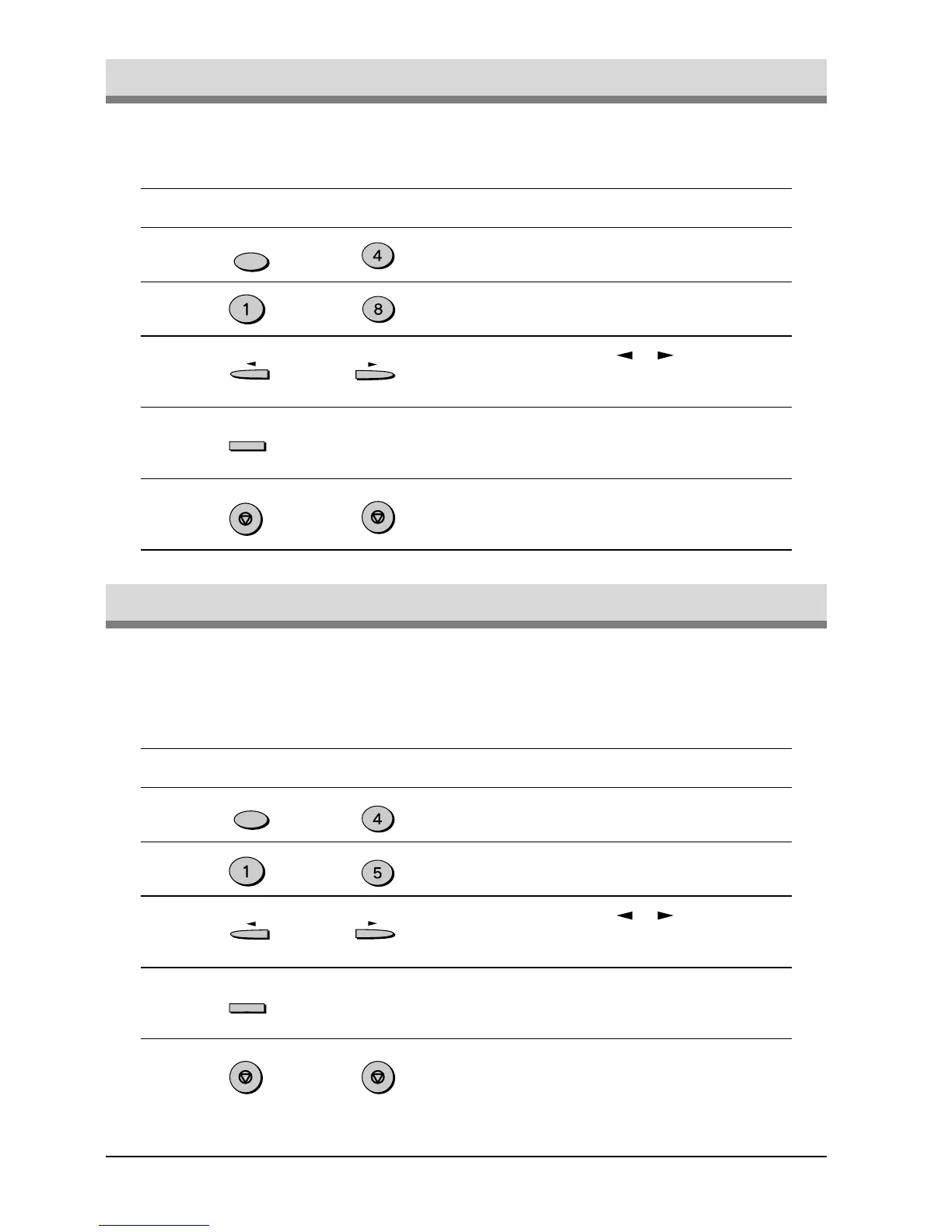
Adjust the ringing volume of the unit using the procedure below.
Factory setting: 3 (MEDIUM)
Step Press these keys Comments
1 “OPTION SETTING” will appear
in the display.
2 “RINGING VOLUME” will
appear in the display.
3 Press the or key to lower
or raise the volume to the
desired level.
4 “STORED” will appear in the
display.
5 Press the STOP key twice to
exit.
Adjusting the Ringing Volume
You can select the length in seconds of the alarm beeps following the proce-
dure below.
Factory setting: 1 (3SEC)
Step Press these keys Comments
1 “OPTION SETTING” will appear
in the display.
2 “BEEP LENGTH” will appear in
the display.
3 Press the or key to set the
alarm beeps to the desired
length or to turn them off.
4 “STORED” will appear in the
display.
5 Press the STOP key twice to
exit.
Setting the Length of Alarm Beeps
or
FUNCTION
GHI
TUV
or
ENTER
STOP
STOP
FUNCTION
GHI
JKL
ENTER
STOP STOP


 To Next Page
 Loading...






