HOME SCREEN- EQUIPMENT STATUS
DEFINITION DEPENDENCIES FUNCTION
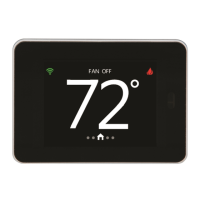
The “Equipment Status” is invoked
when the end user presses the
Equipment Status Button on the
Banner. If the Fan Icon is shown
when the equipment status location is
pressed, the “Fan Screen” will be
invoked. If the Cooling Icon or
Heating Icon is shown when the
equipment status location is pressed,
the “Mode Screen” will be invoked.
None The icon displayed in the
“Equipment Status” area of the
screen will pulse off and on if
the equipment is currently
being activated, otherwise the
icon in this area will be on
solid. Available icons for this
area designate HEAT( ),
COOL ( ) or FAN mode/
operation ( ).
6
Equipment Status



 To Next Page
