11 of 12
Enable the remote control
The remote control is RF-based. This eliminates the need to point it
directly at the jukebox when using it. It has a range of up to 200 feet
depending on the type of the obstructions between it and the jukebox.
Concrete and metal provide more of a barrier than wood or plaster. It can
also be affected by interference from other RF-based devices.
The remote control is powered by two 1.5V AAA batteries. Insert the
batteries in the compartment on the rear of the remote. Use only high-
quality alkaline batteries.
About the Carrier frequency
By default, the remote setup to communicate with Ovation II. If you need
to change it to communicate with another jukebox, do the following:
1. Press the PAUSE and F1 keys at the same time and hold them down
until the red indicator light blinks two times.
2. Enter the three-digit numeric code for the frequency you want to use.
• 027 for 27.145 MHz, which is compatible with jukeboxes that use the
old receiver/demodulator (Genesis I, II, Ovation, Rhapsody)
• 433 for 433.92 MHz for Ovation II. Default setting.
3. The red indicator light will light up for three seconds to confirm your
selection. If you enter an invalid code the light will blink five times.
1 Set the remote control ID
By default, the remote control ID is set to 000. Change it as follows:
a. Press the POWER and F4 keys at the same time and hold them
down until the red indicator light blinks two times.
b. Enter the new three-digit code to use. The new code must be in
the range 000 to 255.
c. The red indicator light will light up for three seconds to confirm
your selection. If you enter an invalid code the light will blink
five times.
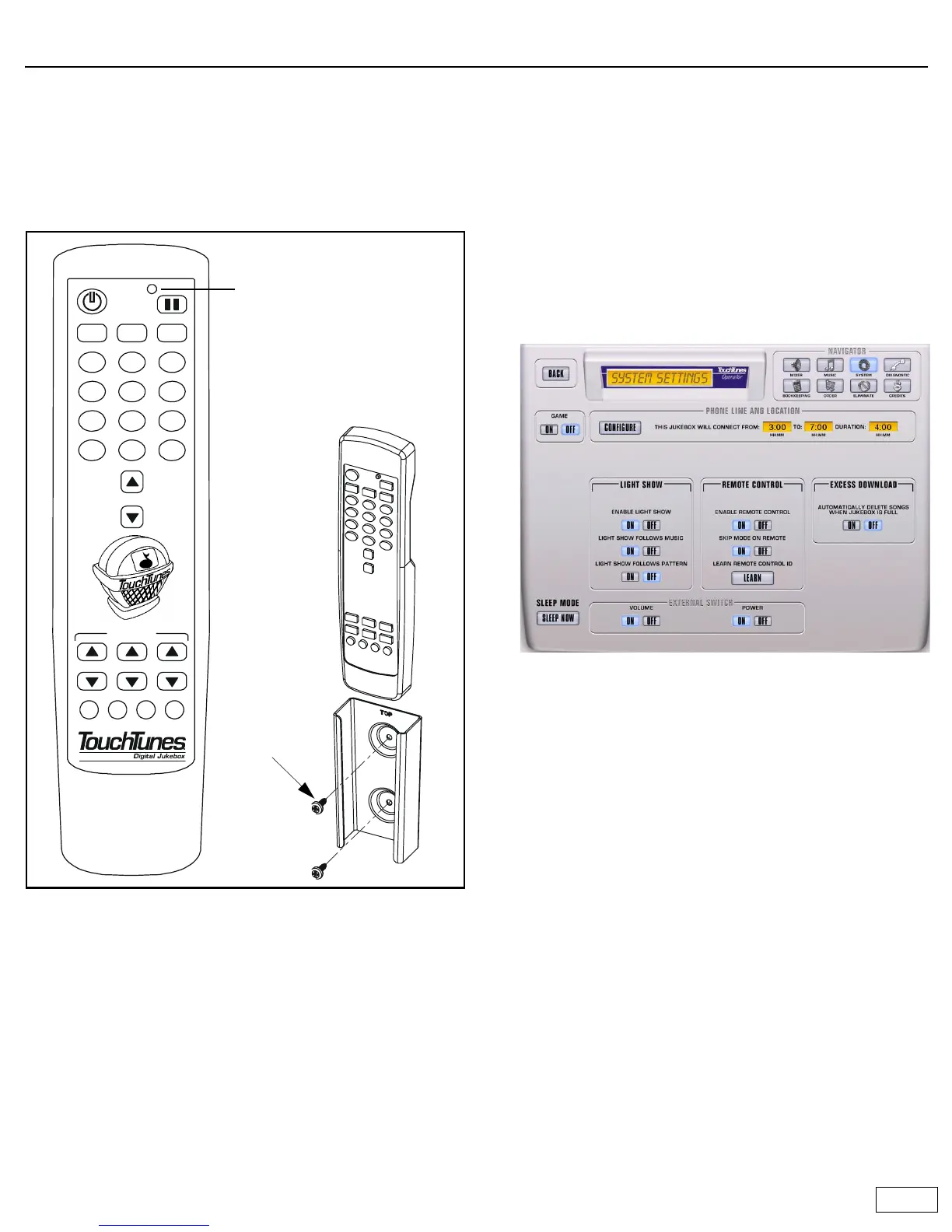
2 Open the Systems Settings screen
On the Operator menu, touch SYSTEM SETTINGS. The System
Settings screen opens:
3 Enable the remote control
a. In the REMOTE CONTROL OPTIONS box, set ENABLE REMOTE
CONTROL to ON.
b. To allow the remote control to skip a song that is playing (P3
button), turn on SKIP MODE ON REMOTE.
c. Next to LEARN REMOTE CONTROL ID, touch LEARN.
d. Watch the monitor. When prompted, press the MIKE VOLUME
UP key on the remote control. The monitor will return to the
System Settings screen.
e. Touch BACK to return to the Operator menu.
f. Test the remote by raising and lowering the jukebox volume as
it is playing.
The red indicator light
flashes when the remote
transmits or when it is being
programmed.
P1 P2 P3
F1 F2 F3 F4
13
456
2
789
*
#
0
SKIP
ZONE 1 ZONE 2 ZONE 3
VOLUME
MIC VOL
Use the mounting bracket to
installed the remote control
on a wall for
easy access.
Fasten the
bracket to the
wall with two
screws as
illustrated.
Use screw
size #6.



 To Next Page