DESTINATION INPUT AND ROUTE GUIDANCE
05 4RUNNER NAVI_U (L/O 0408)
44
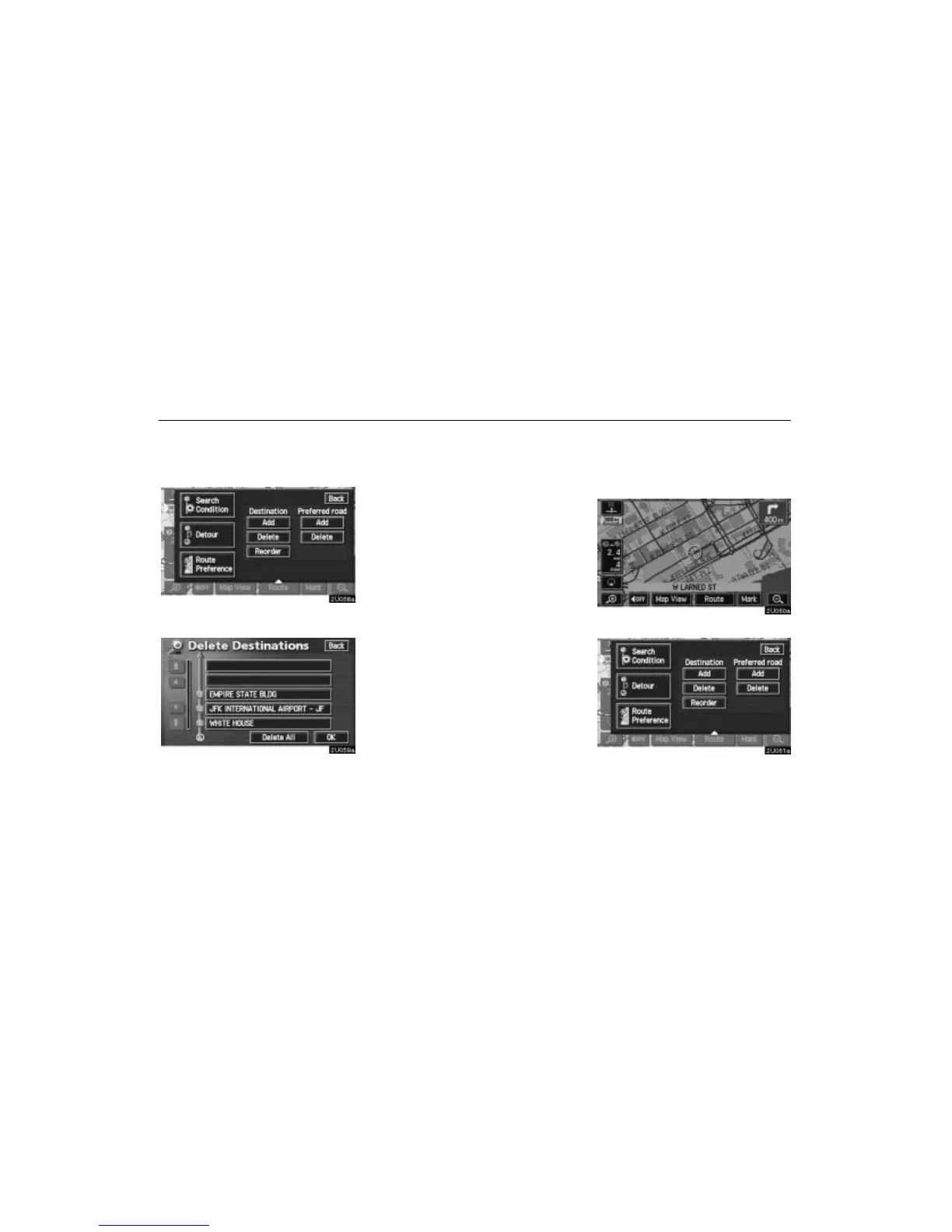
(c) Deleting destination
You can delete a set destination.
1. Touch the
“Route” switch.
2. Touch the “Delete” switch of “Des-
tination”.
3. When more than one destination is set,
a list will appear on the screen. Touch the
destination on the screen you wish to de-
lete.
“Delete All”: To delete all destinations on the
list.
4. A message appears to confirm your re-
quest to delete. To delete the destina-
tion(s), touch the
“Yes” switch.
If you touch the
“Yes” switch, the data can-
not be recovered.
If you touch the
“No” switch, the previous
screen will return.
5. If more than one destination is set,
touch the “OK” switch after deleting the
destinations. The system searches for the
guidance route again, and displays the en-
tire route.
Setting and deleting route
(a) Adding preferred road
You can add points you wish to pass
through.
1. Touch the “Route” switch.
2. Touch the “Add” switch of “Preferred
road”.





 To Next Page