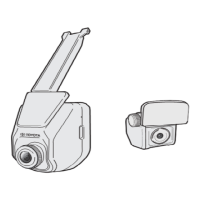
The provided document is an owner's manual for a Digital Video Recorder (DVR) designed for Toyota Avanza vehicles, specifically for models from May 2019 onwards. The DVR system includes both a front and, in some car variants, a rear camera, offering advanced driving safety features.
Function Description
The DVR's primary function is to record video while driving, providing a record of events on the road. It supports three main recording modes:
- Normal Recording: Automatically starts shortly after the vehicle engine is started. Recordings are divided into 3-minute segmented video clips and will overwrite the oldest files when the memory card is full.
- Emergency Recording: Automatically triggered by the G-sensor upon detecting events like sudden impact, high-speed driving, aggressive turns, or accidental crashes. It saves video from 3 seconds before and 17 seconds after the event, and can last up to 1 minute if the sensor is re-triggered. Users can also manually initiate emergency recording.
- Parking Mode: When enabled, the front camera enters standby mode when the vehicle is parked and the engine is off, triggering recordings only when motion is detected. Similar to emergency recording, it saves video from 3 seconds before and 17 seconds after the event, and can last up to 1 minute. The rear camera does not support motion detection in parking mode.
Beyond recording, the DVR integrates "Highway Buddy" functions to enhance driving safety:
- Lane Departure Warning System (LDWS): Uses the camera to recognize visible white/yellow lane lines. If the vehicle might depart from its lane, a warning icon appears for 3 seconds on the DVR screen, accompanied by an optional sound alert. It operates at speeds over 75 km/hour on straight roads or gentle curves, triggering when the car is too close to lane markers, crossing lines, or changing lanes.
- Forward Collision Warning System (FCWS): Uses the camera to detect vehicles ahead. If a high possibility of a frontal collision is detected, a warning icon appears for 3 seconds, urging evasive action, also with an optional sound alert.
- Driver Alert (DA): Functions like an alarm clock, allowing the driver to set alerts at 1, 2, or 3-hour intervals to remind them to take a break from driving. Visual and audio warnings are provided for 10 seconds, with any button press snoozing the alert.
The DVR also allows users to capture photos manually during recording, which are saved in a dedicated "Photo" category. This feature is only available for the front DVR.
Important Technical Specifications
- Processor: AIT 8238P
- Image Sensor: 2M Sony IMX307 CMOS
- Resolution:
- Front Camera: FHD (1920 x 1080p) or HD (1280 x 720p)
- Rear Camera: FHD (1080p)
- External Memory: Class 10 MicroSD Card (SDXC), with supported capacities ranging from 16GB to 128GB. The device comes with a 16GB memory card.
- Display: 2.0" LCD
- Field of View (FOV): 150° (Diagonal)
- Aperture Range: F/#1.8
- Exposure Value: Adjustable from -1 to +1 in increments of 0.3 (-1/-0.7/-0.3/0/0.3/0.7/+1.0)
- Automatic Recording: Yes
- Recycled Recording: Yes (oldest files are overwritten when memory is full)
- LCD Auto OFF: Options include Always ON, 30 sec, 3 min, or 5 min.
- Date / Time: HH:MM:SS YYYY/MM/DD format, settable via GPS or manually.
- Date Stamp / Time Stamp: ON/OFF
- Exposure Control: Auto
- Emergency Recording Mode: Yes
- G-Sensor: 3 Axis, with adjustable sensitivity level.
Usage Features
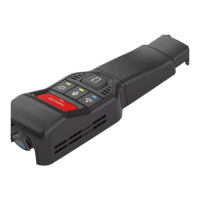
- User Interface: The DVR features a 2.0" LCD screen and 4 function buttons that control corresponding on-screen icons. Button functions vary depending on the screen (Home, Menu, etc.).
- Memory Card Management: Users can install and remove MicroSD cards (Class 10, 16GB-128GB). The device prompts for memory card formatting upon installation. Formatting deletes all existing files, so backing up is recommended.
- File Playback: Recorded videos (Normal, Emergency, Parking) and photos can be played back directly on the DVR. Videos recorded with a rear camera have a "D" icon and allow switching between front and rear views during playback.
- Customization:
- Video Recording Settings: Adjust video resolution (FHD/HD), exposure value (separately for front/rear cameras if applicable), G-sensor sensitivity, and information stamps (Coordinates, G-Sensor, or Hide all).
- System Settings: Set date/time (GPS or manual), configure LCD Auto OFF timer, restore factory defaults, and view software information.
- Highway Buddy Settings: Enable/disable LDWS and FCWS, and their respective sound alerts. Set Driver Alert timing.
Maintenance Features
- Memory Card Formatting: The manual advises formatting the memory card using the DVR at the initial stage and before proceeding with formatting to back up files.
- Calibration: Users are explicitly warned not to manually adjust the calibrated device. Any calibration requirements should be handled by a local Toyota Service Center.
- DVR Removal: Users are advised not to attempt removal of the DVR unit from the windscreen themselves. Removal or calibration should be performed by a local Toyota Service Center.
- General Operation: The manual emphasizes safe driving practices, advising against operating the DVR while driving and minimizing screen viewing time. It also states that the DVR is not a replacement for driver attentiveness and responsibility.
- Limitations: The manual extensively details conditions under which LDWS and FCWS may not operate properly or accurately, including environmental factors (rain, snow, fog, shadows, bright lights), road conditions (unpaved, winding, narrow, construction zones, slopes, poor GPS signal), and vehicle behavior (skidding, wobbling, high speeds, wiper blade blockage). It also lists scenarios where FCWS might trigger even without a collision possibility (e.g., passing vehicles, uneven roads). These limitations highlight the importance of driver awareness and responsibility.

 Need help?
 General


 To Next Page