79
Chapter 12
Customize Your Network Settings
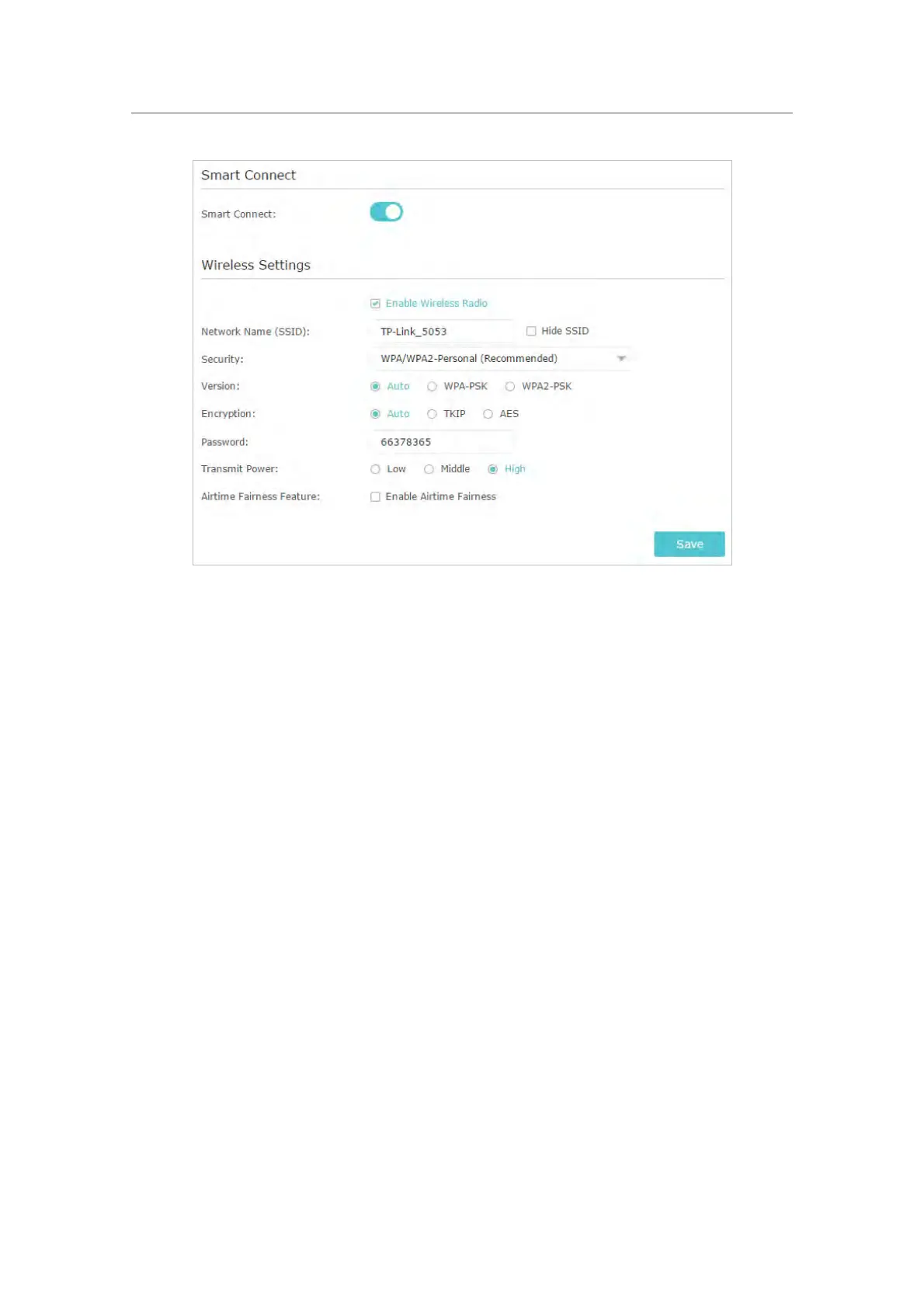
¾ To change the security option:
1. Go to Advanced > Wireless > Wireless Settings.
2.
Select the wireless network 2.4GHz or 5GHz.
3. Select an option fr
om the Security drop-down list. We recommend you don’t change
the def
ault settings unless necessary. If you select other options, configure the
related parameters according to the help page.
In addition
• Mode - Select a transmission mode according to your wireless client devices. It is
r
ecommended to just leave it as default.
• Channel Width - Select a channel width (bandwidth) for the wireless network.
• Channel - Select an operating channel for the wireless network. It is recommended
t
o leave the channel to Auto, if you are not experiencing the intermittent wireless
c
onnection issue.
• Transmit Power - Select either High, Middle or Low to specify the data transmit power.
The def
ault and recommended setting is High.
¾ T
o enable the Airtime Fairness feature
The Airtime Fairness feature can improve the overall network performace by sacrificing
a little bit of network time on your slow devices. Enable Airtime Fairness when you wish
to sacrifice some of the networking time from the slow devices, so that your faster
devices can achieve better quality of service.














 To Next Page