TD-8816 ADSL2+ Modem Router User Guide
39
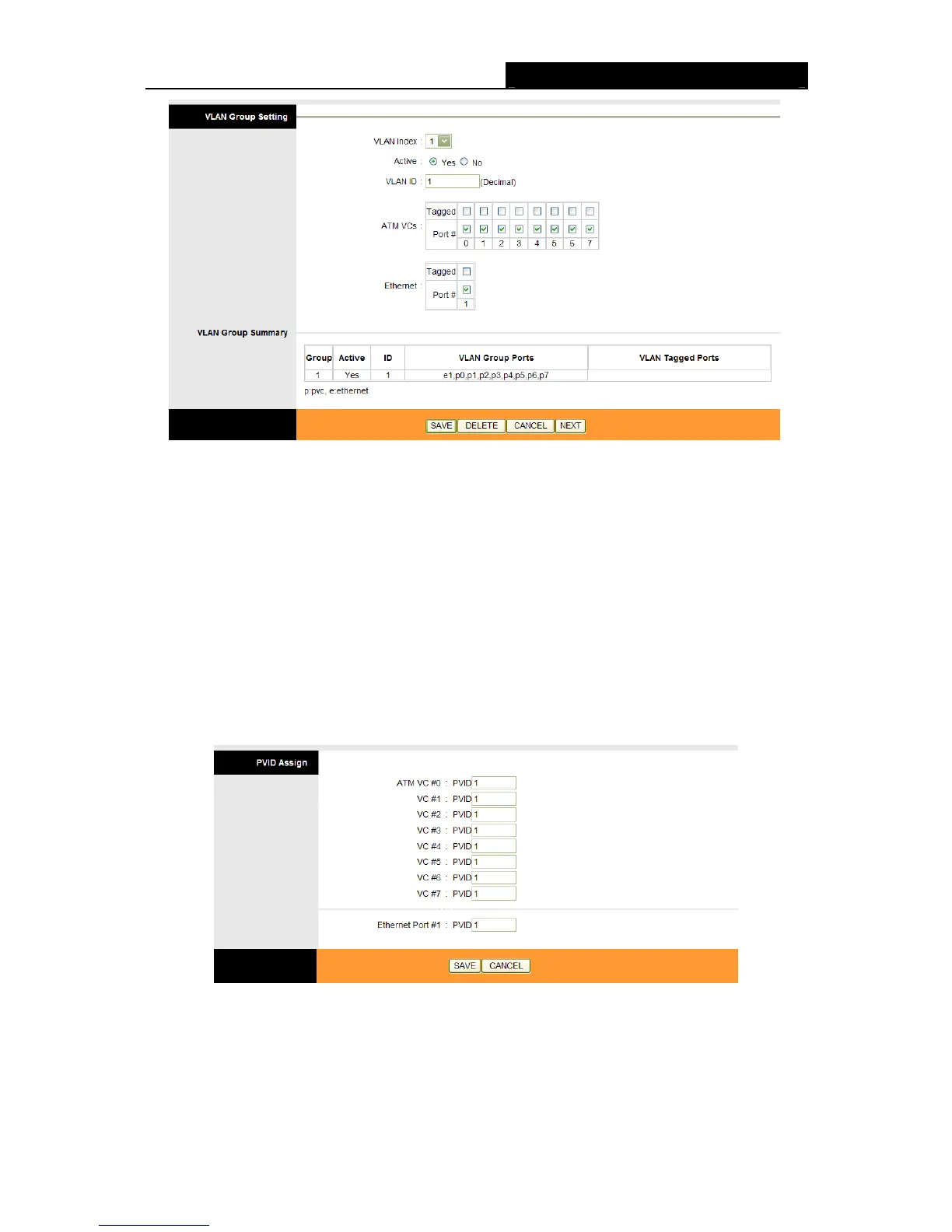
Figure 4-30
VLAN Index: Select the VLAN index for this VC. You can specify 8 groups in maximum.
VLAN ID: This indicates the VLAN group.
ATM VCs: Select the ATM VCs as members of VLAN, and if you leave the Tagged blank, the
tag in frames will be deleted when transmitted from the VC.
Ethernet: Select the Ethernet port as a member of VLAN, and if you leave the Tagged blank,
the tag in frames will be deleted when transmitted from the port.
VLAN Group Summary: This displays the information about the VLAN Groups.
6. Assign VLAN PVID for each Interface
Click Assign VLAN PVID for each Interface in Figure 4-29, you can assign the PVID for each
interface in the next screen (shown in
Figure 4-31 ).
Figure 4-31
PVID: Each physical port has a default VID called PVID (Port VID). PVID is assigned to
untagged frames or priority tagged frames (frames with null (0) VID) received on this port.



 To Next Page