TD-W8961ND 300Mbps Wireless N ADSL2+ Modem Router User Guide
48
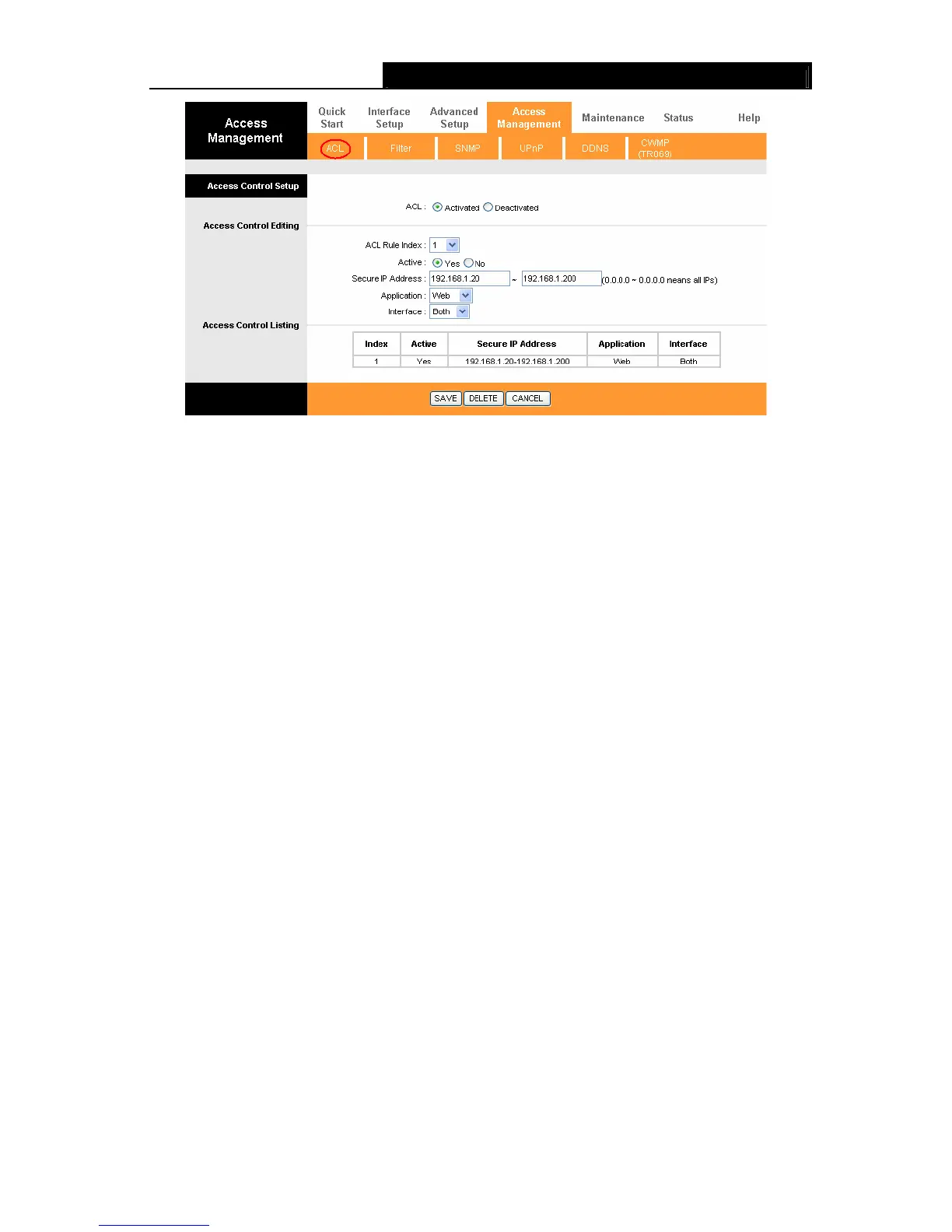
Figure 4-38
¾ ACL: If Activated, the IP addresses which are contained in the Access Control List can
access to the Router. If Deactivated, all IP addresses can access to the Router.
¾ ACL Rule Index: Select the ACL rule index for the entry.
¾ Active: Enable the ACL rule.
¾ Secure IP Address: Select the IP addresses which are permitted to access to the Router
remotely. With the default IP 0.0.0.0, any client would be allowed to remotely access the
ADSL Router.
¾ Application: Select the application for the ACL rule, and then you can access the Router
through it.
¾ Interface: Select the interface for access: LAN, WAN or Both.
¾ Access Control of Listing: This displays the information about the ACL Rules.
4.5.2 Filter
Choose “Access Management→Filter”, you can see the Filter screen (the default is IP/MAC
Filter screen shown in Figure 4-39 ). The filtering feature includes IP/MAC Filter, Application Filter,
and URL Filter. The feature makes it possible for administrators to control user's access to the
Internet, protect the networks.
4.5.2.1 IP Filter
Select IP/Mac Filter as the Filter type, and select IP as the Rule type (shown in Figure 4-39), then
you can configure the filter rules based on IP address. The filtering includes Outgoing and
Incoming, the detailed descriptions are provided below.



 To Next Page