TD-W8961ND 300Mbps Wireless N ADSL2+ Modem Router User Guide
51
)
Note:
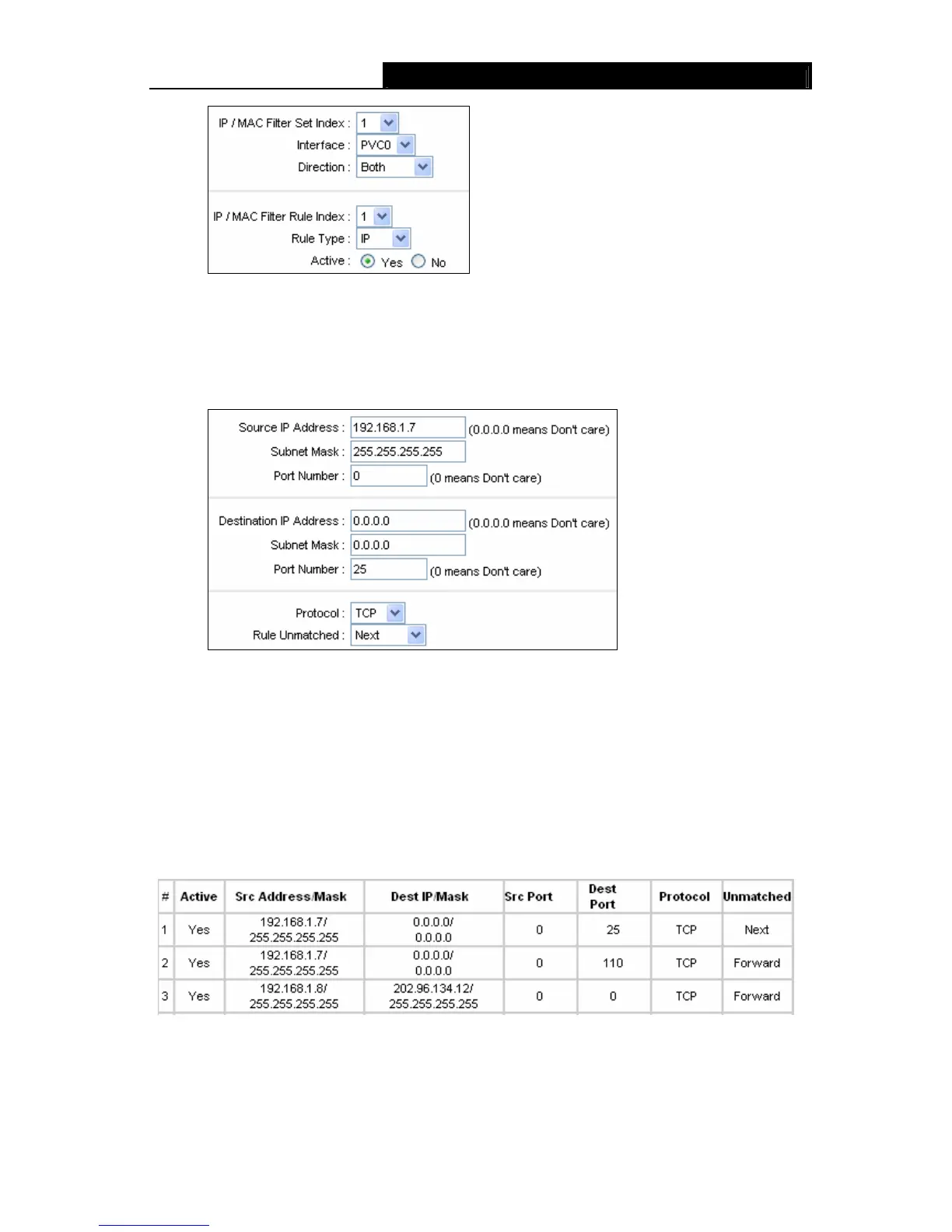
If you want to make the rule take effect, please select
Yes
to active the rule.
Step 3: Enter the “Source IP Address”, “Destination IP Address”, “Subnet Mask” and “Port
Number” in the corresponding field.
Step 4: Select the Protocol as “TCP” and select the Unmatched rule as “Next”.
Step 5: Finally, click the SAVE to save the entry.
Step 6: Go to Step 2 to configure the next two rules: Block E-mail received by the IP address
192.168.1.7 on your local network; Make the PC with IP address 192.168.1.8 unable to
visit the website of IP address 202.96.134.12.
)
Note:
After you complete the IP filter rules for the example, the Filter list will show as follows. You can
enter the IP / MAC Filter Set Index to view the information about the rule.
Other operations for the entries as shown in Figure 4-39:
Select the IP / MAC Filter Set Index and IP/MAC Filter Rule Index to view or modify the entry.
Select the IP / MAC Filter Set Index and IP/MAC Filter Rule Index to locate the specific rule,
and then click the DELETE button to delete the entry.



 To Next Page