18 BAS-SVX51L-EN
Best Practices
Device ID Assignment for Base Tracer
®
SC+s
For unit controllers installed using a Base Tracer
®
SC+, the Application Tracer
®
SC+ calculates the device
ID using the BACnet
®
network number of the Base Tracer
®
SC+ MS/TP link and the rotary switch value
of the unit controller.
The following example in Table 4 illustrates this process.
Device ID Assignment for Wireless Devices
For devices connecting over a wireless network, Tracer
®
SC+ calculates the device ID using the BACnet
®
network number and the rotary switch value of the wireless device.
The following example in Table 5 illustrates this process.
Customizing Device IDs
For complex BACnet
®
addressing schemes or prescribed job specifications, custom device IDs may be
required. You can customize the device IDs of Tracer
®
unit controllers by using the Tracer
®
TU service
tool. During the device installation process in Tracer
®
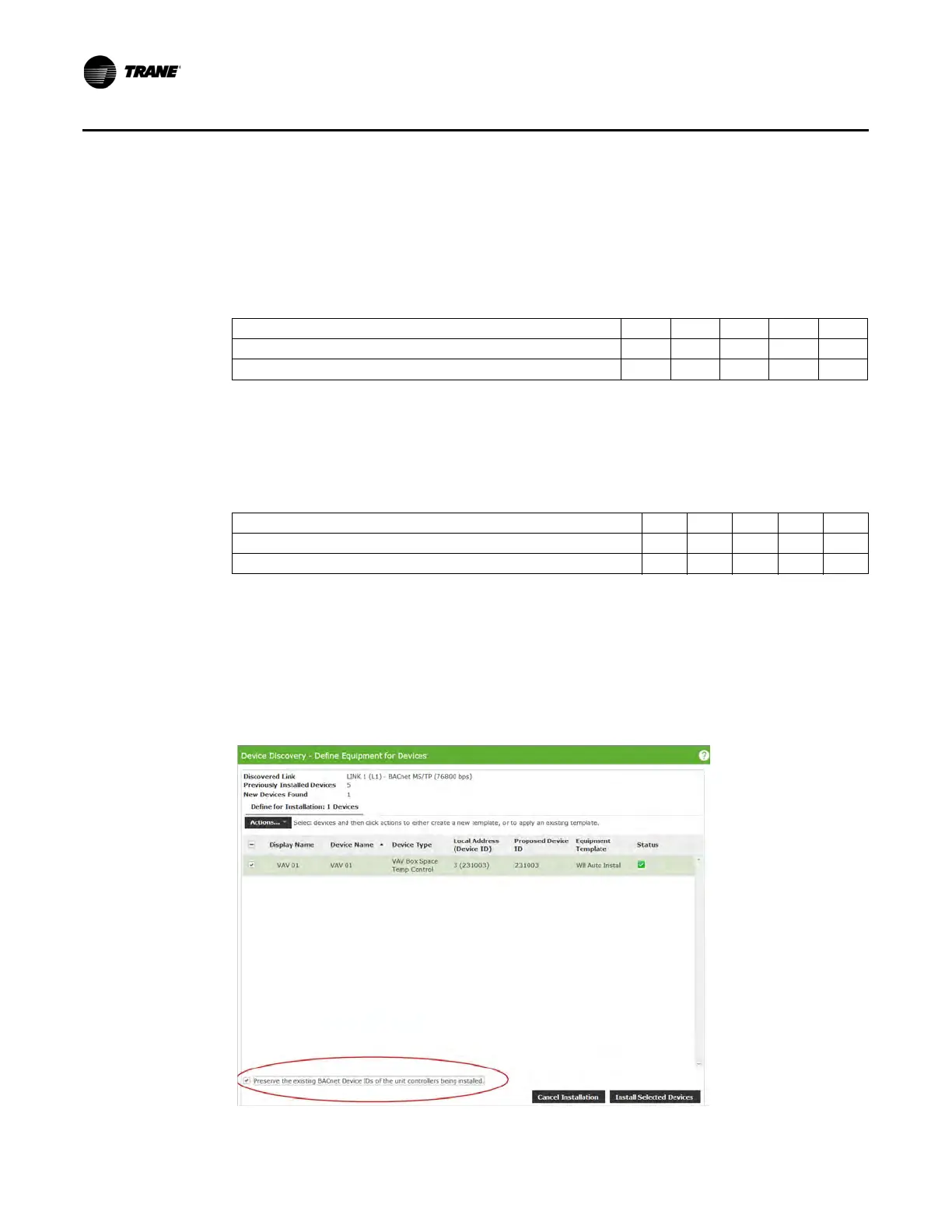
SC+, select the “Preserve the predefined BACnet
®
device ID of the unit controllers being installed” checkbox (Figure 10, p. 18). As a result, the installed
devices will retain their device IDs. This feature applies to Trane and non-Trane BACnet
®
devices.
Figure 10. Customize device IDs (Tracer
®
Synchrony device discovery page)
Table 4. Calculating the base Tracer
®
SC device ID
BACnet
®
network number of Base SC MS/TP link 1 (22) 2 2
Unit controller rotary switch value (001) 0 0 1
Unit controller device ID set by Application SC: 22001 2 2 0 0 1
Table 5. Calculating the wireless device ID
BACnet
®
network number of Tracer SC+ wireless network (13) 1 3
Wireless unit controller rotary switch value (001) 0 0 1
Wireless unit controller Device ID set by Application SC: 13001 1 3 0 0 1


 To Next Page