26 BAS-SVX51L-EN
Trane SerialSpy Protocol Analyzer Software
Tracer
®
SC+ BACnet
®
Capture Help File
The BACnet
®
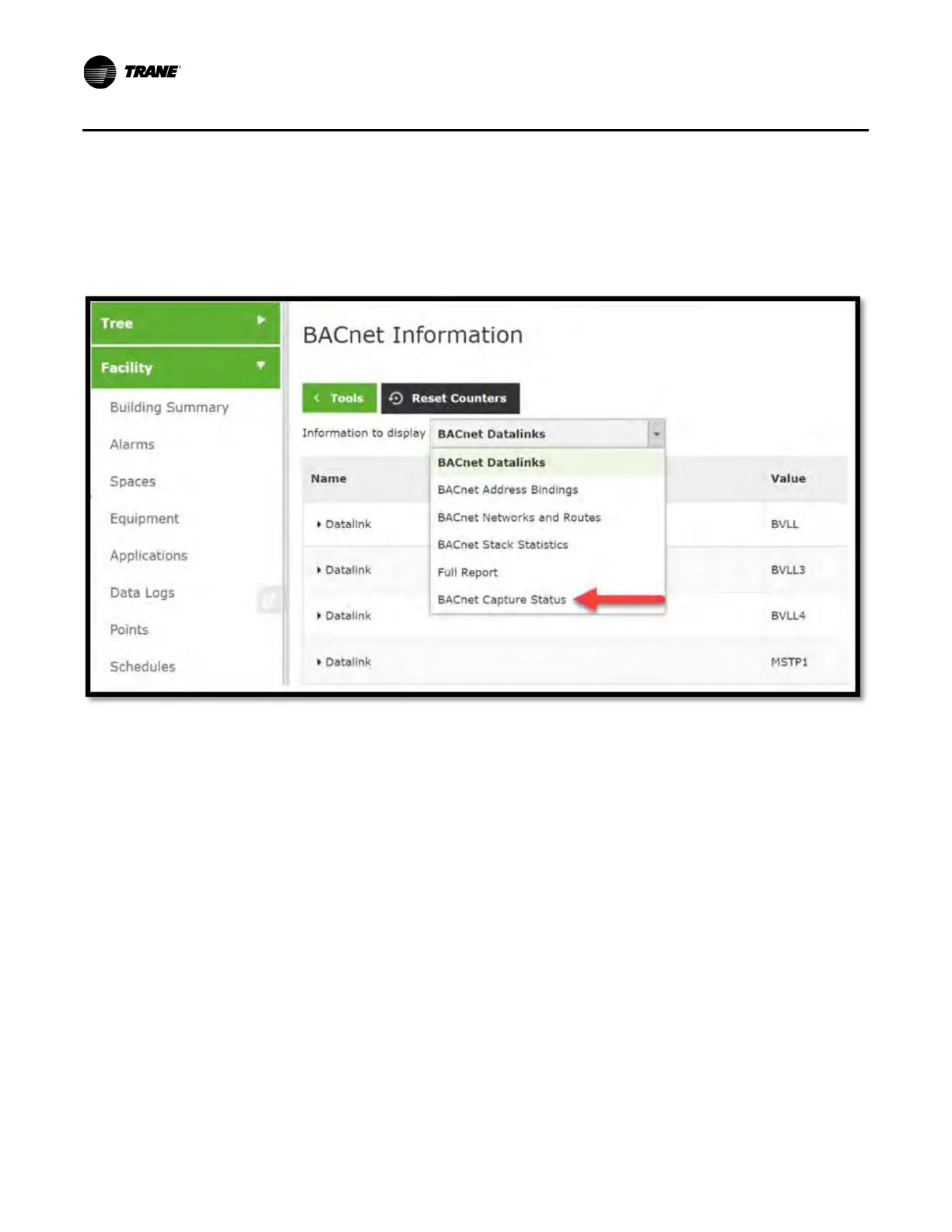
Capture Tool can be found under Tools > BACnet
®
Information. Use the drop-down menu
to select BACnet
®
Capture Status.
This page will show the status of the last capture.
Capture Status:
• Idle - The capture has not yet begun running.
• Running - The capture is currently running.
• Finished - The capture has completed; a download file is available.
• Scheduled - The capture has been scheduled to be run at a specific time.
Last Capture:
• If the status is Scheduled or Running it will show the Start time and planned capture duration.
• If the status is Idle or Finished, it will show the previous capture’s start /stop times and the size of the
capture.
Export Capture: It shows the link to system logs to view/export the file.
Figure 14. BACnet
®
information


 To Next Page