30 BAS-SVX51L-EN
Trane SerialSpy Protocol Analyzer Software
• BACnet
®
Capture Tool log files are saved as bacnetCapture.log, bacnetCapture.log.1 thru 4.
Note: Note: New data will be stored in the bacnetCapture.log file.
• Each Capture log file holds 2 MB of data, with a total max of 10 MB spread across all five log files.
Note: Captures larger than 10 MB will not include data from the beginning of the capture.
Viewing a Log File: Best practice is to Export Log File and view it with Serial Spy.
Evaluate the SerialSpy Output
Typically, there are two types of BACnet
®
link problems:
• Total failure - there is no communication on the link.
• Partial failure - there is some communication on the link, but it is impeded.
Total Communication Failure
Total communication failure can be caused by short circuits, shorts to ground, and reversed comm link
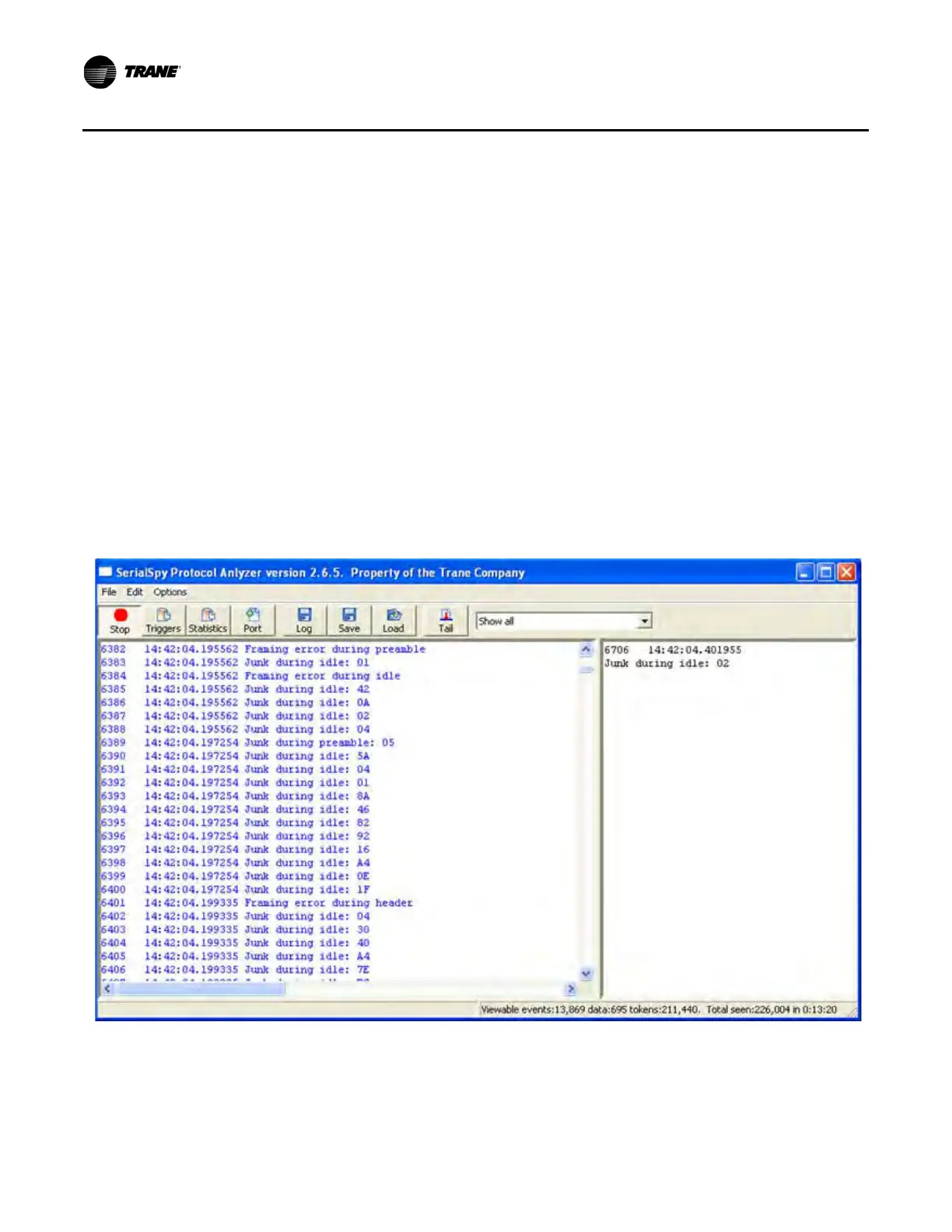
polarity. In these cases, SerialSpy shows nothing but blue diagnostic messages or no messages at all (see
Figure 20, p. 30).
Figure 20. Typical SerialSpy output when connected to a link with a short circuit, short to ground, or reversed polarity
Once you know there is a physical problem with the link, you can use two tools to help locate the problem:
• A voltmeter measuring dc volts
• The link LEDs on the Trane devices


 To Next Page