EasyManua.ls Logo

Trane XR401 - User Manual

Trane XR401
8 pages
Print Icon
To Next Page IconTo Next Page
Loading...
Installer’s Guide
XR401
ALL phases of this installation must comply with NATIONAL, STATE AND LOCAL CODES
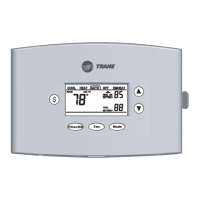
TCONT401AN21MA
2 Heat (Gas, Oil* or Elec) / 1 Cool / Heat Pump
(Factory set for 2H/1C gas applications)
Electronic Non-Programmable
3 - 9 Wire Hookup (2 for outdoor sensor)
Fan Mode
Filter/OD
$
Introduction
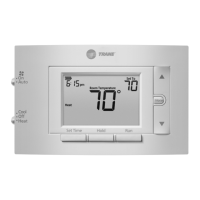
TCONT401AN21MA is a digital non-programmable 2Heat/1
Cool/Heat Pump/Heat-Cool wall mounted low voltage
(24VAC) Comfort Control with backlit LCD and keypad. It
maintains room temperature by controlling the operation of
heating, cooling and heat pump systems. The Comfort
Control is easily configured for heat pump or cooling only and
gas or electric heat applications via the user friendly In-
staller Setup menu. The Comfort Control features include
separate heating and cooling setpoints, selectable auto or
manual changeover, adjustable energy saving mode, adjust-
able filter reminder, outdoor temperature sensing, LitePort
technology for extended system diagnostics and fault notifica-
tion. Setup selections and diagnostics are stored indefinitely
in the Comfort Controls nonvolatile memory eliminating the
need for battery backup.
Safety Considerations
Read the following manufacturer instructions carefully.
Follow all local codes during installation. All wiring must
conform to local and national electrical codes. Improper
wiring or installation may damage comfort control.
Recognize safety information. This is the safety alert symbol
!
. When you see this symbol on the equipment and in the
instruction manual, be alert to the potential for personal
injury.
Understand the signal words DANGER, WARNING and
CAUTION. These words are used with the safety-alert
symbol. DANGER identifies the most serious hazards which
will result in severe personal injury or death. WARNING
signifies a hazard which could result in personal injury or
death. CAUTION is used to identify unsafe practices which
could result in minor personal injury or product and prop-
erty damage.
Note: Read the entire instruction manual before starting the
installation.
Application FIG
Heat Pump or A/C
1 Stage Heat Pump**, 1 Stage Aux Heat. Fig. 5
1 Stage Heat Pump**, 0 Stage Aux Heat. Fig. 5
1 Stage Cool, 2 Stage Heat (Gas, Electric or Oil*). Fig. 3
1 Stage Cool, 1 Stage Heat (Gas, Electric or Oil*). Fig. 4
1 Stage Cool, 0 Stage Heat. Fig. 4
0 Stage Cool, 2 Stage Heat (Gas, Electric or Oil*). Fig. 3
0 Stage Cool, 1 Stage Heat (Gas, Electric or Oil*). Fig. 4
* Requires external relay for oil furnace applications.
** External TAYPLUS103A required for dual fuel applica-
tions.
BAYSEN01ATEMPA required for outdoor temperature
sensing and display
SYSTEM MODE: Heat, Cool, Auto, Emergency Heat and Off
FAN MODE: Auto or On
Product Specifications
- Power Source: 20-30VAC, Class II, 50/60Hz.
- Cooling setpoint temperature range: 65F - 90F,
18.0C - 33.0C, 1F and 0.5C resolution.
- Heating setpoint temperature range: 40F- 85F,
5.0C - 30.0C, 1F and 0.5C resolution.
- Default set points: 68F, 20.0C Heat, 78F, 25.5C Cool
- Storage Range: -40F to 140F, 5% - 90% RH non-
condensing.
- Operating Temperature range: 32F - 110F, 5 - 90% RH
non-condensing.
- Outdoor Temperature Display Range: -40F - 140F.
- Minimum Cycle Off Time Delay: Cooling - 5 minutes,
Heating - 1 minute.
- Use minimum 18 gauge NEC approved control
wiring.
Contents
Introduction ........................................................................ 1
Application.......................................................................... 1
Product Specifications ...................................................... 1
Installation .......................................................................... 2
Mounting and Wiring .......................................................... 2
SETUP ................................................................................. 3
Checkout ............................................................................. 4
Troubleshooting ................................................................. 6
Features .............................................................................. 7
18-HD29D2-4

Questions and Answers

  • M
    Mrs. Michelle MackSep 2, 2025
    Why does my Trane XR401 show '--' for outdoor temperature and the service indicator is on?
    • J
      Joanne DrakeSep 2, 2025
      If your Trane Control Panel displays '--' for the outdoor temperature and the service indicator is solid, it indicates that the outdoor temperature sensor is either open or shorted, or the outdoor sensor field wiring is open or shorted. Replace the outdoor sensor. Check and repair the outdoor sensor field wiring.
  • J
    John CarrAug 31, 2025
    How do I stop my Trane XR401 fan from running constantly?
    • C
      charleshuntAug 31, 2025
      If the fan is running constantly on your Trane Control Panel, it could be because the fan mode is set to ON or there's a short in the control wiring. Set the fan mode to AUTO. Also, check and repair the wiring.
  • E
    Elizabeth LeeAug 29, 2025
    Why is the cooling not turning on with my Trane XR401 Control Panel?
    • K
      kristinriveraAug 29, 2025
      If the cooling isn't activating with your Trane Control Panel, verify that the System Mode is set to Cool and lower the setpoint below room temperature. If cooling does not come on within 15 minutes, contact servicer. Also, repair any loose connections to the control or system. If problems persist, the cooling system may need repair or the control may require replacement.
  • I
    Isabella MayAug 28, 2025
    What should I do if 'Cool ON' or 'Heat ON' is displayed, but there's no air coming from my Trane XR401 Control Panel?
    • M
      Michael SchmidtAug 28, 2025
      If 'Cool ON' or 'Heat ON' is displayed on your Trane Control Panel, but no warm or cool air is coming from the registers, it could be because the heating equipment turns on the fan only after warming up, or the heating/cooling equipment isn't operating. Wait one minute after 'Heat ON' is displayed and then check the registers. Also, check the Heating and Cooling system.
  • C
    Christopher WatsonAug 26, 2025
    What to do if my Trane Control Panel doesn't respond to keypad presses?
    • M
      Mark BurnsAug 27, 2025
      If your Trane Control Panel isn't responding to keypad presses, the keypad might be locked, or there could be a keypad failure. Unlock the keypad by pressing the Up and Down arrow buttons together until 'Keypad locked' disappears. If this doesn't work, the control may need to be replaced.
  • J
    jamiepetersAug 25, 2025
    How to fix Trane XR401 when temperature setting will not change?
    • C
      Christina OrtizAug 25, 2025
      If the temperature setting on your Trane Control Panel won't change, it could be due to upper or lower temperature limits being reached, or the keypad being locked. Check that your heating limits are within 40-85F and cooling limits are within 65-90F. If the keypad is locked, unlock it by pressing the Up and Down arrow buttons together until the lock icon disappears.
  • J
    James RodgersAug 22, 2025
    What to do if the heating will not come on with my Trane XR401?
    • M
      Mark ThompsonAug 22, 2025
      If the heating won't turn on with your Trane Control Panel, ensure the System Mode is set to Heat and raise the setpoint above room temperature. If heating does not come on within 5 minutes, check the heating system. Also, check and repair any loose connections to the control or system. If these steps don't work, the heating system may require service or the control may need replacement.

Summary

Introduction

Application Overview

Describes the HVAC system configurations supported by the thermostat.

Product Specifications

Lists technical details like power source, temperature ranges, and dimensions.

Installation Guide

Location Selection

Provides guidelines for mounting the thermostat and outdoor sensor.

Setup Procedures

Installer and User Setup

Explains how to enter and configure installer and user setup menus.

Control Configuration

Installer Setup Options (ISU)

Details specific installer setup parameters and choices.

User Setup Options (USU)

Details specific user setup parameters and choices.

Troubleshooting Common Issues

Trane XR401 Specifications

General IconGeneral
BrandTrane
ModelXR401
CategoryControl Panel
LanguageEnglish

Related product manuals