EasyManua.ls Logo

Trane XR203 - User Manual

Trane XR203
20 pages
Print Icon
To Next Page IconTo Next Page
Loading...
Pub No. 18-HD50D1-1A-EN
Part No. 37-7768003
December 2018
TCONT203AS42MA
Installation and User Guide
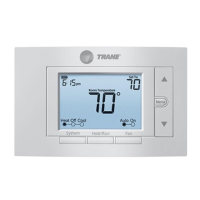
Trane XR203
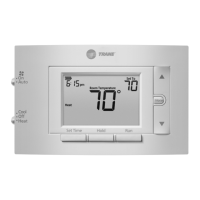
Programmable Thermostat
ALL phases of this installation must comply with NATIONAL, STATE AND LOCAL CODES
IMPORTANT — This Document is customer property and is to remain with this unit.
These instructions do not cover all variations in systems or provide for every possible contingency to be met in connection with
the installation. Should further information be desired or should particular problems arise which are not covered sufficiently
for the purchaser’s purposes, the matter should be referred to your installing dealer or local distributor.

Questions and Answers

  • D
    David SalasAug 4, 2025
    What to do if my Trane XR203 Thermostat has no heat, cool, or fan?
    • B
      Brenda MosesAug 4, 2025
      If your Trane Thermostat isn't producing heat, cool air, or fan function, here's what you can check: * **Blown fuse or tripped circuit breaker:** Replace the fuse or reset the breaker. * **Furnace power switch:** Ensure the furnace power switch is turned ON. * **Furnace blower compartment door:** Make sure the door panel is properly installed to engage the safety interlock or door switch. * **Loose connections:** Tighten any loose connections to the thermostat or system.
  • A
    Angela NavarroAug 9, 2025
    What to do if my Trane Thermostat is not cooling?
    • A
      Alex MirandaAug 9, 2025
      If your Trane thermostat isn't cooling, first ensure the system is set to 'Cool'. Check that all thermostat and system wires are securely attached. If the issue persists, set the system to Cool and lower the set point below room temperature for diagnostic purposes. Note that there may be up to a five-minute delay before the thermostat clicks in Cooling if the compressor lock-out option is selected in the installer menu.
  • S
    Susan PowellAug 14, 2025
    What to do if my Trane XR203 is not heating?
    • L
      Larry BenderAug 14, 2025
      If your Trane thermostat isn't heating, first ensure the system is set to 'Heat'. Check that thermostat and system wires are securely attached. If the issue persists, set the system to Heat and raise the set point above room temperature for diagnostic purposes. Within five minutes the thermostat should make a soft click sound and “Heat On” should appear on display. If the thermostat does not click, try the reset operation. If the thermostat does not click after being reset, contact your heating and cooling service person or place of purchase for a replacement. If the thermostat clicks, contact the furnace manufacturer or a service person to verify the heating system is operating correctly.
  • M
    meltonchristyAug 19, 2025
    Why does the 'Call for Service' icon appear on my Trane Thermostat?
    • C
      Christina LopezAug 19, 2025
      The “Call for Service” icon on your Trane thermostat may appear due to several reasons: 1. The heating system cannot raise the space temperature to within 10 degrees of the set point within 2 hours. Refer to troubleshooting for 'No Heat'. 2. The cooling system cannot lower the space temperature to within 10 degrees of the set point within 2 hours. Refer to troubleshooting for 'No Cool'. 3. If “--” is displayed for the Room Temperature, a replacement thermostat is needed. 4. None of the buttons operate on the thermostat. Ensure keypad lockout is not turned on, if it’s OFF, try reset. 5. If “Call for Service” is flashing, contact a service person to verify the outdoor equipment is operating correctly, as the compressor self-diagnostic is detecting an issue with the outdoor unit.
  • C
    Connie PatrickAug 25, 2025
    Why does my Trane XR203 Thermostat's heat, cool, or fan run constantly?
    • P
      Patrick SkinnerAug 25, 2025
      If the heat, cool, or fan on your Trane Thermostat runs constantly, there might be a short in the wiring, thermostat, or the system itself. Check each wire connection to ensure they are not shorted or touching other wires. Try resetting the thermostat. If the condition persists, it's best to contact your HVAC service person.
  • K
    kphillipsAug 28, 2025
    Why is my Trane Furnace (Air Conditioner) Cycling Too Fast or Slow?
    • U
      ubryantAug 29, 2025
      The cycling rate of your Trane furnace or air conditioner might be influenced by the thermostat's location or the heating system's size. Digital thermostats offer more precise control and cycle faster than older models, turning on and off more frequently but running for shorter durations. To increase the cycle time, select 'SLO' for slow cycle in the Installer menu. If an acceptable cycle rate isn't achieved, contact your HVAC service person.

Summary

Safety Information

General Installation Warnings

Covers crucial warnings before installation and operation for safety.

Mercury Handling Notice

Provides information on handling products containing mercury.

Product Specifications

General Information and Installation Basics

Overview, Contents, and Accessories

Details the thermostat's features, package contents, and included accessories.

Location Selection

Guidelines for choosing an optimal installation location for the thermostat.

Installation Procedures

Mounting and Battery Management

Instructions for mounting the thermostat and managing its battery power.

Wiring and Configuration

System Wiring Diagrams

Provides detailed wiring schematics for various HVAC system configurations.

Installer Menu Settings

Configuration options accessible via the installer menu for system setup.

Test Modes

Fan Operation Test

Procedure to test the fan's operation in auto and manual modes.

Heating System Test

Steps to verify the functionality of the heating system.

Auxiliary Heat Test

How to test the auxiliary heating system for heat pumps.

Cooling System Test

Procedure to test the cooling system's performance.

Thermostat Operation and Settings

Buttons and Display Overview

Identifies thermostat buttons and explains display icons and indicators.

User Menu Navigation and Time Setup

Guide to accessing user menus, setting time, and day.

Scheduling and Thermostat Reset

Instructions for programming schedules and resetting thermostat settings.

Troubleshooting Guide

Common Issues and Solutions

Addresses common thermostat and system problems with corrective actions.

Trane XR203 Specifications

General IconGeneral
Product TypeThermostat
BrandTrane
ModelXR203
TypeNon-programmable
DisplayDigital
ProgrammableNo
Hold FeatureYes
Filter Change AlertYes
Backup BatteryNo
Power Source24VAC

Related product manuals