EasyManua.ls Logo

Trane XT300C - User Manual

Trane XT300C
12 pages
Print Icon
To Next Page IconTo Next Page
Loading...
® U.S. Registered Trademark
Copyright © American Standard Inc. 1999
INSTALLER'S GUIDE
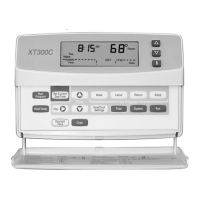
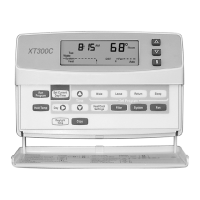
XT300C Deluxe Programmable
Heat-Cool Thermostat
18-HD25D1-3
APPLICATION
The XT300C Deluxe Programmable Heat-Cool Thermostat provides electronic control of 24 Vac single-stage heating and
cooling systems. Refer to Table 1 for a general description of the thermostat. This thermostat is powered by the heating system
only. Refer to Wiring for information on wiring for cooling-only applications.
Table 1. Description of XT300C
RECYCLING NOTICE
If this thermostat is replacing a thermostat that contains
mercury in a sealed tube, do not place your old
thermostat in the trash.
Contact your local waste management authority for
instructions regarding recycling and the proper
disposal of the old thermostat.
INSTALLATION
When Installing this Thermostat...
1. Read these instructions carefully. Failure to follow the
instructions can damage the product or cause a
hazardous condition.
2. Check the ratings given in the instructions and on the
product to make sure the product is suitable for your
application.
3. Installer must be a trained, experienced service
technician.
4. After completing installation, use these instructions
to check out the product operation.
Location
Install the thermostat about 5 ft (1.5m) above the floor in an
area with good air circulation at average temperature. See
Fig. 1. Avoid installing the thermostat where it can be affected
by the following:
Drafts, or dead spots behind doors and in corners.
Hot or cold air from ducts.
Radiant heat from sun or appliances.
Concealed pipes and chimneys.
Unheated (uncooled) areas such as an outside wall
behind the thermostat.
Wallplate Installation
Position wallplate horizontally on the wall or on a 2 in. x 4 in.
wiring box.
1. Position and level the wallplate for appearance only (the
thermostat will function properly even when
not level).
Fig. 1. Typical location of thermostat.
5 FEET
[1.5 METERS]
YES
NO
NO
NO
M17106
69-1212-1
Model System Changeover
System
Selection
Fan
Selection Comments
XT300C Heat-Cool Automatic Heat-Off-Cool-
Auto
On-Auto System and fan selections are done by
keyboard.
Question and Answer IconNeed help?

Do you have a question about the Trane XT300C and is the answer not in the manual?

Summary

APPLICATION

RECYCLING NOTICE

Notice regarding recycling and proper disposal of mercury-containing thermostats.

INSTALLATION

Instructions for installing the thermostat, including wallplate and location.

WIRING

WARNING

Safety warning about electric shock and equipment damage during wiring.

Cooling-Only Applications

Notes on operating the thermostat in cooling-only systems.

Mounting Thermostat

Steps for attaching the thermostat unit to the installed wallplate.

Using Thermostat Keys

SETTINGS

System and Fan Settings

How to configure system (Heat/Cool/Auto) and fan (On/Auto) settings.

Temperature Settings

Details on default program temperature settings for different periods.

INSTALLER SETUP

Installer Setup Procedure

Step-by-step guide to configuring thermostat settings for specific systems.

CAUTION

Warning about potential equipment damage with electric heat systems.

Installer Setup Options

Programming and Recovery Settings

Configure programming type, adaptive recovery, and system changeover.

Temperature Display and Clock Format

Set display units (°F/°C) and clock format (12/24 hour).

Fan Operation and Cycle Control

Adjust fan operation timing, heating/cooling cycle rates.

Installer Setup Options (Continued)

Minimum Off Time and Temperature Range

Configure minimum equipment off time and temperature range stops.

Temperature Display Adjustment

Adjust how the thermostat displays room temperature relative to actual.

Minimum Off Time (Heat;Cool)

Set minimum off time for equipment during heating and cooling cycles.

Installer Setup Options (Continued)

Cooling Droop and Programming

Configure cooling droop and programming type (7-day or 24-hour).

Setting Current Day and Time

Set Current Day;Time

Steps to set the current day and time on the thermostat.

Daylight Savings Time

Procedure to set Daylight Savings Time if applicable.

INSTALLER SELF-TEST

CAUTION

Warning about potential equipment damage from rapid compressor cycling.

Self-Test Procedures

Detailed steps for performing heating, cooling, fan, and Comfort-R self-tests.

Installer Self-Test Options (Continued)

Keyboard Operation Self-Test

Testing individual keys and their corresponding test numbers.

Device Information Self-Test

Accessing thermostat information like software revision and model ID.

DEVICE INFORMATION SELF-TEST

Accessing Thermostat Information

Steps to view software revision, production date, and model identification.

CHECKOUT

Outdoor Temperature Sensor

Notes on using and reading the optional outdoor temperature sensor.

TROUBLESHOOTING GUIDE

Display and Power Issues

Troubleshooting steps for display not showing, incorrect display, or no power.

Temperature Setting Issues

Resolving problems with temperature limits and setpoint range configuration.

TROUBLESHOOTING (CONTINUED)

Heating and Cooling Operation Issues

Diagnosing problems with heating/cooling not coming on, cycling, or system indicators.

Outdoor Temperature and Filter Issues

Troubleshooting outdoor temperature display and filter expiration warnings.

System Indicator and Time Display Issues

Resolving issues with system indicators and time display errors (EEE).

Overview

The Trane XT300C Deluxe Programmable Heat-Cool Thermostat is an electronic control device designed for 24 Vac single-stage heating and cooling systems. It is powered by the heating system and offers automatic system changeover (Heat-Off-Cool-Auto) and fan selection (On-Auto). System and fan selections are conveniently made via the keyboard.

Function Description

The thermostat provides precise electronic control over your heating and cooling system. It allows for programmable scheduling, enabling users to set specific temperatures and times for different periods of the day (Wake, Leave, Return, Sleep). The default program settings include a 7-day schedule with specific temperature setpoints for both heating and cooling, and an automatic fan setting.

Key functions include:

  • Setting Current Day and Time: Users can easily adjust the current day and time, including daylight saving adjustments.
  • Programming Times and Setpoints: The thermostat supports programming for heating and cooling schedules, allowing for energy savings and comfort optimization.
  • Temporary Override: Programmed temperatures can be temporarily overridden for immediate comfort adjustments.
  • Display Present Setting: The display shows current settings, outdoor temperature (with an optional accessory), and other relevant information.
  • Installer Setup: This feature allows for customization of the thermostat for specific systems, including Comfort-R™ control activation, Fahrenheit vs. Centigrade temperature display, outdoor temperature display (requires outdoor sensor installation), and system changeover.
  • Self-Test: A built-in self-test function helps verify the thermostat's operation, checking heating, cooling, fan equipment, Comfort-R terminals, keyboard operation, and device information.
  • System Operation Selection: Users can choose between Heat (thermostat controls heating), Off (both heating and cooling are off), Cool (thermostat controls cooling), and Auto (thermostat automatically changes between heating and cooling based on indoor temperature).
  • Fan Operation Selection: The fan can be set to operate continuously (On) or only with the equipment (Auto). Fan settings can be configured individually for each program period, while the system selection applies to all program periods.

Usage Features

The XT300C thermostat is designed for user-friendly interaction with a clear LCD display and a dedicated keypad. The keys are used for various functions:

  • Information (i) Key: Displays present settings and outdoor temperature.
  • Increase/Decrease Keys (▲/▼): Adjust time settings, scroll through installer setup options, and change temperature settings.
  • Run Program Key: Returns to normal operations and exits installer setup.
  • Set Current Day/Time Key: Sets the current day and time.
  • Wake, Leave, Return, Sleep Keys: Set times and setpoints for programmed periods.
  • Hold Temp Key: Enters indefinite or timed hold mode.
  • Day Key: Sets the current or program day.
  • Heat/Cool Settings Key: Changes between heating and cooling setpoints.
  • Filter Key: Selects filter expiration in number of days.
  • System Key: Selects system operation (Heat, Cool, Off, Auto).
  • Fan Key: Selects fan operation (On, Auto).
  • Daylight Time Key: Changes between daylight savings and standard time.
  • Copy Key: Copies one programmed day to another.

The thermostat also features Adaptive Intelligent Recovery™ control, which starts heating or cooling early to ensure the setpoint is reached by the start of a program period. This feature can be configured during installer setup.

Maintenance Features

The XT300C thermostat incorporates features that aid in maintenance and troubleshooting:

  • Filter Expiration Reminder: The thermostat can be programmed to remind users when it's time to change the filter, with the expiration period set in number of days.
  • Installer Self-Test: This diagnostic tool allows service technicians to quickly check the functionality of various components, including heating, cooling, and fan equipment, as well as keyboard operation. It helps in identifying issues efficiently.
  • Device Information Self-Test: Provides access to crucial device information such as production date code, software identification code, software revision number, and model identification number, which can be valuable for troubleshooting and support.
  • Troubleshooting Guide: The manual includes a comprehensive troubleshooting guide that lists common symptoms, possible causes, and recommended actions, enabling users or technicians to resolve issues like display problems, incorrect temperature readings, or system not turning on.
  • Recycling Notice: The device emphasizes responsible disposal, particularly if it replaces an older thermostat containing mercury, encouraging users to contact local waste management authorities for proper recycling instructions.

The thermostat is designed to be installed in an area with good air circulation, away from drafts, direct sunlight, or heat sources, to ensure accurate temperature readings and optimal performance.

Trane XT300C Specifications

General IconGeneral
Wi-Fi EnabledNo
Stages1 Heat/1 Cool
DisplayLCD
Power Source24V AC
Hold FeatureYes
Temperature Range45°F to 90°F (7°C to 32°C)

Related product manuals