21
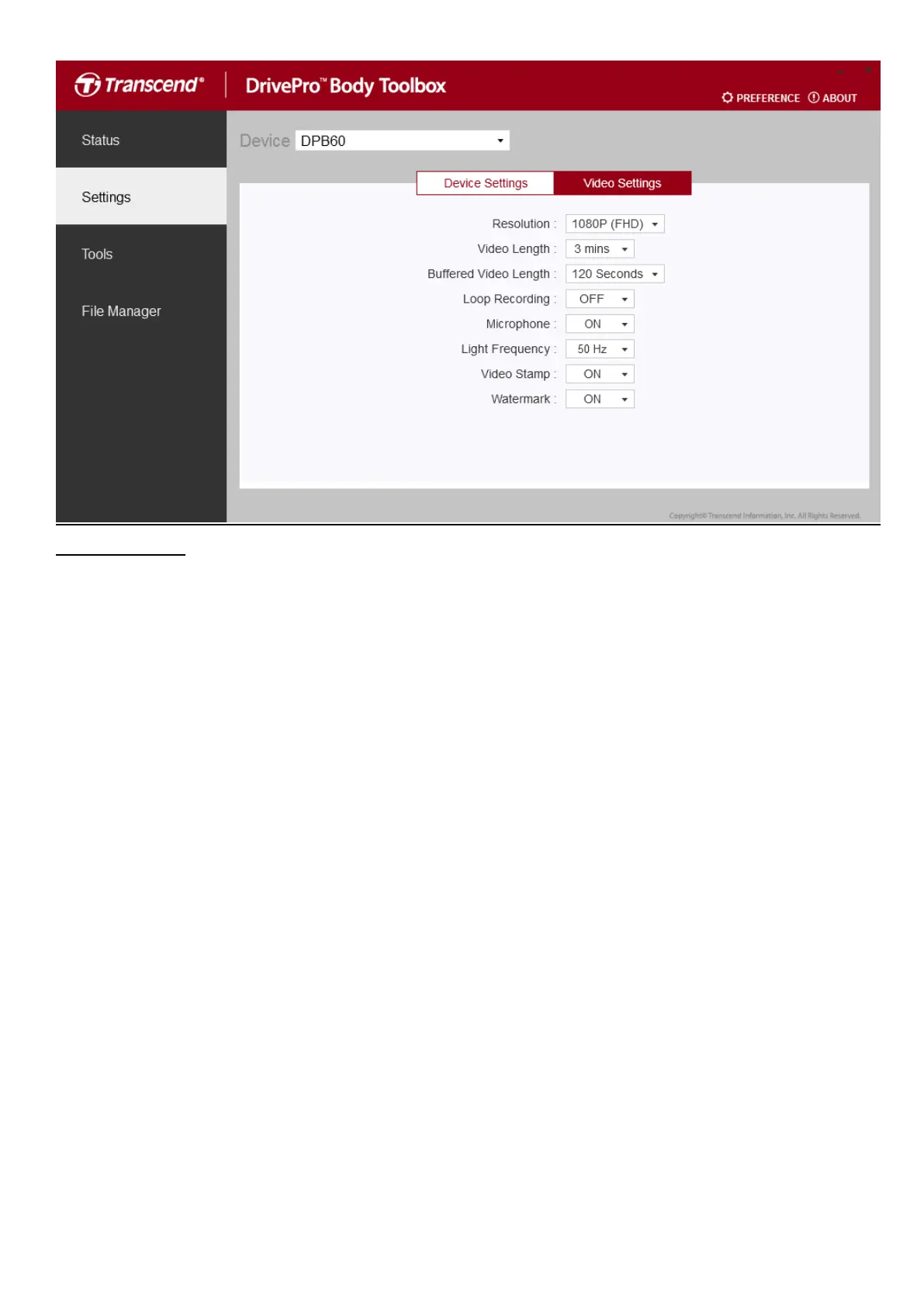
Video Settings
Resolution: Set the resolution/quality for video recording.
Available options: FHD / HD
Video Length: Set the recording length of each recorded video file.
Available options: 3 mins / 5 mins / 10 mins
Buffered Video Length: Set the buffered video length to record footage that happens prior to
activating the Recording mode.
Available options: Available options: 30 secs / 60 secs / 90 secs / 120 secs (default)
Loop recording: Overwrite the old video files with new ones.
Available options: Disable (default) / Enable
Microphone: Turn on/off the microphone during video recording.
Available options: On/Off
Light Frequency: Select the appropriate frequency to avoid flashing A/C light.
Available options: 50Hz / 60Hz
Video Stamp: Display the video label, date/time, watermark, and GPS coordinates, on the photo or
video.
Available options: On/Off
Watermark: Display the Transcend logo watermark on the photo or video
Available options: On/Off


 To Next Page