34
13. Frequently Asked Questions
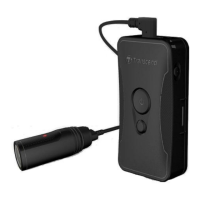
If you have any question or a problem occurs to your DrivePro Body 60, please first check the
instructions listed below before sending your DrivePro for repair. If you cannot find any ideal solution
to your question below, please consult your dealer, service center, or local Transcend branch office
for further help. You can also visit Transcend website (http://www.transcend-info.com/) for more
FAQs and Technical Support services (http://www.transcend-info.com/Support/contact_form).
My computer operating system cannot detect my DrivePro Body
Please check the followings:
1. Is your DrivePro Body properly connected to the USB port? If not, unplug and connect it again.
Make sure that both ends of the USB cables are properly connected as shown in the User’s
Manual.
2. Is your DrivePro Body connected to the Mac keyboard? If yes, try to plug it in an available USB
port on your Mac Desktop directly.
3. Is the computer’s USB ports enabled? If not, refer to the user’s manual of your computer (or
motherboard) to enable them.
None of the DrivePro Body buttons are responding.
Please press the Reset button on the bottom of the DrivePro Body with a pointed object such
as a paper clip.
Is the DrivePro Body shockproof and waterproof?
The DrivePro is IP67 dust and water protected and meets rigorous U.S. military drop-test
standards*.
*Based on MIL-STD-810G 516.6-Transit Drop Test


 To Next Page