Installing an MP—Models MP-341 and MP-352
Chapter 3
Trapeze Mobility Point Installation Guide
Version 3.0
34
Confidential—Beta1 Draft—Confidential—Beta1 Draft—20 Sep 04
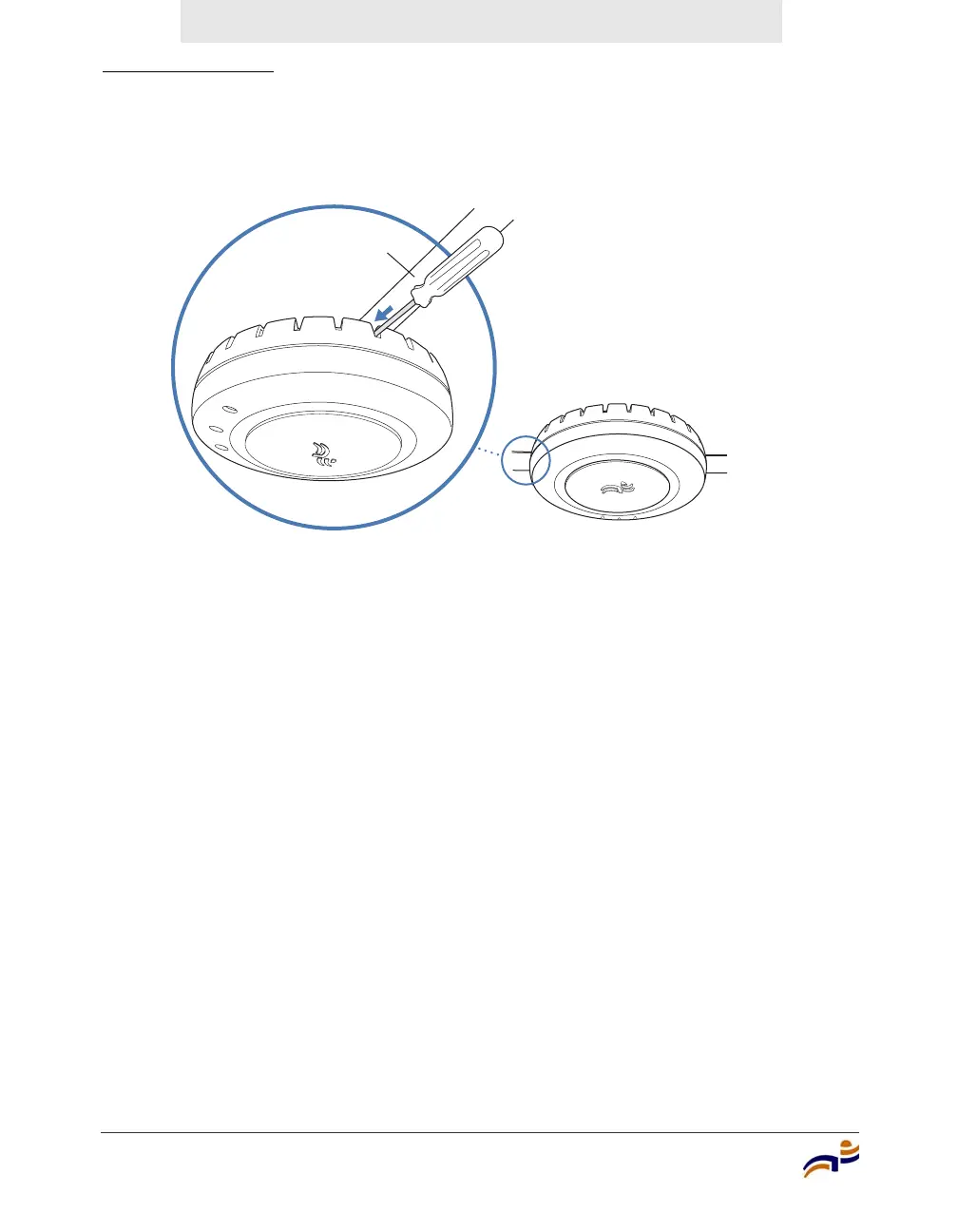
Figure 16. Step 11—Locking the Bracket
12 To ensure that the MP access point is fully locked onto the bracket, gently pull
down on the access point and attempt to rotate it from side to side.
13 If the access point comes off the bracket, relock the device onto the bracket as
described in step 11 on page 33.
14 If the MP requires an external antenna, install and connect the antenna. (See
“Connecting an MP to an External Antenna” on page 53.)
15 If the other ends of the Cat 5 cable(s) are not already connected and the link
activated, go to “Connecting an MP to an MX Switch” on page 59. Otherwise,
go to “Verifying MP Health” on page 61.
840-9502-0006
L
o
ck
T-bar



 To Next Page